- JMP Statement Regarding Critical PHP Remote Code Execution Vulnerabilities (CVE-2026-109618, CVE-2026-109619)
- Don’t miss your chance to experience Discovery Summit Europe at our best available rate! Early bird registration through 31 Oct.
- Graph Builder Toolbar streamlines interactive graphing. Creates shortcuts on Report and GraphBuilder Helpers toolbars. Download and install the extension.
- Subscribe to RSS Feed
- Mark Topic as New
- Mark Topic as Read
- Float this Topic for Current User
- Bookmark
- Subscribe
- Mute
- Printer Friendly Page
Discussions
Solve problems, and share tips and tricks with other JMP users.- User Community
- :
- Discussions
- :
- Factor coding in JMP

- Mark as New
- Bookmark
- Subscribe
- Mute
- Subscribe to RSS Feed
- Get Direct Link
- Report Inappropriate Content
Factor coding in JMP
Hello again dear All,
I am analyzing the results of an experimental design with two quantitative factors. It has three
levels for the first factor and six levels for the other one. The design region does not much a regular rectangle
and the levels of the factors are not equispaced. It is what we could obtain in a constrained design or in an optimal design.
I copied the data in JMP and I want to analyze them by using the fit model platform. My question is:
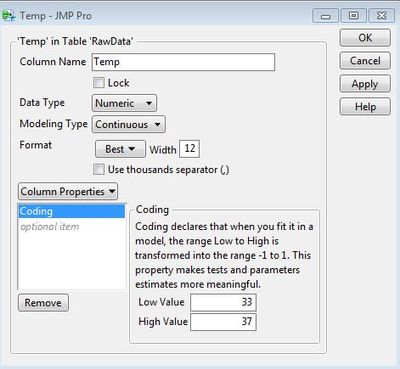
how can I tell JMP to code the design factors? This could be useful in the interpretation of results. I would like to use -1 and +1 for the min and max level of each factor (this is what JMP does when we generate a constrained design by using the custom design Platform I think).
Many thanks,
Marcello.
Accepted Solutions


- Mark as New
- Bookmark
- Subscribe
- Mute
- Subscribe to RSS Feed
- Get Direct Link
- Report Inappropriate Content
Re: Factor coding in JMP
You can set the CODING property of the columns for the factors:
-Dave
- Mark as New
- Bookmark
- Subscribe
- Mute
- Subscribe to RSS Feed
- Get Direct Link
- Report Inappropriate Content
Re: Factor coding in JMP
You can set the CODING property of the columns for the factors:
-Dave
- Mark as New
- Bookmark
- Subscribe
- Mute
- Subscribe to RSS Feed
- Get Direct Link
- Report Inappropriate Content
Re: Factor coding in JMP
Many thanks David! It worked. Marcello.
Recommended Articles
- © 2026 JMP Statistical Discovery LLC. All Rights Reserved.
- Terms of Use
- Privacy Statement
- Contact Us