- Don’t miss your chance to experience Discovery Summit Europe at our best available rate! Early bird registration through 31 Oct.
- Graph Builder Toolbar streamlines interactive graphing. Creates shortcuts on Report and GraphBuilder Helpers toolbars. Download and install the extension.
- Subscribe to RSS Feed
- Mark Topic as New
- Mark Topic as Read
- Float this Topic for Current User
- Bookmark
- Subscribe
- Mute
- Printer Friendly Page
Discussions
Solve problems, and share tips and tricks with other JMP users.- User Community
- :
- Discussions
- :
- Exponential fit

- Mark as New
- Bookmark
- Subscribe
- Mute
- Subscribe to RSS Feed
- Get Direct Link
- Report Inappropriate Content
Exponential fit
I just want fo fit an exponential curve to my XY data. The Online Documentation indicates ''To launch the Nonlinear platform, select Analyze > Modeling > Nonlinear''. However, in ''Modeling'' I only have 2 choices (Partition and Time series). Is that normal? I have JMP 12 Mac. Thanks!
Here are my data:
| x | y |
| 24 | 0.06 |
| 22 | 0.29 |
| 22 | 0.29 |
| 21 | 0.37 |
| 20 | 1.76 |
| 21 | 0.36 |
| 22 | 0.21 |

Message was edited by: Caroline Bouchard
Accepted Solutions

- Mark as New
- Bookmark
- Subscribe
- Mute
- Subscribe to RSS Feed
- Get Direct Link
- Report Inappropriate Content
Re: Exponential fit
I think you might be looking for something like this. First, here's a plot of your data that you want to fit.
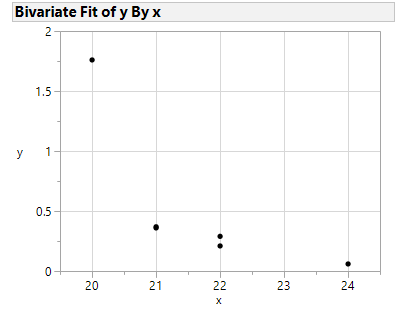
By clicking Analyze>Modeling>Nonlinear, you get the following dialog box.
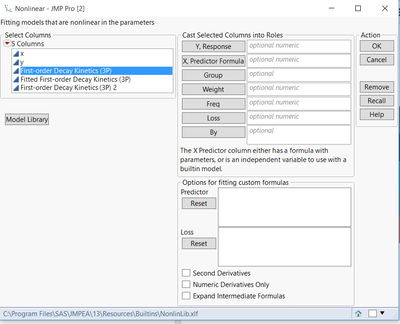
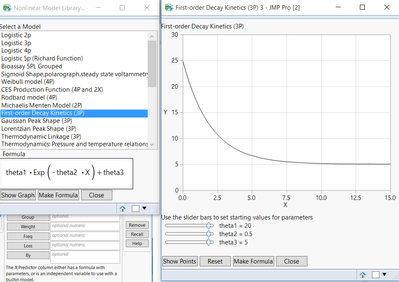
Click the Model Library button and you'll see a variety of built-in models. You can even add your own custom formulas by editing a dll although I forget which one off the top of my head. There's one titles First Order Decay Kinetics and you can view the formula as well as a graph with sliders as seem below. You can click the 'Make Formula' button on the left graph and a new dialog appears asking you to input the x and y variables. Once that is done the selected decay formula with be shown with your data as well as more sliders for 'What-If' scenarios. These can be used as your initial estimates for theta1 and theta2 which you must provide for a nonlinear fit. Now you have a new column in your JMP data set containing the formula with initial estimates.
Go back to Analyze>Modeling>Nonlinear, fill in the following and click 'OK'. I took the liberty of editing the formula such that there was no theta3 parameter (i.e., assuming it can't go below zero).
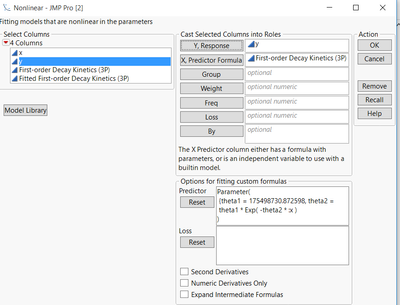
You'll get the following. Click 'Go' and you'll see the 'best' fit based on the starting parameters and method of convergence. You can save the prediction formula by accessing the red triangle. Now you have your formula saved in the original table.
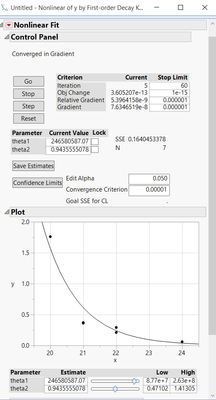
Hope this helps.
Dave

- Mark as New
- Bookmark
- Subscribe
- Mute
- Subscribe to RSS Feed
- Get Direct Link
- Report Inappropriate Content
Re: Exponential fit
To perform curve fitting, use the Distribution platform. In the Distribution dialog, the data you wish to fit the curve to will be your Y value (Y, columns). Once you get the Distribution report, click on the drop menu (inverted red triangle) for the Y value you selected and you will see the option Continuous Fit and the submenu will contain the appropriate distributions that you may fit to your data.

- Mark as New
- Bookmark
- Subscribe
- Mute
- Subscribe to RSS Feed
- Get Direct Link
- Report Inappropriate Content
Re: Exponential fit
The behaviour you are describing is due to your preference settings. Under File > Preferences > Menu make sure the advanced modelling option is checked.
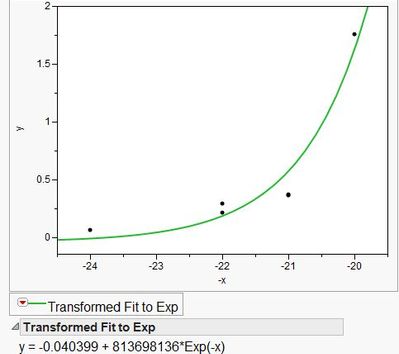
You can do simple fits such as this using the fit-y-by-x platform. I made a new column called -x, with a formula (x*-1). From the bivariate hotspot choose Fit Special... and then under X Transformations: Exponential: e^x.
- Mark as New
- Bookmark
- Subscribe
- Mute
- Subscribe to RSS Feed
- Get Direct Link
- Report Inappropriate Content
Re: Exponential fit
Thanks Stephen. However I need the formula for the original data (not transformed ones) in a decay-style graph. Also, I'm wondering the exponential fit on transformed data has different (better) p and adjustedR2 than the exponential fit on the original data (I obtained that with sigmaplot) ? Are they not supposed to be equivalent???
- Mark as New
- Bookmark
- Subscribe
- Mute
- Subscribe to RSS Feed
- Get Direct Link
- Report Inappropriate Content
Re: Exponential fit
I think you might be looking for something like this. First, here's a plot of your data that you want to fit.
By clicking Analyze>Modeling>Nonlinear, you get the following dialog box.
Click the Model Library button and you'll see a variety of built-in models. You can even add your own custom formulas by editing a dll although I forget which one off the top of my head. There's one titles First Order Decay Kinetics and you can view the formula as well as a graph with sliders as seem below. You can click the 'Make Formula' button on the left graph and a new dialog appears asking you to input the x and y variables. Once that is done the selected decay formula with be shown with your data as well as more sliders for 'What-If' scenarios. These can be used as your initial estimates for theta1 and theta2 which you must provide for a nonlinear fit. Now you have a new column in your JMP data set containing the formula with initial estimates.
Go back to Analyze>Modeling>Nonlinear, fill in the following and click 'OK'. I took the liberty of editing the formula such that there was no theta3 parameter (i.e., assuming it can't go below zero).
You'll get the following. Click 'Go' and you'll see the 'best' fit based on the starting parameters and method of convergence. You can save the prediction formula by accessing the red triangle. Now you have your formula saved in the original table.
Hope this helps.
Dave
Recommended Articles
- © 2026 JMP Statistical Discovery LLC. All Rights Reserved.
- Terms of Use
- Privacy Statement
- Contact Us