- JMP will suspend normal business operations for our Winter Holiday beginning on Wednesday, Dec. 24, 2025, at 5:00 p.m. ET (2:00 p.m. ET for JMP Accounts Receivable).
Regular business hours will resume at 9:00 a.m. EST on Friday, Jan. 2, 2026. - We’re retiring the File Exchange at the end of this year. The JMP Marketplace is now your destination for add-ins and extensions.
- Subscribe to RSS Feed
- Mark Topic as New
- Mark Topic as Read
- Float this Topic for Current User
- Bookmark
- Subscribe
- Mute
- Printer Friendly Page
Discussions
Solve problems, and share tips and tricks with other JMP users.- JMP User Community
- :
- Discussions
- :
- Display selected file in button box

- Mark as New
- Bookmark
- Subscribe
- Mute
- Subscribe to RSS Feed
- Get Direct Link
- Report Inappropriate Content
Display selected file in button box
Hi there,
I have a button that prompts user to select 2 files. However, once the user clicks the button and picks a file, I would like the path name to show up on the button so that the user knows the file was correctly selected. In the photo below, once a user picks a file, I want that selected path to show up in the highlighted area.
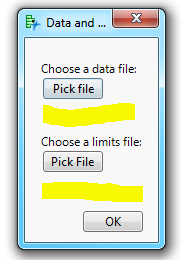
Current Code:
New Window( "Data and Limits file",
	<<modal,
	Text box(""),
	Text box("Choose a data file:"),
	Button Box( "Pick file", D = Pick File()),
	//Text box(L),
	Text box (""),
	Text box (""),
	Text box("Choose a limits file:"),
	Button Box( "Pick File", L = Pick File()),
	//Text box(D),
	Text box(""),
	Text box (""),
	);
Thanks!
Accepted Solutions


- Mark as New
- Bookmark
- Subscribe
- Mute
- Subscribe to RSS Feed
- Get Direct Link
- Report Inappropriate Content
Re: Display selected file in button box
Here is the script. The documentation on all of the features that can be used with a given function or display object is available at:
Help==>Scripting Index
It will give you all of the details, and examples
Names Default To Here( 1 );
New Window( "Data and Limits file",
	<<modal,
	Spacer Box( size( 10, 10 ) ),
	Text Box( "Choose a data file:" ),
	BB1 = Button Box( "Pick file",
		D = Pick File();
		If( D != "",
			BB1 << set button name( D )
		);
	),
	//Text box(L),
	Spacer Box( size( 20, 10 ) ),
	Text Box( "Choose a limits file:" ),
	BB2 = Button Box( "Pick File",
		L = Pick File();
		If( L != "",
			BB2 << set button name( L )
		);
	),
	//Text box(D),
	Spacer Box( size( 20, 10 ) )

);

 Community Manager
- Mark as New
- Bookmark
- Subscribe
- Mute
- Subscribe to RSS Feed
- Get Direct Link
- Report Inappropriate Content
Re: Display selected file in button box
@txnelson's solution changes the text of the button, which is what the title of your post says you wanted.
But, the picture you provided looks like you want the name of the file below the button – not in the button.
If that's what you really want here's a modification of Jim's code that will get you there.
Names Default To Here( 1 );
New Window( "Data and Limits file",
	<<modal,
	Spacer Box( size( 10, 10 ) ),
	Text Box( "Choose a data file:" ),
	BB1 = Button Box( "Pick file",
		D = Pick File();
		If( D != "",
			file1 << set text( D )
		);
	),
	file1 = Text Box( ),
	//Text box(L),
	Spacer Box( size( 20, 10 ) );,
	Text Box( "Choose a limits file:" ),
	BB2 = Button Box( "Pick File",
		L = Pick File();
		If( L != "",
			file2 << set text( L )
		);
	),
	file2 = Text Box(  ),
	//Text box(D),
	Spacer Box( size( 20, 10 ) )

	;
);- Mark as New
- Bookmark
- Subscribe
- Mute
- Subscribe to RSS Feed
- Get Direct Link
- Report Inappropriate Content
Re: Display selected file in button box
Here is the script. The documentation on all of the features that can be used with a given function or display object is available at:
Help==>Scripting Index
It will give you all of the details, and examples
Names Default To Here( 1 );
New Window( "Data and Limits file",
	<<modal,
	Spacer Box( size( 10, 10 ) ),
	Text Box( "Choose a data file:" ),
	BB1 = Button Box( "Pick file",
		D = Pick File();
		If( D != "",
			BB1 << set button name( D )
		);
	),
	//Text box(L),
	Spacer Box( size( 20, 10 ) ),
	Text Box( "Choose a limits file:" ),
	BB2 = Button Box( "Pick File",
		L = Pick File();
		If( L != "",
			BB2 << set button name( L )
		);
	),
	//Text box(D),
	Spacer Box( size( 20, 10 ) )

);- Mark as New
- Bookmark
- Subscribe
- Mute
- Subscribe to RSS Feed
- Get Direct Link
- Report Inappropriate Content
Re: Display selected file in button box
Perfect!!! Thanks so much!
Community Manager
- Mark as New
- Bookmark
- Subscribe
- Mute
- Subscribe to RSS Feed
- Get Direct Link
- Report Inappropriate Content
Re: Display selected file in button box
@txnelson's solution changes the text of the button, which is what the title of your post says you wanted.
But, the picture you provided looks like you want the name of the file below the button – not in the button.
If that's what you really want here's a modification of Jim's code that will get you there.
Names Default To Here( 1 );
New Window( "Data and Limits file",
	<<modal,
	Spacer Box( size( 10, 10 ) ),
	Text Box( "Choose a data file:" ),
	BB1 = Button Box( "Pick file",
		D = Pick File();
		If( D != "",
			file1 << set text( D )
		);
	),
	file1 = Text Box( ),
	//Text box(L),
	Spacer Box( size( 20, 10 ) );,
	Text Box( "Choose a limits file:" ),
	BB2 = Button Box( "Pick File",
		L = Pick File();
		If( L != "",
			file2 << set text( L )
		);
	),
	file2 = Text Box(  ),
	//Text box(D),
	Spacer Box( size( 20, 10 ) )

	;
);
- Mark as New
- Bookmark
- Subscribe
- Mute
- Subscribe to RSS Feed
- Get Direct Link
- Report Inappropriate Content
Re: Display selected file in button box
Hi,
Just an idea I thought of. From the script, understood that it allows us to open 2 files based on the path selected. Once the each file is open, how can we assign it as data table to automatically create for example a distribution(or a simple Fix Y-X) plot. Thanks.
- Mark as New
- Bookmark
- Subscribe
- Mute
- Subscribe to RSS Feed
- Get Direct Link
- Report Inappropriate Content
Re: Display selected file in button box
Here are 2 simple scripts that illustrate how to create a handle to the different data tables, and then to use that handle to determine which analysis to use with what data table.
Names Default To Here( 1 );
dt = Open( "$SAMPLE_DATA\iris.jmp" );
dt2 = Open( "$SAMPLE_DATA\big class.jmp" );

dt << Distribution(
	Continuous Distribution( Column( :Sepal length ) ),
	Continuous Distribution( Column( :Sepal width ) ),
	Continuous Distribution( Column( :Petal length ) ),
	Continuous Distribution( Column( :Petal width ) )
);

dt2 << Oneway( Y( :height ), X( :age ), Means( 1 ), Mean Diamonds( 1 ) );
Names Default To Here( 1 );
dtList = {};
dt = Open( "$SAMPLE_DATA\iris.jmp" );
Insert Into( dtlist, dt );
dt = Open( "$SAMPLE_DATA\big class.jmp" );
Insert Into( dtlist, dt );
dtList[1] << Distribution(
Continuous Distribution( Column( :Sepal length ) ),
Continuous Distribution( Column( :Sepal width ) ),
Continuous Distribution( Column( :Petal length ) ),
Continuous Distribution( Column( :Petal width ) )
);
dtList[2] << Oneway( Y( :height ), X( :age ), Means( 1 ), Mean Diamonds( 1 ) );- Mark as New
- Bookmark
- Subscribe
- Mute
- Subscribe to RSS Feed
- Get Direct Link
- Report Inappropriate Content
Re: Display selected file in button box
Recommended Articles
- © 2026 JMP Statistical Discovery LLC. All Rights Reserved.
- Terms of Use
- Privacy Statement
- Contact Us