- JMP Statement Regarding Critical PHP Remote Code Execution Vulnerabilities (CVE-2026-109618, CVE-2026-109619)
- Don’t miss your chance to experience Discovery Summit Europe at our best available rate! Early bird registration through 31 Oct.
- Graph Builder Toolbar streamlines interactive graphing. Creates shortcuts on Report and GraphBuilder Helpers toolbars. Download and install the extension.
- Subscribe to RSS Feed
- Mark Topic as New
- Mark Topic as Read
- Float this Topic for Current User
- Bookmark
- Subscribe
- Mute
- Printer Friendly Page
Discussions
Solve problems, and share tips and tricks with other JMP users.- User Community
- :
- Discussions
- :
- Design of journal

- Mark as New
- Bookmark
- Subscribe
- Mute
- Subscribe to RSS Feed
- Get Direct Link
- Report Inappropriate Content
Design of journal
Hello
I have written the script and everything runs ok, but:
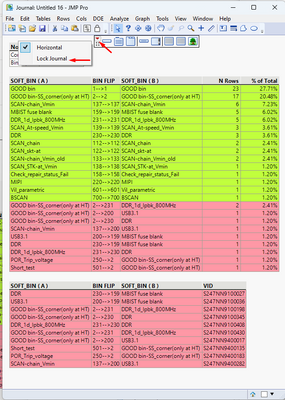
1) I don't know how to do the last point to a choice Lock Journal by script?
2) I have 2 tables, how I can put the 2 tables in front of each other?


- Mark as New
- Bookmark
- Subscribe
- Mute
- Subscribe to RSS Feed
- Get Direct Link
- Report Inappropriate Content
Re: Design of journal
Here is an example of how to lock an outline box
Names Default To Here( 1 );
dt = Open( "$SAMPLE_DATA/big class.jmp" );

jr = New Window( "my jr", <<journal, ob = Outline Box( "box" ) );
ob << append( dt << new data box );
ob << lock( 1 );- Mark as New
- Bookmark
- Subscribe
- Mute
- Subscribe to RSS Feed
- Get Direct Link
- Report Inappropriate Content
Re: Design of journal
Thank you very much
and I have the last question
when I use
obj_1<< Journal( );
obj_2 << Journal( );
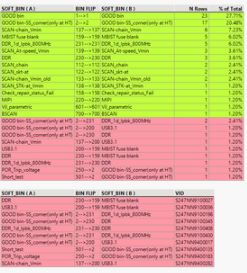
it means 2 tables were added in a vertical position in Journal.
So if I would like to insert them into Journal in a horizontal position, how can I do it by script?
- Mark as New
- Bookmark
- Subscribe
- Mute
- Subscribe to RSS Feed
- Get Direct Link
- Report Inappropriate Content
Re: Design of journal
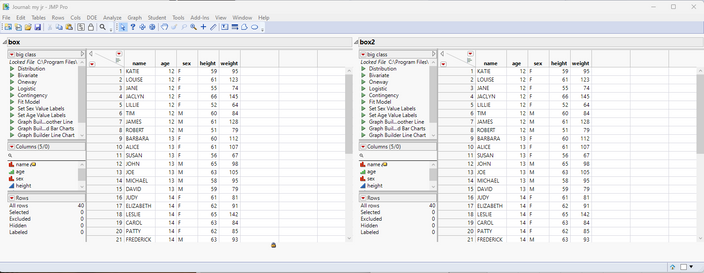
There is a complete set of functions that can be used to structure the layout of objects within a JMP journal. Below is a simple expansion of the example I previously provided, that places display objects side by side.
Names Default To Here( 1 );
dt = Open( "$SAMPLE_DATA/big class.jmp" );
dt2 = Open( "$SAMPLE_DATA/blood pressure.jmp" );


jr = New Window( "my jr", <<journal, hlb = h list box());
ob = Outline Box( "box" ) ;
ob << append( dt << new data box );
ob << lock( 1 );
hlb << append(ob);

ob = Outline Box( "box2" ) ;
ob << append( dt << new data box );
ob << lock( 1 );
hlb << append(ob);
I suggest that you take the time to read the Scripting Guide, available in the JMP Documentation Library, under the Help pull down menu.
Recommended Articles
- © 2026 JMP Statistical Discovery LLC. All Rights Reserved.
- Terms of Use
- Privacy Statement
- Contact Us