- JMP will suspend normal business operations for our Winter Holiday beginning on Wednesday, Dec. 24, 2025, at 5:00 p.m. ET (2:00 p.m. ET for JMP Accounts Receivable).
Regular business hours will resume at 9:00 a.m. EST on Friday, Jan. 2, 2026. - We’re retiring the File Exchange at the end of this year. The JMP Marketplace is now your destination for add-ins and extensions.
- Subscribe to RSS Feed
- Mark Topic as New
- Mark Topic as Read
- Float this Topic for Current User
- Bookmark
- Subscribe
- Mute
- Printer Friendly Page
Discussions
Solve problems, and share tips and tricks with other JMP users.- JMP User Community
- :
- Discussions
- :
- Deselecting portion of contour plot

- Mark as New
- Bookmark
- Subscribe
- Mute
- Subscribe to RSS Feed
- Get Direct Link
- Report Inappropriate Content
Deselecting portion of contour plot
I've accidentally clicked a portion of a contour plot and the text is bolded with the box having stripes across it. How do I deselect this portion of the contour plot? Right clicking to Deselect didn't seem to do anything, and the annoying thing is that when I try to copy the graph as a graphic, the image shows the highlighted/selected box with the bolded text and the striped box.


- Mark as New
- Bookmark
- Subscribe
- Mute
- Subscribe to RSS Feed
- Get Direct Link
- Report Inappropriate Content
Re: Deselecting portion of contour plot
Several different platforms support contours of different types. Can you provide an example and also which platform and version of JMP you are using?
- Mark as New
- Bookmark
- Subscribe
- Mute
- Subscribe to RSS Feed
- Get Direct Link
- Report Inappropriate Content
Re: Deselecting portion of contour plot
It is JMP 15 and I mistakenly said a contour map when I meant a heatmap! Very sorry for the confusion!
- Mark as New
- Bookmark
- Subscribe
- Mute
- Subscribe to RSS Feed
- Get Direct Link
- Report Inappropriate Content
Re: Deselecting portion of contour plot
In most places where selection is supported, shift-click will extend selection (select more items without deselecting the old) and ctrl-click (command-click on Mac) will toggle the selection of the clicked item.
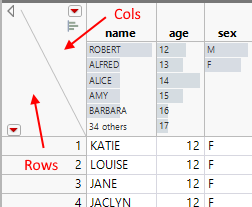
In the data table, you can also clear row selection or column selection by clicking in the areas shown:


- Mark as New
- Bookmark
- Subscribe
- Mute
- Subscribe to RSS Feed
- Get Direct Link
- Report Inappropriate Content
Re: Deselecting portion of contour plot
Welcome to the community. Not sure this will work but here. WAG...If you look at your data table are there certain rows that are highlighted? (From your selecting a portion of the heat map). If so try: Rows>Clear Row States
Recommended Articles
- © 2025 JMP Statistical Discovery LLC. All Rights Reserved.
- Terms of Use
- Privacy Statement
- Contact Us