- JMP will suspend normal business operations for our Winter Holiday beginning on Wednesday, Dec. 24, 2025, at 5:00 p.m. ET (2:00 p.m. ET for JMP Accounts Receivable).
Regular business hours will resume at 9:00 a.m. EST on Friday, Jan. 2, 2026. - We’re retiring the File Exchange at the end of this year. The JMP Marketplace is now your destination for add-ins and extensions.
- Subscribe to RSS Feed
- Mark Topic as New
- Mark Topic as Read
- Float this Topic for Current User
- Bookmark
- Subscribe
- Mute
- Printer Friendly Page
Discussions
Solve problems, and share tips and tricks with other JMP users.- JMP User Community
- :
- Discussions
- :
- Delaying (lag) a row value by column date

- Mark as New
- Bookmark
- Subscribe
- Mute
- Subscribe to RSS Feed
- Get Direct Link
- Report Inappropriate Content
Delaying (lag) a row value by column date
Dear All,
I would like to make a simple calculation but I can not.
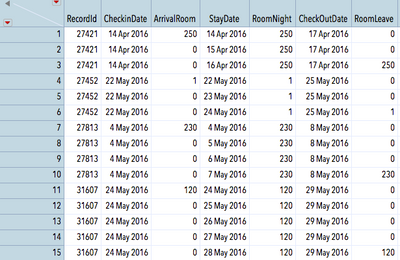
Attached jmp table is a subset of Hotel Occupancy Data Base.
Simple logic for Record ID 27421 is;
in 14 Apr 2016 250 Rooms arrive and check in,
in 14-15-16 Apr 2016 those 250 Rooms stay at the hotel for 3 days long,
in 17.04.2015 the 250 Rooms which arrived in 14 Apr 2016 Check Out (Leave the hotel).
I need to calculate the RoomLeave Column (which I filled manually for the purpose)..
Record ID is unique but many more arrivals/stay/leave occur at the same dates with different Record IDs.
Many thanks in advance for any of your support.
Accepted Solutions


- Mark as New
- Bookmark
- Subscribe
- Mute
- Subscribe to RSS Feed
- Get Direct Link
- Report Inappropriate Content
Re: Delaying (lag) a row value by column date
Are the data for each RecordID always grouped together and in ascending order based upon StayDate?
If they are, here is a formula that will work:
If( :RecordId != Lag( :RecordId ) | Row() == 1,
ar = :ArrivalRoom
);
If( Date Difference( :StayDate, :CheckOutDate, "Day" ) == 1,
ar,
0
);

- Mark as New
- Bookmark
- Subscribe
- Mute
- Subscribe to RSS Feed
- Get Direct Link
- Report Inappropriate Content
Re: Delaying (lag) a row value by column date
Would the date difference function work for you?
If Date Difference(CheckOutDate, CheckInDate, Day) = 1 then room leave = room night, else 0.
- Mark as New
- Bookmark
- Subscribe
- Mute
- Subscribe to RSS Feed
- Get Direct Link
- Report Inappropriate Content
Re: Delaying (lag) a row value by column date
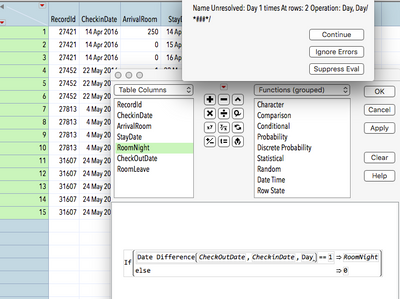
Dear karen@boulderstats thank you for the input. Either I did it wrong or the formula itself gives error.
- Mark as New
- Bookmark
- Subscribe
- Mute
- Subscribe to RSS Feed
- Get Direct Link
- Report Inappropriate Content
Re: Delaying (lag) a row value by column date
Yes, I didn't provide the exact correct formula. You got close. It is the "Day" piece that is tricky. Jim used the same formula in the script he wrote only he has it correct in that you need the quotes around "Day". With many JMP formula's the options can be tricky (they generally make sense once you see them) so I find I often need the user manual to get all of the pieces correct.
- Mark as New
- Bookmark
- Subscribe
- Mute
- Subscribe to RSS Feed
- Get Direct Link
- Report Inappropriate Content
Re: Delaying (lag) a row value by column date
Here is a quick script that performs the data table updating you want.
Names default to here(1);
dt=current data table();
// Create the RoomLeave column and initialize it
If(Try(dt:RoomLeave<<get name,"")!="", dt<<delete columns("RoomLeave"));
wait(.2);
dt<< New Column("RoomLeave", set each value(0));
// Find the last staydate and the Arrival Room for each RecordID
dtsumm = dt << Summary(invisible,
Group( :RecordId ),
Max( :StayDate ),
Max( :ArrivalRoom ),
Freq( "None" ),
Weight( "None" ),
statistics column name format( "column" )
);
// Change the ArrivalRoom to the RoomLeave
dtsumm:ArrivalRoom << Set Name("RoomLeave");
// Cleanup the data table to keep only the columns needed
dtsumm << delete columns("N Rows");
// Update the original data table with the Leaving data
// Matching on the RecordID and the last staydate
dt << Update(
With(dtsumm ),
Match Columns( :RecordId = :RecordId, :StayDate = :StayDate )
);
// Delete the summary data table
close( dtsumm, nosave );
- Mark as New
- Bookmark
- Subscribe
- Mute
- Subscribe to RSS Feed
- Get Direct Link
- Report Inappropriate Content
Re: Delaying (lag) a row value by column date
Dear Jim Nelson,
Thank you for the input it does the job but I need to solve it with a formula column, the data base is huge and updating itself in every minute.
- Mark as New
- Bookmark
- Subscribe
- Mute
- Subscribe to RSS Feed
- Get Direct Link
- Report Inappropriate Content
Re: Delaying (lag) a row value by column date
Are the data for each RecordID always grouped together and in ascending order based upon StayDate?
If they are, here is a formula that will work:
If( :RecordId != Lag( :RecordId ) | Row() == 1,
ar = :ArrivalRoom
);
If( Date Difference( :StayDate, :CheckOutDate, "Day" ) == 1,
ar,
0
);
- Mark as New
- Bookmark
- Subscribe
- Mute
- Subscribe to RSS Feed
- Get Direct Link
- Report Inappropriate Content
Re: Delaying (lag) a row value by column date
Thank you Jim Nelson! It works and yes the data is in ascending order.
Many thanks again, I can pull my report.
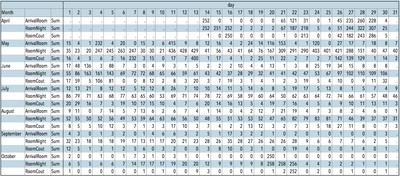
P.S.: Unfortunately the 'day' have to come from the StayDate for the ArrivalRoom and RoomNight but does not fit for RoomCout which needs a +1 day delay (A guest can not stay and Check Out same day). Acc. to my logic it is impossible to solve it in one tabulate report like the one above...
Recommended Articles
- © 2026 JMP Statistical Discovery LLC. All Rights Reserved.
- Terms of Use
- Privacy Statement
- Contact Us