Turn on suggestions
Auto-suggest helps you quickly narrow down your search results by suggesting possible matches as you type.
- Don’t miss your chance to experience Discovery Summit Europe at our best available rate! Early bird registration through 31 Oct.
- Graph Builder Toolbar streamlines interactive graphing. Creates shortcuts on Report and GraphBuilder Helpers toolbars. Download and install the extension.
Options
- Subscribe to RSS Feed
- Mark Topic as New
- Mark Topic as Read
- Float this Topic for Current User
- Bookmark
- Subscribe
- Mute
- Printer Friendly Page
Discussions
Solve problems, and share tips and tricks with other JMP users.- User Community
- :
- Discussions
- :
- Date: Date Type, Modeling Type and Format -> How to fix MMM/YYYY

Level IV
- Mark as New
- Bookmark
- Subscribe
- Mute
- Subscribe to RSS Feed
- Get Direct Link
- Report Inappropriate Content
Date: Date Type, Modeling Type and Format -> How to fix MMM/YYYY
Created:
Oct 26, 2018 02:00 PM
| Last Modified: Oct 26, 2018 12:23 PM
(6172 views)
Data in format MMM/YYYY (001/2019, 002/2019, ...012/2019) is being imported as Date Type Character, Modeling Type Nominal.
I'm trying to get JMP to recognize this as a date. The final format isn't import per se. I show a format below just as an example.
I've tried scripting two ways to fix with no luck. The column name is "MMM/YYYY"
[fail #1]
names default to here(1);
dt = current data table();
dt<< column(:"MMM/YYYY",Numeric,Continous,Format( "m/d/y", 10));
[fail #2]
names default to here(1);
dt = current data table();
:"MMM/YYYY"() << Date Type(Numeric) << Modeling Type(Continous) <<Format( "m/d/y", 10);
1 ACCEPTED SOLUTION
Accepted Solutions


Super User (Alumni)
Solution
- Mark as New
- Bookmark
- Subscribe
- Mute
- Subscribe to RSS Feed
- Get Direct Link
- Report Inappropriate Content
Re: Date: Date Type, Modeling Type and Format -> How to fix MMM/YYYY
The script below demonstrates that a simple Informat() will work, or you can strip off the leading zero and use Informat() .
New Column( "Date",
	Numeric,
	"Continuous",
	Format( "m/y", 12 ),
	Formula( Informat( Right( :Name("MMM/YYYY"), 8 ), "m/y" ) )
);

New Column( "Date2",
	Numeric,
	"Continuous",
	Format( "m/y", 12 ),
	Formula( Informat(  :Name("MMM/YYYY") , "m/y" ) )
);
2 REPLIES 2
Level IV
- Mark as New
- Bookmark
- Subscribe
- Mute
- Subscribe to RSS Feed
- Get Direct Link
- Report Inappropriate Content
Re: Date: Date Type, Modeling Type and Format -> How to fix MMM/YYYY
Created:
Oct 26, 2018 03:03 PM
| Last Modified: Oct 26, 2018 12:25 PM
(6167 views)
| Posted in reply to message from BSwid 10-26-2018
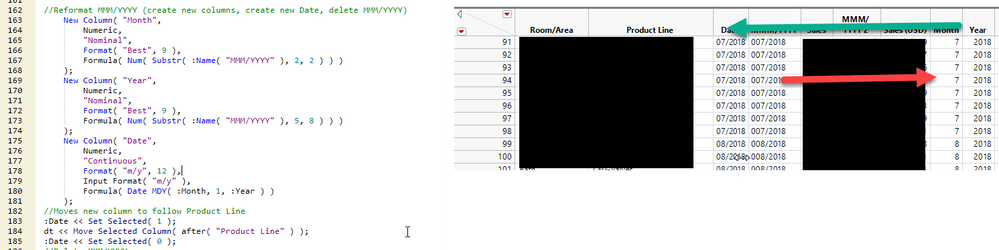
This code works, but it seems like there should be a simplier way.
//Reformat MMM/YYYY (create new columns, create new Date, delete MMM/YYYY)
New Column( "Month",
Numeric,
"Nominal",
Format( "Best", 9 ),
Formula( Num( Substr( :Name( "MMM/YYYY" ), 2, 2 ) ) )
);
New Column( "Year",
Numeric,
"Nominal",
Format( "Best", 9 ),
Formula( Num( Substr( :Name( "MMM/YYYY" ), 5, 8 ) ) )
);
New Column( "Date",
Numeric,
"Continuous",
Format( "m/y", 12 ),
Input Format( "m/y" ),
Formula( Date MDY( :Month, 1, :Year ) )
);
//Moves new column to follow Product Line
:Date << Set Selected( 1 );
dt << Move Selected Column( after( "Product Line" ) );
:Date << Set Selected( 0 );
Super User (Alumni)
Solution
- Mark as New
- Bookmark
- Subscribe
- Mute
- Subscribe to RSS Feed
- Get Direct Link
- Report Inappropriate Content
Re: Date: Date Type, Modeling Type and Format -> How to fix MMM/YYYY
The script below demonstrates that a simple Informat() will work, or you can strip off the leading zero and use Informat() .
New Column( "Date",
	Numeric,
	"Continuous",
	Format( "m/y", 12 ),
	Formula( Informat( Right( :Name("MMM/YYYY"), 8 ), "m/y" ) )
);

New Column( "Date2",
	Numeric,
	"Continuous",
	Format( "m/y", 12 ),
	Formula( Informat(  :Name("MMM/YYYY") , "m/y" ) )
);
Recommended Articles
- © 2026 JMP Statistical Discovery LLC. All Rights Reserved.
- Terms of Use
- Privacy Statement
- Contact Us