- JMP will suspend normal business operations for our Winter Holiday beginning on Wednesday, Dec. 24, 2025, at 5:00 p.m. ET (2:00 p.m. ET for JMP Accounts Receivable).
Regular business hours will resume at 9:00 a.m. EST on Friday, Jan. 2, 2026. - We’re retiring the File Exchange at the end of this year. The JMP Marketplace is now your destination for add-ins and extensions.
- Subscribe to RSS Feed
- Mark Topic as New
- Mark Topic as Read
- Float this Topic for Current User
- Bookmark
- Subscribe
- Mute
- Printer Friendly Page
Discussions
Solve problems, and share tips and tricks with other JMP users.- JMP User Community
- :
- Discussions
- :
- Date Conversion issue

- Mark as New
- Bookmark
- Subscribe
- Mute
- Subscribe to RSS Feed
- Get Direct Link
- Report Inappropriate Content
Date Conversion issue
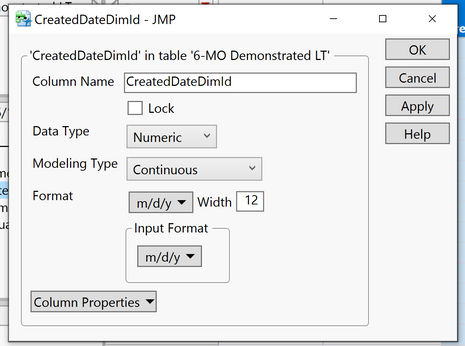
I have a set of data from a database that represents a date in an 8-number string "CreatedDateDimID" in the screen capture. I need it to be formatted like the date in "SterlingDimDate.Date"
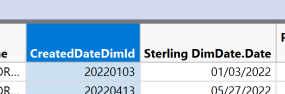
I tried converting to m/d/y in the column info, but it doesn't convert it correctly (see screen capture). What am I missing?
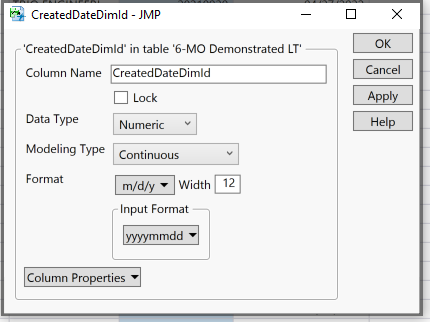
Gives me this result when I would expect 01/03/2022 for the first one and 04/13/2022 for the second one;
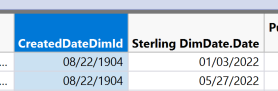
I need to be able to capture the delta between the two dates.
Thanks!
-Phil
Accepted Solutions


- Mark as New
- Bookmark
- Subscribe
- Mute
- Subscribe to RSS Feed
- Get Direct Link
- Report Inappropriate Content
Re: Date Conversion issue
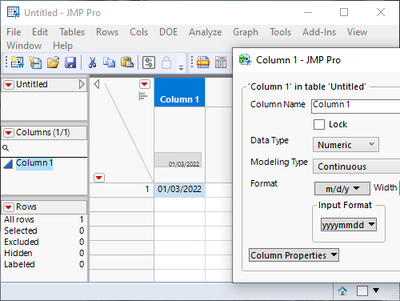
I think you might have to change the column to Character column, press apply (and possible even OK), then go back to column properties, set column to numeric continuous, set correct format and then press apply.
Numeric
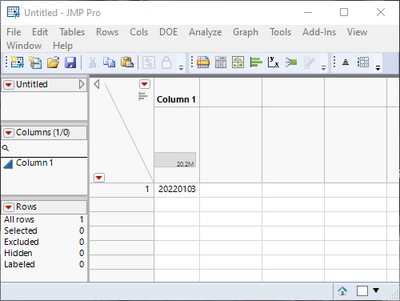
Character
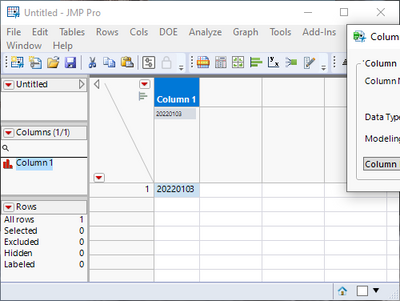
Back to numeric with formatting
- Mark as New
- Bookmark
- Subscribe
- Mute
- Subscribe to RSS Feed
- Get Direct Link
- Report Inappropriate Content
Re: Date Conversion issue
I think you might have to change the column to Character column, press apply (and possible even OK), then go back to column properties, set column to numeric continuous, set correct format and then press apply.
Numeric
Character
Back to numeric with formatting
- Mark as New
- Bookmark
- Subscribe
- Mute
- Subscribe to RSS Feed
- Get Direct Link
- Report Inappropriate Content
Re: Date Conversion issue
Thanks! That worked perfectly.
- Mark as New
- Bookmark
- Subscribe
- Mute
- Subscribe to RSS Feed
- Get Direct Link
- Report Inappropriate Content
Re: Date Conversion issue
I'm trying to build this into JSL and I can't seem to get the last step to work..

It doesn't seem to respect the Input Format.. I'm certain my code is wrong.
- Mark as New
- Bookmark
- Subscribe
- Mute
- Subscribe to RSS Feed
- Get Direct Link
- Report Inappropriate Content
Re: Date Conversion issue
If I were to do this with scripting I would use different method. One option would be to use Informat:
Names Default To Here(1);

dt = New Table("Untitled",
	Add Rows(1),
	New Column("Col", Numeric, "Continuous", Format("Best", 12), Set Values([20220103]))
);
wait(1);
Column(dt, "Col") << Set Each Value(Informat(Char(:Col), "YYYYMMDD"));
wait(1);
Column(dt, "Col") << Format("m/d/y", 12);
Recommended Articles
- © 2025 JMP Statistical Discovery LLC. All Rights Reserved.
- Terms of Use
- Privacy Statement
- Contact Us