Turn on suggestions
Auto-suggest helps you quickly narrow down your search results by suggesting possible matches as you type.
- Don’t miss your chance to experience Discovery Summit Europe at our best available rate! Early bird registration through 31 Oct.
- Graph Builder Toolbar streamlines interactive graphing. Creates shortcuts on Report and GraphBuilder Helpers toolbars. Download and install the extension.
- JMP will suspend normal business operations for our Rest and Recharge Day on Friday, October 2, 2026.
Regular business hours will resume on Monday, October 5, 2026.
Options
- Subscribe to RSS Feed
- Mark Topic as New
- Mark Topic as Read
- Float this Topic for Current User
- Bookmark
- Subscribe
- Mute
- Printer Friendly Page
Discussions
Solve problems, and share tips and tricks with other JMP users.- User Community
- :
- Discussions
- :
- Re: Date Calendar box

Level III
- Mark as New
- Bookmark
- Subscribe
- Mute
- Subscribe to RSS Feed
- Get Direct Link
- Report Inappropriate Content
Date Calendar box
Created:
Apr 6, 2022 08:15 AM
| Last Modified: Jun 9, 2023 9:56 AM
(4058 views)
I'm trying to make a jmp application that will run trends. I have two calendar boxes with a "From" and "To" date. When I click the "Run Script" button, I want to be able to use dates defined in the calendar boxes to select dates in my trend. How can I get the values from the calendar boxes to use in the script?

5 REPLIES 5
Level III
- Mark as New
- Bookmark
- Subscribe
- Mute
- Subscribe to RSS Feed
- Get Direct Link
- Report Inappropriate Content
Re: Date Calendar box
Created:
Apr 6, 2022 09:52 AM
| Last Modified: Apr 6, 2022 7:14 AM
(4048 views)
| Posted in reply to message from B1234 04-06-2022
This is what I have tried but doesnt seem to work
NumberEdit1 << set Function( Function( {this}, sd = NumberEdit1 << Get Date() ) );
NumberEdit2 << set Function( Function( {this}, ed = NumberEdit2 << Get Date() ) );

Show( sd );
startdate = Format( sd, "ddMonyyyy" );

Show( ed );
enddate = Format( ed, "ddMonyyyy" );


Super User
- Mark as New
- Bookmark
- Subscribe
- Mute
- Subscribe to RSS Feed
- Get Direct Link
- Report Inappropriate Content
Re: Date Calendar box
Try something like this:
nw = new window("Test Dates", << modal(),
	Lineup Box( N Col( 2 ),
		text box("Enter start date: "),
		start_neb = number edit box(today(), << Set Format( Format( "ddMonyyyy", 10))),
		text box("Enter end date: "),
		end_neb   = number edit box(today(), << Set Format( Format( "ddMonyyyy", 10))),
	),
	ok_button = button box("OK",
		startdate = start_neb << get;
		enddate   = end_neb << get;
	)
);

print(format(startdate, "ddMonyyyy" ), format(enddate, "ddMonyyyy" ));
From the log:
"11Apr2022"
"24Apr2022"
Super User
- Mark as New
- Bookmark
- Subscribe
- Mute
- Subscribe to RSS Feed
- Get Direct Link
- Report Inappropriate Content
Re: Date Calendar box
Didn't realize you were using calendar boxes. Try this:
nw = new window("Test Dates", << modal(),
	text box("Monitoring & Trending"),
	hlistbox(
		panelbox("From Date",
			cal_start = calendar box(<< Show Time( 0 )),
		),
		panelbox("To Date",
			cal_end = calendar box(<< Show Time( 0 )),
		),
	),
	ok_button = button box("OK",
		startdate = cal_start << get date;
		enddate   = cal_end << get date;
	)
);

print(format(startdate, "ddMonyyyy" ), format(enddate, "ddMonyyyy" ));

Super User
- Mark as New
- Bookmark
- Subscribe
- Mute
- Subscribe to RSS Feed
- Get Direct Link
- Report Inappropriate Content
Re: Date Calendar box
you might like Select Date Range with Calendar Boxes 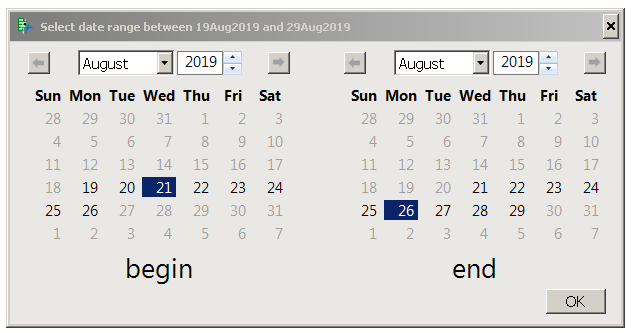
Craige
Level III
- Mark as New
- Bookmark
- Subscribe
- Mute
- Subscribe to RSS Feed
- Get Direct Link
- Report Inappropriate Content
Re: Date Calendar box
thank you @pmroz and @Craige_Hales this was very helpful! working well now thank you both.
Recommended Articles
- © 2026 JMP Statistical Discovery LLC. All Rights Reserved.
- Terms of Use
- Privacy Statement
- Contact Us