cancel
Showing results for 
Show  only  | Search instead for 
Did you mean: 
  • Don’t miss your chance to experience Discovery Summit Europe at our best available rate! Early bird registration through 31 Oct.
  • Image to Table JMP extension imports single or batch images as data tables. Useful to extract curves from pictures or convert image data to curve data to use in analyses like Functional Data Explorer. Download and install the extension.

Discussions

Solve problems, and share tips and tricks with other JMP users.
Choose Language Hide Translation Bar
Hegedus
Level IV

Data Filter to select missing

Hi,


I am attempting script a plot Y by X plot and constrain the rows to those missing in column Z.  I am modifying some existing code and the local filter is defined

as


  Add Filter( columns( :Fid_data_check ), Where( :Fid_data_check == "not found" ) )

but this depended on the creation of a column externally in Excel that was either "OK" or "Not Found".  I am moving the entire workflow to eliminate the need of Excel and would like to take advantage of the is missing values handling.


I am trying:

 Add Filter( columns( :Z ), Where( is missing(:Z) ) ),

The Log window says that:

Range value cannot be missing.

How do I need to modify the Add Filter line?

1 REPLY 1
Jeff_Perkinson
Community Manager Community Manager

Re: Data Filter to select missing

The best way to figure stuff like this out is to let JMP write it for you.


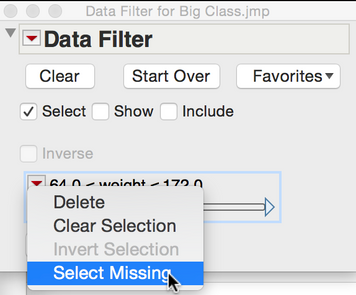
In the Data Filter there's a Select Missing option in the red triangle above a column.


8387_JMPScreenSnapz001.png


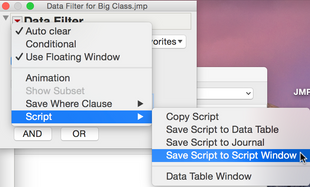
Turn that on and then save the filter script to a script window to see how to script it.


8388_JMPScreenSnapz002.png


Current Data Table() << Data Filter(
  Location( {838, -4} ),
  Add Filter( columns( :weight ), Display( :weight ), Select Missing( :weight ) )
);


-Jeff

-Jeff

Recommended Articles