Turn on suggestions
Auto-suggest helps you quickly narrow down your search results by suggesting possible matches as you type.
- JMP will suspend normal business operations for our Winter Holiday beginning on Wednesday, Dec. 24, 2025, at 5:00 p.m. ET (2:00 p.m. ET for JMP Accounts Receivable).
Regular business hours will resume at 9:00 a.m. EST on Friday, Jan. 2, 2026. - We’re retiring the File Exchange at the end of this year. The JMP Marketplace is now your destination for add-ins and extensions.
Options
- Subscribe to RSS Feed
- Mark Topic as New
- Mark Topic as Read
- Float this Topic for Current User
- Bookmark
- Subscribe
- Mute
- Printer Friendly Page
Discussions
Solve problems, and share tips and tricks with other JMP users.- JMP User Community
- :
- Discussions
- :
- #DACH2024 : title and legend: blue font?

Level XIII
- Mark as New
- Bookmark
- Subscribe
- Mute
- Subscribe to RSS Feed
- Get Direct Link
- Report Inappropriate Content
#DACH2024 : title and legend: blue font?
Created:
Oct 8, 2024 07:45 AM
| Last Modified: Oct 8, 2024 4:46 AM
(970 views)
adjust the colors interactively, then use the Enhanced log to get the right command ...
Next step: create your toolbar
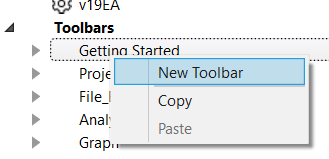
and add a command with something like this:
Names Default to Here(1);
dt = Open( "$SAMPLE_DATA/Big Class.jmp" );
gb = dt << Graph Builder(
	Size( 437, 413 ),
	Graph Spacing( 4 ),
	Variables( X( :height ), Y( :weight ), Overlay( :sex ) ),
	Elements( Points( X, Y, Legend( 1 ) ), Smoother( X, Y, Legend( 2 ) ) )
);

wait (2);

// ^^^^^^ don't include this part ^^^^^^^^

current report() << 	SendToReport(
		Dispatch( {}, "graph title", TextEditBox,
			{Text Color( "Blue" ), Font Color( 5 )}
		),
		Dispatch( {}, "400", LegendBox, {Text Color( "Blue" )} )
	)
3 REPLIES 3
Level XIII
- Mark as New
- Bookmark
- Subscribe
- Mute
- Subscribe to RSS Feed
- Get Direct Link
- Report Inappropriate Content
Re: #DACH2024 : title and legend: blue font?
Created:
Oct 8, 2024 02:10 PM
| Last Modified: Oct 8, 2024 11:11 AM
(925 views)
| Posted in reply to message from hogi 10-08-2024
As an alternative (we just discussed it : :(
via the new JMP 18 Platform presets.
- change the fonts via the GUI
- save the current settings as a preset
- got to the preferences and export the preset
- remove all the other GB commands, just keep the color settings
- import and enjoy
[the attached file has to be renamed to .jmppreset !]
Level XIII
- Mark as New
- Bookmark
- Subscribe
- Mute
- Subscribe to RSS Feed
- Get Direct Link
- Report Inappropriate Content
Re: #DACH2024 : title and legend: blue font?
@Ryan_Gilmore is it possible to classify .jmppreset as allowed filetype?


 Community Manager
- Mark as New
- Bookmark
- Subscribe
- Mute
- Subscribe to RSS Feed
- Get Direct Link
- Report Inappropriate Content
Re: #DACH2024 : title and legend: blue font?
We are working on it. There are apparently some changes that need to occur outside of our direct control. Hopefully soon.
Recommended Articles
- © 2025 JMP Statistical Discovery LLC. All Rights Reserved.
- Terms of Use
- Privacy Statement
- Contact Us