- Subscribe to RSS Feed
- Mark Topic as New
- Mark Topic as Read
- Float this Topic for Current User
- Bookmark
- Subscribe
- Mute
- Printer Friendly Page
Discussions
Solve problems, and share tips and tricks with other JMP users.- JMP User Community
- :
- Discussions
- :
- Customize & save preferences in Fit Y by X Mean Std Dev report

- Mark as New
- Bookmark
- Subscribe
- Mute
- Subscribe to RSS Feed
- Get Direct Link
- Report Inappropriate Content
Customize & save preferences in Fit Y by X Mean Std Dev report
Hello,
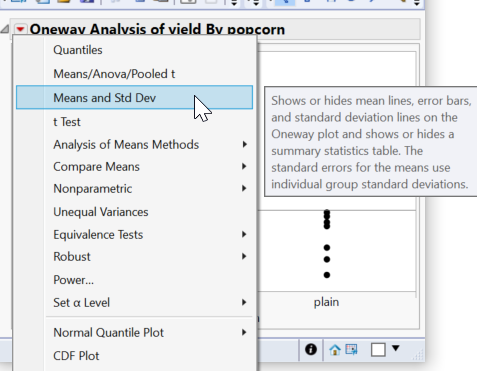
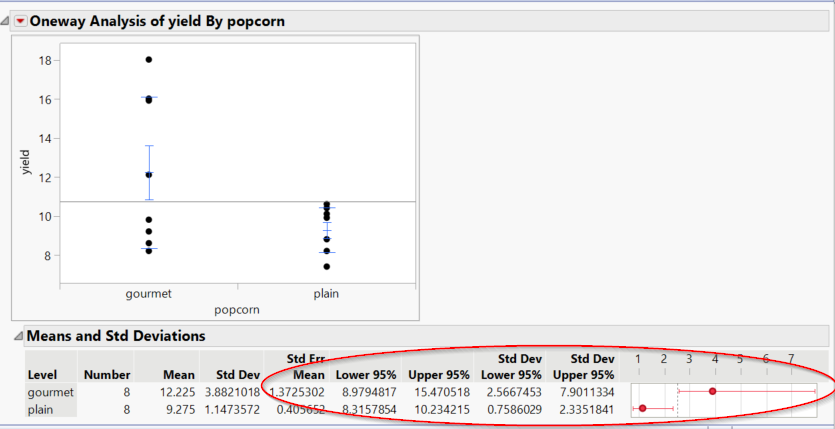
The JMP17 Fit Y by X, "Means and Std Dev" output report changed the standard columns output.
I know how to change the displayed columns by right-clicking on the table and choosing the Columns I want to see.
I don't know how to make this a permanent preference for when I do this again on other data files. I checked Preferences but, couldn't find where to change this. Could someone please advise me on what to do?
I appreciate the additional available columns, but I don't want this output to be my standard. I've had two other engineers here in my company ask me for help to make this preference change as well.
Accepted Solutions


- Mark as New
- Bookmark
- Subscribe
- Mute
- Subscribe to RSS Feed
- Get Direct Link
- Report Inappropriate Content
Re: Customize & save preferences in Fit Y by X Mean Std Dev report
Hi,
There may be a way to save this permanently in preferences, but it is also a good candidate for a custom scripted solution. Please try the script below and see if it does what you need. This could then be packaged and distributed as an add-in or a custom menu item.
(By the way, it took less than 10 minutes to write this with the help of Workflow Builder. I saved the Fit-Y-by-X script after setting it up the way I wanted and then simply added the column dialog options at the top).
Names Default To Here( 1 );

dt=Current Data Table();

dlg = Column Dialog(
	yCol = Col List( "Y, Data",
		Data Type( Numeric ),
		Min Col(1),
		Max Col(1)
	),
	xCol = Col List( "X, Data",
		Data Type( Character ),
		Min Col(1),
		Max Col(1)
	),
	"Select data for Fit-Y-By-X with Means and Std"
);

If( dlg["Button"] == -1, Throw( "User cancelled" ) );
Remove From( dlg ); Eval List( dlg );


//Report snapshot: DataTable - Fit Y by X of Y by X
dt << Oneway(
	Y( yCol[1] ),
	X( xCol[1] ),
	Means and Std Dev( 1 ),
	Mean Error Bars( 1 ),
	Std Dev Lines( 1 ),
	SendToReport(
		Dispatch(
			{"Means and Std Deviations"},
			"Std Err Mean",
			NumberColBox,
			{Visibility( "Collapse" )}
		),
		Dispatch(
			{"Means and Std Deviations"},
			"Lower 95%",
			NumberColBox,
			{Visibility( "Collapse" )}
		),
		Dispatch(
			{"Means and Std Deviations"},
			"Upper 95%",
			NumberColBox,
			{Visibility( "Collapse" )}
		),
		Dispatch(
			{"Means and Std Deviations"},
			"Std Dev Lower 95%",
			NumberColBox,
			{Visibility( "Collapse" )}
		),
		Dispatch(
			{"Means and Std Deviations"},
			"Std Dev Upper 95%",
			NumberColBox,
			{Visibility( "Collapse" )}
		),
		Dispatch(
			{"Means and Std Deviations"},
			"~Std Dev",
			PlotColBox,
			{Visibility( "Collapse" )}
		)
	)
);

- Mark as New
- Bookmark
- Subscribe
- Mute
- Subscribe to RSS Feed
- Get Direct Link
- Report Inappropriate Content
Re: Customize & save preferences in Fit Y by X Mean Std Dev report
Hey Ted,
This is got much easier to do in JMP 17. Turn on Means and Std Deviations then go to the red triangle the platform preferences (New in JMP 17) and select Save changes to ... This should work for all future oneway plots for this to pop up automatically.
- Mark as New
- Bookmark
- Subscribe
- Mute
- Subscribe to RSS Feed
- Get Direct Link
- Report Inappropriate Content
Re: Customize & save preferences in Fit Y by X Mean Std Dev report
Hi,
There may be a way to save this permanently in preferences, but it is also a good candidate for a custom scripted solution. Please try the script below and see if it does what you need. This could then be packaged and distributed as an add-in or a custom menu item.
(By the way, it took less than 10 minutes to write this with the help of Workflow Builder. I saved the Fit-Y-by-X script after setting it up the way I wanted and then simply added the column dialog options at the top).
Names Default To Here( 1 );

dt=Current Data Table();

dlg = Column Dialog(
	yCol = Col List( "Y, Data",
		Data Type( Numeric ),
		Min Col(1),
		Max Col(1)
	),
	xCol = Col List( "X, Data",
		Data Type( Character ),
		Min Col(1),
		Max Col(1)
	),
	"Select data for Fit-Y-By-X with Means and Std"
);

If( dlg["Button"] == -1, Throw( "User cancelled" ) );
Remove From( dlg ); Eval List( dlg );


//Report snapshot: DataTable - Fit Y by X of Y by X
dt << Oneway(
	Y( yCol[1] ),
	X( xCol[1] ),
	Means and Std Dev( 1 ),
	Mean Error Bars( 1 ),
	Std Dev Lines( 1 ),
	SendToReport(
		Dispatch(
			{"Means and Std Deviations"},
			"Std Err Mean",
			NumberColBox,
			{Visibility( "Collapse" )}
		),
		Dispatch(
			{"Means and Std Deviations"},
			"Lower 95%",
			NumberColBox,
			{Visibility( "Collapse" )}
		),
		Dispatch(
			{"Means and Std Deviations"},
			"Upper 95%",
			NumberColBox,
			{Visibility( "Collapse" )}
		),
		Dispatch(
			{"Means and Std Deviations"},
			"Std Dev Lower 95%",
			NumberColBox,
			{Visibility( "Collapse" )}
		),
		Dispatch(
			{"Means and Std Deviations"},
			"Std Dev Upper 95%",
			NumberColBox,
			{Visibility( "Collapse" )}
		),
		Dispatch(
			{"Means and Std Deviations"},
			"~Std Dev",
			PlotColBox,
			{Visibility( "Collapse" )}
		)
	)
);
- Mark as New
- Bookmark
- Subscribe
- Mute
- Subscribe to RSS Feed
- Get Direct Link
- Report Inappropriate Content
Re: Customize & save preferences in Fit Y by X Mean Std Dev report
Hello HadleyMyers, thank you very much for suggesting this scripting option. I'll take a look and see if others can use this.
Does anyone know of a non-scripting option? I would prefer a non-scripting option so it is easier to deploy the solution.
- Mark as New
- Bookmark
- Subscribe
- Mute
- Subscribe to RSS Feed
- Get Direct Link
- Report Inappropriate Content
Re: Customize & save preferences in Fit Y by X Mean Std Dev report
Hey Ted,
This is got much easier to do in JMP 17. Turn on Means and Std Deviations then go to the red triangle the platform preferences (New in JMP 17) and select Save changes to ... This should work for all future oneway plots for this to pop up automatically.
- Mark as New
- Bookmark
- Subscribe
- Mute
- Subscribe to RSS Feed
- Get Direct Link
- Report Inappropriate Content
Re: Customize & save preferences in Fit Y by X Mean Std Dev report
Thanks Peter for helping. As we discussed just now on the phone, we were not able to change the Preferences on this table using this method.
I was able to change the Columns in the table, and when I Redo Analysis the same Columns were selected. But, I was not able to change my Preferences. I'll add an item to the Wish List to be able to select Columns from the Fit Y by X Means and Std Dev. Thank you
Recommended Articles
- © 2026 JMP Statistical Discovery LLC. All Rights Reserved.
- Terms of Use
- Privacy Statement
- Contact Us