- JMP will suspend normal business operations for our Winter Holiday beginning on Wednesday, Dec. 24, 2025, at 5:00 p.m. ET (2:00 p.m. ET for JMP Accounts Receivable).
Regular business hours will resume at 9:00 a.m. EST on Friday, Jan. 2, 2026. - We’re retiring the File Exchange at the end of this year. The JMP Marketplace is now your destination for add-ins and extensions.
- Subscribe to RSS Feed
- Mark Topic as New
- Mark Topic as Read
- Float this Topic for Current User
- Bookmark
- Subscribe
- Mute
- Printer Friendly Page
Discussions
Solve problems, and share tips and tricks with other JMP users.- JMP User Community
- :
- Discussions
- :
- Custom Icons for Button Box

- Mark as New
- Bookmark
- Subscribe
- Mute
- Subscribe to RSS Feed
- Get Direct Link
- Report Inappropriate Content
Custom Icons for Button Box
Hey JMPers!
Again a little scripting problem: I would like to add a custom image to a ButtonBox. Sadly it does not work. My script looks like this:
New Window("My Window",
	V List Box(
		bb = Button Box("New Project");
	)
);

// bb << Set Icon("JMP"); // This works!
bb <<Set Icon("../imgs/New Project Icon.png"); // => Gives "Unknown" in the log!!!

New Image(Open("../imgs/New Project Icon.png")); // Opens the image. Path seems to work fine
As you can see, JMP is able to find my image, as the last line of the script works without error. But the second to last line produces the message "Unknown" in the log and doe not add the Image to the Button.
Thanks for any advice,
Sebastian
Accepted Solutions


- Mark as New
- Bookmark
- Subscribe
- Mute
- Subscribe to RSS Feed
- Get Direct Link
- Report Inappropriate Content
Re: Custom Icons for Button Box
Try using an absolute filepath instead of a relative filepath. A button has its own context and does not know anything about the script that created it.


- Mark as New
- Bookmark
- Subscribe
- Mute
- Subscribe to RSS Feed
- Get Direct Link
- Report Inappropriate Content
Re: Custom Icons for Button Box
Change the semicolon to a comma for your button box definition::
bb = Button Box("New Project"),This works in JMP 13:
a = new window("test",
	b = button box("Bar Chart"),
);

b << set icon("C:\JMP\Icons\icon-48x48-chart_bar.png");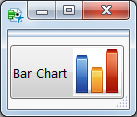
- Mark as New
- Bookmark
- Subscribe
- Mute
- Subscribe to RSS Feed
- Get Direct Link
- Report Inappropriate Content
Re: Custom Icons for Button Box
Try using an absolute filepath instead of a relative filepath. A button has its own context and does not know anything about the script that created it.
Recommended Articles
- © 2025 JMP Statistical Discovery LLC. All Rights Reserved.
- Terms of Use
- Privacy Statement
- Contact Us