- Subscribe to RSS Feed
- Mark Topic as New
- Mark Topic as Read
- Float this Topic for Current User
- Bookmark
- Subscribe
- Mute
- Printer Friendly Page
Discussions
Solve problems, and share tips and tricks with other JMP users.- JMP User Community
- :
- Discussions
- :
- Custom Design: Mixture with Process Variables. How to Evaluate Design?

- Mark as New
- Bookmark
- Subscribe
- Mute
- Subscribe to RSS Feed
- Get Direct Link
- Report Inappropriate Content
Custom Design: Mixture with Process Variables. How to Evaluate Design?
I am trying to use Custom Design to screen some material composition and process variable factors within my experimental system. My experimental setup is perhaps a little convoluted but I will explain the best I can.
My factors are as follows:
Material components:
- Monomer type: Categorical, 2 levels.
- Photoinitiator content: Continuous.
- Photoabsorber content: Continuous.
- Monomer Mixture (3:2): Continuous. (this is the content of a predetermined ratio of monomers at a 3:2 ratio)
- Multicrosslinker content: Continuous.
Process variables:
- Power ratio: Continuous.
Questions:
- I used literature to inform the monomer mixture ratio contents. Could or should I be better off coding the Monomer Mixture (3:2) as two separate continuous factors at this screening stage instead of adding them as a single factor?
- According to the Mixture_with_Process JMP scripting guide, evaluation of the design should be done based off the prediction variance profile, design space plot and design diagnostics. I tried to evaluate this custom design in the same way (see Mixture-ProcessVarbables_Custom Design Evaluations.pdf) but have several confusions:
- the Prediction Variance > Max Desirability option is greyed out
- the design evaluation has not output all the stats for Design Diagnostics Outline
- The power analysis for my factors are on a whole pretty low. I have no idea if this is the best design to go with this type of screening experiment. If you can suggest alternative ways to design this, I would appreciate your input.
Accepted Solutions


- Mark as New
- Bookmark
- Subscribe
- Mute
- Subscribe to RSS Feed
- Get Direct Link
- Report Inappropriate Content
Re: Custom Design: Mixture with Process Variables. How to Evaluate Design?
Hi @Jingwen,
Welcome in the Community !
Mixture design are typically optimization design, where you try to predict and optimize your response based on components ratio. So related to your objective and factors, the Mixture design will help you optimize your response(s) depending on the monomer type chosen. It may not help you choose the most appropriate monomer type, as you can find different optima for each monomer type. Since they are optimization designs, it is often recommended to use an I-Optimality criterion, related to the average variance of prediction (that you want to minimize). You can change the optimality criterion during design creation by clicking on the red triangle next to "Custom Design", then "Optimality Criterion", and "Make I-Optimal design".
Related to your questions :
- If you want to change the possible ratio of your Monomer Mixture, that means you may end up with two factors for this parameter :
- one mixture continuous factor for Monomer Mixture content "Monomer Mixture",
- one ratio continuous factor for Monomer ratio "Monomer Ratio".
Doing so may increase the required number of runs, from 21 in your example to 24 recommended runs (default) in the absence of random block. I have saved the alternative design with these two Monomer factors, and I have chosen a range for Monomer ratio from 1 to 2 (so 1:1 to 2:1) so that the ratio 3:2 should be in the middle of this range.
Here is the script to generate this new design :
DOE(
Could you explain the role of random block in your case ? Is it a limitation of number of runs per day ? If yes, you can add the number of runs per block at the end of the DOE generation, which can increase the recommended default number of runs to 27 (4 blocks, 3 with 7 runs and the last one with 6 runs) :
Custom Design,
{Add Response( Minimize, "Cd (mm)", ., ., . ),
Add Response( Minimize, "Ec (mJ/cm²)", ., ., . ),
Add Response( None, "#Discs Printed", ., ., . ),
Add Factor( Categorical, {"HEMA", "GMA"}, "Func Monomer Type", 0 ),
Add Factor( Continuous, 60, 120, "Power Ratio (%)", 0 ),
Add Factor( Continuous, 0.005, 0.02, "PI Content", 0 ),
Add Factor( Continuous, 0.001, 0.003, "PA Content", 0 ),
Add Factor( Mixture, 0.2, 0.6, "MX Content", 0 ),
Add Factor( Mixture, 0.4, 0.8, "Monomer Mixture (3:2)", 0 ),
Add Factor( Continuous, 1, 2, "Monomer Ratio", 0 ), Set Random Seed( 685147623 ),
Number of Starts( 200 ), Add Term( {5, 1} ), Add Term( {6, 1} ),
Add Term( {1, 1}, {2, 1} ), Add Term( {1, 1}, {3, 1} ),
Add Term( {1, 1}, {4, 1} ), Add Term( {1, 1}, {5, 1} ),
Add Term( {1, 1}, {6, 1} ), Add Term( {1, 1}, {7, 1} ),
Add Term( {2, 1}, {3, 1} ), Add Term( {2, 1}, {4, 1} ),
Add Term( {2, 1}, {5, 1} ), Add Term( {2, 1}, {6, 1} ),
Add Term( {2, 1}, {7, 1} ), Add Term( {3, 1}, {4, 1} ),
Add Term( {3, 1}, {5, 1} ), Add Term( {3, 1}, {6, 1} ),
Add Term( {3, 1}, {7, 1} ), Add Term( {4, 1}, {5, 1} ),
Add Term( {4, 1}, {6, 1} ), Add Term( {4, 1}, {7, 1} ),
Add Term( {5, 1}, {6, 1} ), Add Term( {5, 1}, {7, 1} ),
Add Term( {6, 1}, {7, 1} ), Set Sample Size( 24 ),
Optimality Criterion( "Make I-Optimal Design" ), Simulate Responses( 0 ),
Save X Matrix( 0 ), Make Design}
);
I also saved this design in a script in your original datatable, and here is the script to generate it :
DOE(
	Custom Design,
	{Add Response( Minimize, "Cd (mm)", ., ., . ),
	Add Response( Minimize, "Ec (mJ/cm²)", ., ., . ),
	Add Response( None, "#Discs Printed", ., ., . ),
	Add Factor( Categorical, {"HEMA", "GMA"}, "Func Monomer Type", 0 ),
	Add Factor( Continuous, 60, 120, "Power Ratio (%)", 0 ),
	Add Factor( Continuous, 0.005, 0.02, "PI Content", 0 ),
	Add Factor( Continuous, 0.001, 0.003, "PA Content", 0 ),
	Add Factor( Mixture, 0.2, 0.6, "MX Content", 0 ),
	Add Factor( Mixture, 0.4, 0.8, "Monomer Mixture (3:2)", 0 ),
	Add Factor( Continuous, 1, 2, "Monomer Ratio", 0 ),
	Set Random Seed( 2039145980 ), Number of Starts( 200 ), Add Term( {5, 1} ),
	Add Term( {6, 1} ), Add Term( {1, 1}, {2, 1} ), Add Term( {1, 1}, {3, 1} ),
	Add Term( {1, 1}, {4, 1} ), Add Term( {1, 1}, {5, 1} ),
	Add Term( {1, 1}, {6, 1} ), Add Term( {1, 1}, {7, 1} ),
	Add Term( {2, 1}, {3, 1} ), Add Term( {2, 1}, {4, 1} ),
	Add Term( {2, 1}, {5, 1} ), Add Term( {2, 1}, {6, 1} ),
	Add Term( {2, 1}, {7, 1} ), Add Term( {3, 1}, {4, 1} ),
	Add Term( {3, 1}, {5, 1} ), Add Term( {3, 1}, {6, 1} ),
	Add Term( {3, 1}, {7, 1} ), Add Term( {4, 1}, {5, 1} ),
	Add Term( {4, 1}, {6, 1} ), Add Term( {4, 1}, {7, 1} ),
	Add Term( {5, 1}, {6, 1} ), Add Term( {5, 1}, {7, 1} ),
	Add Term( {6, 1}, {7, 1} ), Set Runs Per Random Block( 7 ),
	Set Sample Size( 27 ), Optimality Criterion( "Make I-Optimal Design" ),
	Simulate Responses( 0 ), Save X Matrix( 0 ), Make Design}
);
- When evaluating Mixture design using Evaluate Designs platform, you can look at informations related to predictivity, like Prediction Variance Profile, Fraction of Design Space Plot, and Design Diagnostics like G-Efficiency and Average Variance of Prediction (related to I-Efficiency), like mentioned in the JMP Guide. The goal of this evaluation would be to get an understanding about the predictive performances of the design used.
Note that it can be difficult to evaluate a design without any reference design/benchmark, so I would recommend creating several designs and use the platform Compare Designs to better assess the pros and cons of each design. You can vary the number of runs, complexity of the model, optimality criterion, etc...
You don't have these informations displayed or accessible as you have Random Blocks in your design. Using the Evaluate platform and specifying your factors without the Random Block (or changing it's design role from "Random Block" to "Blocking" and including it with the other factors) will help you find the Maximum Prediction Variance and get access to Design Diagnostics. - Mixture designs are quite different from other designs (like factorial designs), as the factors are not independent : changing the level of a mixture factor has an impact on others, so mixture factors are correlated. Also, the emphasis of this type of design is more on predictivity and optimization than screening/statistical significance. Last, you have chosen a model-based mixture design (not a Space-Filling approach), so you already have assumed a possible complete model you would like to investigate.
For these 3 reasons, it doesn't make sense to evaluate a mixture design based on power analysis. For modeling, it makes more sense in the analysis to start from the full model with the possible terms you have assumed in the design creation, and start removing terms in the model (except main effects), based on the predictive performance of the model (RMSE for example) or Information criteria (AICc/BIC), NOT on individual p-values/logworth of each term (because of multicollinearity/correlation among mixture factors, no intercept in this type of model, p-values/logworth are not a valid metric for model selection).
For design creation, as mentioned in point 2, you can create different designs and compare them based on prediction performances : prediction variance profile, fraction of design space plot, G-Efficiency and average variance of prediction, etc...

Hope this answer will help you,
"It is not unusual for a well-designed experiment to analyze itself" (Box, Hunter and Hunter)
- Mark as New
- Bookmark
- Subscribe
- Mute
- Subscribe to RSS Feed
- Get Direct Link
- Report Inappropriate Content
Re: Custom Design: Mixture with Process Variables. How to Evaluate Design?
Hi @Jingwen,
Welcome in the Community !
Mixture design are typically optimization design, where you try to predict and optimize your response based on components ratio. So related to your objective and factors, the Mixture design will help you optimize your response(s) depending on the monomer type chosen. It may not help you choose the most appropriate monomer type, as you can find different optima for each monomer type. Since they are optimization designs, it is often recommended to use an I-Optimality criterion, related to the average variance of prediction (that you want to minimize). You can change the optimality criterion during design creation by clicking on the red triangle next to "Custom Design", then "Optimality Criterion", and "Make I-Optimal design".
Related to your questions :
- If you want to change the possible ratio of your Monomer Mixture, that means you may end up with two factors for this parameter :
- one mixture continuous factor for Monomer Mixture content "Monomer Mixture",
- one ratio continuous factor for Monomer ratio "Monomer Ratio".
Doing so may increase the required number of runs, from 21 in your example to 24 recommended runs (default) in the absence of random block. I have saved the alternative design with these two Monomer factors, and I have chosen a range for Monomer ratio from 1 to 2 (so 1:1 to 2:1) so that the ratio 3:2 should be in the middle of this range.
Here is the script to generate this new design :
DOE(
Could you explain the role of random block in your case ? Is it a limitation of number of runs per day ? If yes, you can add the number of runs per block at the end of the DOE generation, which can increase the recommended default number of runs to 27 (4 blocks, 3 with 7 runs and the last one with 6 runs) :
Custom Design,
{Add Response( Minimize, "Cd (mm)", ., ., . ),
Add Response( Minimize, "Ec (mJ/cm²)", ., ., . ),
Add Response( None, "#Discs Printed", ., ., . ),
Add Factor( Categorical, {"HEMA", "GMA"}, "Func Monomer Type", 0 ),
Add Factor( Continuous, 60, 120, "Power Ratio (%)", 0 ),
Add Factor( Continuous, 0.005, 0.02, "PI Content", 0 ),
Add Factor( Continuous, 0.001, 0.003, "PA Content", 0 ),
Add Factor( Mixture, 0.2, 0.6, "MX Content", 0 ),
Add Factor( Mixture, 0.4, 0.8, "Monomer Mixture (3:2)", 0 ),
Add Factor( Continuous, 1, 2, "Monomer Ratio", 0 ), Set Random Seed( 685147623 ),
Number of Starts( 200 ), Add Term( {5, 1} ), Add Term( {6, 1} ),
Add Term( {1, 1}, {2, 1} ), Add Term( {1, 1}, {3, 1} ),
Add Term( {1, 1}, {4, 1} ), Add Term( {1, 1}, {5, 1} ),
Add Term( {1, 1}, {6, 1} ), Add Term( {1, 1}, {7, 1} ),
Add Term( {2, 1}, {3, 1} ), Add Term( {2, 1}, {4, 1} ),
Add Term( {2, 1}, {5, 1} ), Add Term( {2, 1}, {6, 1} ),
Add Term( {2, 1}, {7, 1} ), Add Term( {3, 1}, {4, 1} ),
Add Term( {3, 1}, {5, 1} ), Add Term( {3, 1}, {6, 1} ),
Add Term( {3, 1}, {7, 1} ), Add Term( {4, 1}, {5, 1} ),
Add Term( {4, 1}, {6, 1} ), Add Term( {4, 1}, {7, 1} ),
Add Term( {5, 1}, {6, 1} ), Add Term( {5, 1}, {7, 1} ),
Add Term( {6, 1}, {7, 1} ), Set Sample Size( 24 ),
Optimality Criterion( "Make I-Optimal Design" ), Simulate Responses( 0 ),
Save X Matrix( 0 ), Make Design}
);
I also saved this design in a script in your original datatable, and here is the script to generate it :
DOE(
	Custom Design,
	{Add Response( Minimize, "Cd (mm)", ., ., . ),
	Add Response( Minimize, "Ec (mJ/cm²)", ., ., . ),
	Add Response( None, "#Discs Printed", ., ., . ),
	Add Factor( Categorical, {"HEMA", "GMA"}, "Func Monomer Type", 0 ),
	Add Factor( Continuous, 60, 120, "Power Ratio (%)", 0 ),
	Add Factor( Continuous, 0.005, 0.02, "PI Content", 0 ),
	Add Factor( Continuous, 0.001, 0.003, "PA Content", 0 ),
	Add Factor( Mixture, 0.2, 0.6, "MX Content", 0 ),
	Add Factor( Mixture, 0.4, 0.8, "Monomer Mixture (3:2)", 0 ),
	Add Factor( Continuous, 1, 2, "Monomer Ratio", 0 ),
	Set Random Seed( 2039145980 ), Number of Starts( 200 ), Add Term( {5, 1} ),
	Add Term( {6, 1} ), Add Term( {1, 1}, {2, 1} ), Add Term( {1, 1}, {3, 1} ),
	Add Term( {1, 1}, {4, 1} ), Add Term( {1, 1}, {5, 1} ),
	Add Term( {1, 1}, {6, 1} ), Add Term( {1, 1}, {7, 1} ),
	Add Term( {2, 1}, {3, 1} ), Add Term( {2, 1}, {4, 1} ),
	Add Term( {2, 1}, {5, 1} ), Add Term( {2, 1}, {6, 1} ),
	Add Term( {2, 1}, {7, 1} ), Add Term( {3, 1}, {4, 1} ),
	Add Term( {3, 1}, {5, 1} ), Add Term( {3, 1}, {6, 1} ),
	Add Term( {3, 1}, {7, 1} ), Add Term( {4, 1}, {5, 1} ),
	Add Term( {4, 1}, {6, 1} ), Add Term( {4, 1}, {7, 1} ),
	Add Term( {5, 1}, {6, 1} ), Add Term( {5, 1}, {7, 1} ),
	Add Term( {6, 1}, {7, 1} ), Set Runs Per Random Block( 7 ),
	Set Sample Size( 27 ), Optimality Criterion( "Make I-Optimal Design" ),
	Simulate Responses( 0 ), Save X Matrix( 0 ), Make Design}
);
- When evaluating Mixture design using Evaluate Designs platform, you can look at informations related to predictivity, like Prediction Variance Profile, Fraction of Design Space Plot, and Design Diagnostics like G-Efficiency and Average Variance of Prediction (related to I-Efficiency), like mentioned in the JMP Guide. The goal of this evaluation would be to get an understanding about the predictive performances of the design used.
Note that it can be difficult to evaluate a design without any reference design/benchmark, so I would recommend creating several designs and use the platform Compare Designs to better assess the pros and cons of each design. You can vary the number of runs, complexity of the model, optimality criterion, etc...
You don't have these informations displayed or accessible as you have Random Blocks in your design. Using the Evaluate platform and specifying your factors without the Random Block (or changing it's design role from "Random Block" to "Blocking" and including it with the other factors) will help you find the Maximum Prediction Variance and get access to Design Diagnostics. - Mixture designs are quite different from other designs (like factorial designs), as the factors are not independent : changing the level of a mixture factor has an impact on others, so mixture factors are correlated. Also, the emphasis of this type of design is more on predictivity and optimization than screening/statistical significance. Last, you have chosen a model-based mixture design (not a Space-Filling approach), so you already have assumed a possible complete model you would like to investigate.
For these 3 reasons, it doesn't make sense to evaluate a mixture design based on power analysis. For modeling, it makes more sense in the analysis to start from the full model with the possible terms you have assumed in the design creation, and start removing terms in the model (except main effects), based on the predictive performance of the model (RMSE for example) or Information criteria (AICc/BIC), NOT on individual p-values/logworth of each term (because of multicollinearity/correlation among mixture factors, no intercept in this type of model, p-values/logworth are not a valid metric for model selection).
For design creation, as mentioned in point 2, you can create different designs and compare them based on prediction performances : prediction variance profile, fraction of design space plot, G-Efficiency and average variance of prediction, etc...
Hope this answer will help you,
"It is not unusual for a well-designed experiment to analyze itself" (Box, Hunter and Hunter)
- Mark as New
- Bookmark
- Subscribe
- Mute
- Subscribe to RSS Feed
- Get Direct Link
- Report Inappropriate Content
Re: Custom Design: Mixture with Process Variables. How to Evaluate Design?
Dear Victor,
First of all, I owe you a very heartfelt thank you for your detailed and very rapid response to my problem!
In order of your responses:
- I had not considered the option of adding a ratio column, thank you for your suggestion.
- The random blocking was indeed added to account for the max number of runs per day!
- I followed your advice to compare the designs. I have a follow-up question if I may:
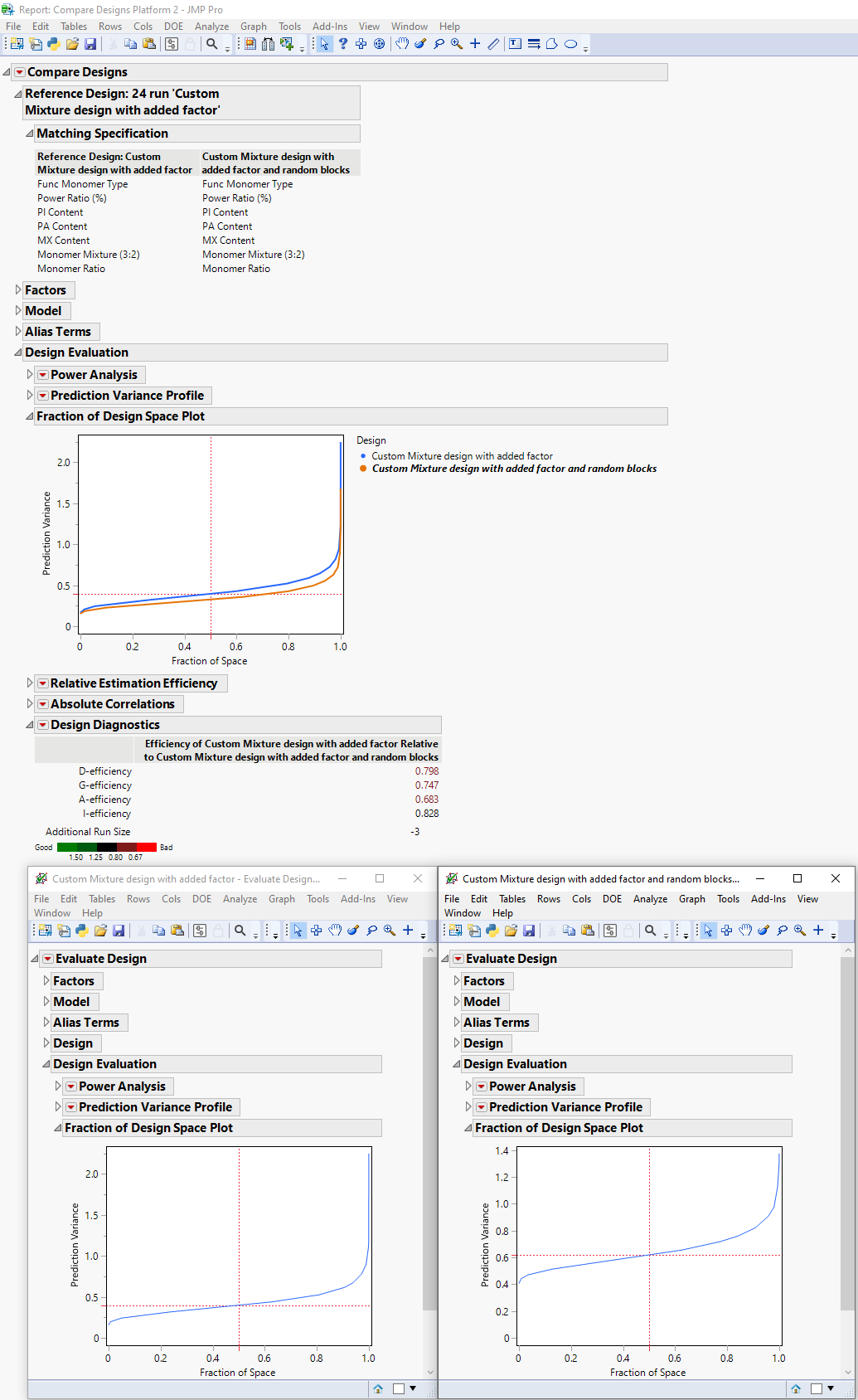
- It's noticable that upon comparing the 'Added Factor' custom design with the 'Added Factor with Random Blocks' design, the over-layed Fraction of Design Space Plot differs to each table's design space plot if opened individually (Fig 2 below). i.e. The prediction variance for the blocked design is all of a sudden lowered in the comparison design space plot. Is that because I had selected to match certain factors to compare?

Fig 1: Comparison of both designs

Fig 2: comparison of both designs and each individual design's Design Space Plot.
Finally, in order to make best use of the data from this design (if I were to choose the 27 runs with blocking), what would be your suggested model analysis workflow?
Thank you for your time :)
- Mark as New
- Bookmark
- Subscribe
- Mute
- Subscribe to RSS Feed
- Get Direct Link
- Report Inappropriate Content
Re: Custom Design: Mixture with Process Variables. How to Evaluate Design?
Hi @Jingwen,
Glad you find the answer helpful !
Regarding your follow-up questions :
- It's difficult to compare the two designs mentioned, as 'Added Factor' design has no blocking factor. So JMP is comparing the design only for common factors based on the other factors, levels, repartition of runs and number of experiments, hence a slightly lower prediction variance for the 'Added Factor with Random Blocks' design, as it has more runs (27 runs) compared to the original 'Added Factor' design with 24 runs (without taking in consideration the blocking factor of the 27-runs design).
But to evaluate designs in a situation where you don't have exactly the same factors or same structuration of experiments (in blocks for example), it's best to compare the designs based on the outcomes of each individual "Evaluate" platforms.
In the second design, as you impose a condition on the randomization of runs through blocking, each random block should contain similar experiments between each blocks, so you end up with different runs when you're in an unconstrained situation. You typically end up with "less diverse" experiments in a situation with blocking than in a situation without it, so prediction variance might be slightly higher (all other parameters kept constant, like number of runs, optimality, ...) when you add blocks. In your concrete situation, you can check that design 'Added Factor' has more runs at the middle levels for factors than the design 'Added Factor with Random Blocks'. - As you're in a mixture experiment, I would recommend to start with your full assumed model with a regression model. Depending on the adequacy of your model, you can :
- Augment your initial design if the model is too simple for your use case. You can check this underfitting by looking at the residuals patterns, and performance model metrics like RMSE, and the accordance of the model with your domain expertise.
- Refine your model if your full assumed model is too complex for your use case. Again, you can remove some terms based on their impact on the predictive performance (RMSE) or based on Information criteria (AICc, BIC...) that balances the complexity of the model with its predictive accuracy. Always make sure that your process is guided by statistics and domain expertise.
Use visualization tools like Prediction Profiler, Contour Profiler, Surface Profiler, Mixture Profiler etc... to visualize and assess the relevance of your model based on your domain expertise.
The topic of modeling with mixture designs is a broad topic already well discussed in this forum. You may be interested in the following discussions :
Backward regression for Mixture DOE analysis with regular (non pro) JMP?
How to use the effect summary effectively for a mixture DOE?
Analysis of a Mixture DOE with stepwise regression
Hope this response will help you,
"It is not unusual for a well-designed experiment to analyze itself" (Box, Hunter and Hunter)
Recommended Articles
- © 2026 JMP Statistical Discovery LLC. All Rights Reserved.
- Terms of Use
- Privacy Statement
- Contact Us