cancel
Showing results for 
Show  only  | Search instead for 
Did you mean: 
  • Sign-in to the JMP Community will be unavailable intermittently Dec. 6-7 due to a system update. Thank you for your understanding!
  • We’re retiring the File Exchange at the end of this year. The JMP Marketplace is now your destination for add-ins and extensions.
  • JMP 19 is here! Learn more about the new features.

Discussions

Solve problems, and share tips and tricks with other JMP users.
Choose Language Hide Translation Bar
hogi
Level XIII

Custom Binning - how to edit the bins?

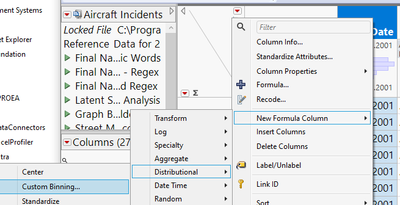
Wow, custom binning even works with dates, cool!
hogi_0-1705832337221.png


There is even a possibility to edit the binning. But: quite uncomfortable to type in the dates in seconds and to correct the labels manually.

What do I have to change in my workflow to be able to enter the "dates" in a usual format - and to get the labels adjusted automatically?


dt = Open( "$SAMPLE_DATA/Aircraft Incidents.jmp" );
dt << New Formula Column(
	Operation( Category( "Distributional" ), "Custom Binning" ),
	Columns( :Event Date )
);

0 REPLIES 0

Recommended Articles