cancel
Showing results for 
Show  only  | Search instead for 
Did you mean: 
  • JMP will suspend normal business operations for our Winter Holiday beginning on Wednesday, Dec. 24, 2025, at 5:00 p.m. ET (2:00 p.m. ET for JMP Accounts Receivable).
    Regular business hours will resume at 9:00 a.m. EST on Friday, Jan. 2, 2026.
  • We’re retiring the File Exchange at the end of this year. The JMP Marketplace is now your destination for add-ins and extensions.

Discussions

Solve problems, and share tips and tricks with other JMP users.
%3CLINGO-SUB%20id%3D%22lingo-sub-29546%22%20slang%3D%22en-US%22%20mode%3D%22NONE%22%3EErstellen%20Sie%20einen%20horizontalen%20Rahmen%2C%20um%20y-gruppierte%20Diagramme%20zu%20trennen%3C%2FLINGO-SUB%3E%3CLINGO-BODY%20id%3D%22lingo-body-29546%22%20slang%3D%22en-US%22%20mode%3D%22NONE%22%3E%3CP%3EHi%2C%3C%2FP%3E%0A%3CP%3E%26nbsp%3B%3C%2FP%3E%0A%3CP%3EIch%20m%C3%B6chte%20eine%20horizontale%20Grenze%20erstellen%2C%20um%20meine%20y-gruppierten%20Diagramme%20zu%20trennen.%20Ich%20habe%20eine%20Screenshot-Show%20mit%20schwarzen%20Kreuzen%20angeh%C3%A4ngt%2C%20wo%20ich%20die%20Grenze%20erstellen%20m%C3%B6chte.%3C%2FP%3E%0A%3CP%3E%26nbsp%3B%3C%2FP%3E%0A%3CP%3E%3CSPAN%20class%3D%22lia-inline-image-display-wrapper%20lia-image-align-inline%22%20image-alt%3D%22Untitled.png%22%20style%3D%22width%3A%20400px%3B%22%3E%3CSPAN%20class%3D%22lia-inline-image-display-wrapper%22%20image-alt%3D%22Untitled.png%22%20style%3D%22width%3A%20400px%3B%22%3E%3Cspan%20class%3D%22lia-inline-image-display-wrapper%22%20image-alt%3D%22Untitled.png%22%20style%3D%22width%3A%20400px%3B%22%3E%3Cimg%20src%3D%22https%3A%2F%2Fcommunity.jmp.com%2Ft5%2Fimage%2Fserverpage%2Fimage-id%2F4130iB80525DFA0539F88%2Fimage-size%2Fmedium%3Fv%3Dv2%26amp%3Bpx%3D400%22%20role%3D%22button%22%20title%3D%22Untitled.png%22%20alt%3D%22Untitled.png%22%20%2F%3E%3C%2Fspan%3E%3C%2FSPAN%3E%3C%2FSPAN%3E%3C%2FP%3E%3C%2FLINGO-BODY%3E%3CLINGO-SUB%20id%3D%22lingo-sub-31037%22%20slang%3D%22en-US%22%20mode%3D%22NONE%22%3EBetreff%3A%20Erstellen%20Sie%20eine%20horizontale%20Grenze%2C%20um%20y-gruppierte%20Diagramme%20zu%20trennen%3C%2FLINGO-SUB%3E%3CLINGO-BODY%20id%3D%22lingo-body-31037%22%20slang%3D%22en-US%22%20mode%3D%22NONE%22%3E%3CP%3EReferenzlinie%20funktioniert%20auch.%3C%2FP%3E%3CP%3ENamen%20sind%20standardm%C3%A4%C3%9Fig%20hier%3CSTRONG%3E%20(%3C%2FSTRONG%3E%3CSTRONG%3E%201%3C%2FSTRONG%3E%3CSTRONG%3E%20)%3C%2FSTRONG%3E%20%3B%3C%2FP%3E%3CP%3E%26nbsp%3B%3C%2FP%3E%3CP%3Edt%3Doffen%3CSTRONG%3E%20(%3C%2FSTRONG%3E%20%22%24SAMPLE_DATA%5Cbig%20class.jmp%22%3CSTRONG%3E%20)%3C%2FSTRONG%3E%20%3B%3C%2FP%3E%3CP%3E%26nbsp%3B%3C%2FP%3E%3CP%3EnMin%20%3D%20Spalte%20min%3CSTRONG%3E%20(%3C%2FSTRONG%3E%20dt%3AH%C3%B6he%3CSTRONG%3E%20)%3C%2FSTRONG%3E%20-Spalte%20min%3CSTRONG%3E%20(%3C%2FSTRONG%3E%20dt%3AH%C3%B6he%3CSTRONG%3E%20)%3C%2FSTRONG%3E%20*%3CSTRONG%3E%200%2C1%3C%2FSTRONG%3E%20%3B%3C%2FP%3E%3CP%3E%26nbsp%3B%3C%2FP%3E%3CP%3EGraph-Generator%3CSTRONG%3E%20(%3C%2FSTRONG%3E%3C%2FP%3E%3CP%3EGr%C3%B6%C3%9Fe%3CSTRONG%3E%20(%3C%2FSTRONG%3E%3CSTRONG%3E%20787%3C%2FSTRONG%3E%20%2C%3CSTRONG%3E%20633%3C%2FSTRONG%3E%3CSTRONG%3E%20)%3C%2FSTRONG%3E%20%2C%3C%2FP%3E%3CP%3EVariablen%3CSTRONG%3E%20(%3C%2FSTRONG%3E%20X%3CSTRONG%3E%20(%3C%2FSTRONG%3E%20%3AGewicht%3CSTRONG%3E%20)%3C%2FSTRONG%3E%20%2C%20Y%3CSTRONG%3E%20(%3C%2FSTRONG%3E%20%3AH%C3%B6he%3CSTRONG%3E%20)%3C%2FSTRONG%3E%20%2C%20Gruppe%20Y%3CSTRONG%3E%20(%3C%2FSTRONG%3E%20%3ASex%3CSTRONG%3E%20)%3C%2FSTRONG%3E%3CSTRONG%3E%20)%3C%2FSTRONG%3E%20%2C%3C%2FP%3E%3CP%3EElemente%3CSTRONG%3E%20(%3C%2FSTRONG%3E%20Punkte%3CSTRONG%3E%20(%3C%2FSTRONG%3E%20X%2C%20Y%2C%20Legende%3CSTRONG%3E%20(%3C%2FSTRONG%3E%3CSTRONG%3E%207%3C%2FSTRONG%3E%3CSTRONG%3E%20)%3C%2FSTRONG%3E%3CSTRONG%3E%20)%3C%2FSTRONG%3E%3CSTRONG%3E%20)%3C%2FSTRONG%3E%20%2C%3C%2FP%3E%3CP%3ESendToReport%3CSTRONG%3E%20(%3C%2FSTRONG%3E%3C%2FP%3E%3CP%3EVersenden%3CSTRONG%3E%20(%3C%2FSTRONG%3E%3C%2FP%3E%3CP%3E%3CSTRONG%3E%7B%7D%3C%2FSTRONG%3E%20%2C%3C%2FP%3E%3CP%3E%22H%C3%B6he%22%2C%3C%2FP%3E%3CP%3EScaleBox%2C%3C%2FP%3E%3CP%3E%3CSTRONG%3E%7B%3C%2FSTRONG%3E%20Mindest%3CSTRONG%3E%20(%3C%2FSTRONG%3E%20nMin%3CSTRONG%3E%20)%3C%2FSTRONG%3E%20%2C%20Referenzlinie%20hinzuf%C3%BCgen%3CSTRONG%3E%20(%3C%2FSTRONG%3E%20nMin%2C%20%22Fest%22%2C%20%22Schwarz%22%2C%20%22%22%2C%3CSTRONG%3E%202%3C%2FSTRONG%3E%3CSTRONG%3E%20)%7D%3C%2FSTRONG%3E%3C%2FP%3E%3CP%3E%3CSTRONG%3E)%3C%2FSTRONG%3E%3C%2FP%3E%3CP%3E%3CSTRONG%3E)%3C%2FSTRONG%3E%3C%2FP%3E%3CP%3E%3CSTRONG%3E)%3C%2FSTRONG%3E%20%3B%3C%2FP%3E%3C%2FLINGO-BODY%3E%3CLINGO-SUB%20id%3D%22lingo-sub-29547%22%20slang%3D%22en-US%22%20mode%3D%22NONE%22%3EBetreff%3A%20Erstellen%20Sie%20eine%20horizontale%20Grenze%2C%20um%20y-gruppierte%20Diagramme%20zu%20trennen%3C%2FLINGO-SUB%3E%3CLINGO-BODY%20id%3D%22lingo-body-29547%22%20slang%3D%22en-US%22%20mode%3D%22NONE%22%3E%3CP%3EHier%20ist%20ein%20Beispielskript%2C%20das%20dem%20Diagramm%20eine%20Anmerkungslinie%20hinzuf%C3%BCgt.Ich%20habe%20einfach%20die%20Anmerkungswerkzeuge%20verwendet%2C%20um%20die%20Linie%20zu%20zeichnen%2C%20und%20dann%20das%20Skript%20erfasst.%3C%2FP%3E%0A%3CPRE%3E%3CCODE%20class%3D%22%20language-jsl%22%3ENames%20default%20to%20here(1)%3B%0A%0Adt%3Dopen(%22%24SAMPLE_DATA%5Cbig%20class.jmp%22)%3B%0A%0AGraph%20Builder(%0A%20Size(%20587%2C%20495%20)%2C%0A%20Variables(%20X(%20%3Aweight%20)%2C%20Y(%20%3Aheight%20)%2C%20Group%20Y(%20%3Asex%20)%20)%2C%0A%20Elements(%20Points(%20X%2C%20Y%2C%20Legend(%207%20)%20)%20)%2C%0A%20SendToReport(%0A%20%20Dispatch(%20%7B%7D%2C%20%22height%22%2C%20ScaleBox%2C%20%7BMin(%2056.9527534300518%20)%7D%20)%2C%0A%20%20Dispatch(%0A%20%20%20%7B%7D%2C%0A%20%20%20%22%22%2C%0A%20%20%20GraphBuilderContainerBox%2C%0A%20%20%20Add%20Line%20Annotation(%0A%20%20%20%20Line(%20%7B52%2C%20251%7D%2C%20%7B550%2C%20249%7D%20)%2C%0A%20%20%20%20Color(%20%22Black%22%20)%2C%0A%20%20%20%20Thick(%201%20)%0A%20%20%20)%0A%20%20)%0A%20)%0A)%3B%3C%2FCODE%3E%3C%2FPRE%3E%3C%2FLINGO-BODY%3E
Choose Language Hide Translation Bar
tobben24
Level I

Create horizontal border to separate y-grouped plots

Hi,


I want to create a horizontal border to seperate my y-grouped plots. I have attached a screen shot show with black crosses where I want to create the border.
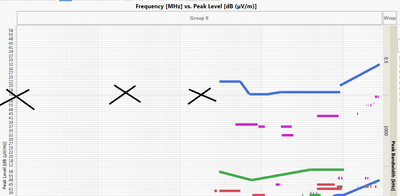
 

Untitled.png

2 REPLIES 2
txnelson
Super User

Re: Create horizontal border to seperate y-grouped plots

Here is an example script that adds an annotation line to the graph.  I simply used the annotation tools to draw the line, and then captured the script.

Names default to here(1);

dt=open("$SAMPLE_DATA\big class.jmp");

Graph Builder(
	Size( 587, 495 ),
	Variables( X( :weight ), Y( :height ), Group Y( :sex ) ),
	Elements( Points( X, Y, Legend( 7 ) ) ),
	SendToReport(
		Dispatch( {}, "height", ScaleBox, {Min( 56.9527534300518 )} ),
		Dispatch(
			{},
			"",
			GraphBuilderContainerBox,
			Add Line Annotation(
				Line( {52, 251}, {550, 249} ),
				Color( "Black" ),
				Thick( 1 )
			)
		)
	)
);

Jim

Re: Create horizontal border to seperate y-grouped plots

Reference line also will work.

Names default to here(1);


dt=open("$SAMPLE_DATA\big class.jmp");


nMin = col min(dt:height)-col min(dt:height)*0.1;


Graph Builder(

       Size( 787, 633 ),

       Variables( X( :weight ), Y( :height ), Group Y( :sex ) ),

       Elements( Points( X, Y, Legend( 7 ) ) ),

       SendToReport(

              Dispatch(

                     {},

                     "height",

                     ScaleBox,

                     {Min( nMin ), Add Ref Line( nMin, "Solid", "Black", "", 2 )}

              )

       )

);

Recommended Articles