- Don’t miss your chance to experience Discovery Summit Europe at our best available rate! Early bird registration through 31 Oct.
- Graph Builder Toolbar streamlines interactive graphing. Creates shortcuts on Report and GraphBuilder Helpers toolbars. Download and install the extension.
- Subscribe to RSS Feed
- Mark Topic as New
- Mark Topic as Read
- Float this Topic for Current User
- Bookmark
- Subscribe
- Mute
- Printer Friendly Page
Discussions
Solve problems, and share tips and tricks with other JMP users.- User Community
- :
- Discussions
- :
- Re: Create a tab box with a cross tab box design

- Mark as New
- Bookmark
- Subscribe
- Mute
- Subscribe to RSS Feed
- Get Direct Link
- Report Inappropriate Content
Create a tab box with a cross tab box design
Hi all,
Not sure this is possible, but I try my luck.
I would like to create (in jsl) kind of a cross tab box, but customized with my own values. To make myself better understood:
Here is a tabulate (FIG. 1) containing the data I want to display:
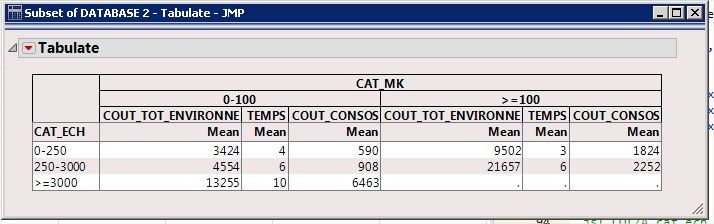
This is fine, but not quite what I want. What I would like to obtain is something similar to the cross tab box we get when calling a contingency analysis, such as in FIG.2: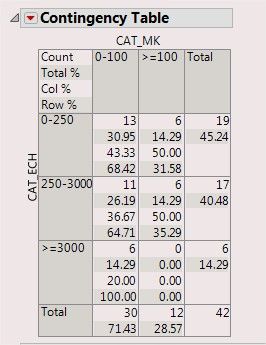
BUT instead of "Count", "Total%" and so on, I would put into the cells the mean values that correspond to my analysis columns in tabulate.
The features I like in this design and which I don't have in the tabulate version are :
- the possibility to display several values in one cell (and display legend in the top left hand corner)
- the shade on columns AND rows headers
- the absence of the "mean" line under the column headers
I couldn't find a way of converting my tabulate into what I want using tab box. Do you think it would be possible?
Thanks
- Tags:
- Mass Customization
Accepted Solutions


- Mark as New
- Bookmark
- Subscribe
- Mute
- Subscribe to RSS Feed
- Get Direct Link
- Report Inappropriate Content
Re: Create a tab box with a cross tab box design
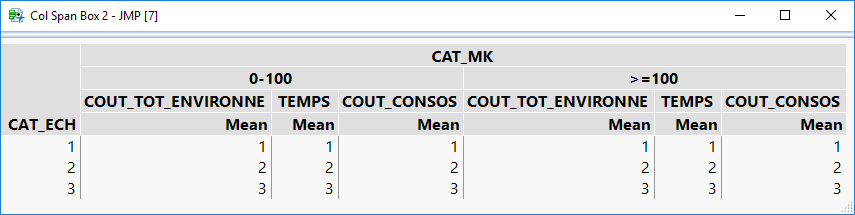
You can fairly easily recreate the Tabulate using a TableBox and ColSpan Boxes. See below for an example.
Names Default To Here( 1 );
New Window( "Col Span Box",
	Table Box(
		Number Col Box( "CAT_ECH", {1, 2, 3} ),
		Col Span Box(
			"CAT_MK",
			Col Span Box(
				"0-100",
				Col Span Box("COUT_TOT_ENVIRONNE",Number Col Box( "Mean", {1, 2, 3} )),
				Col Span Box("TEMPS",Number Col Box( "Mean", {1, 2, 3} )),
				Col Span Box("COUT_CONSOS",Number Col Box( "Mean", {1, 2, 3} ))
			),
			Col Span Box(
				">=100",
				Col Span Box("COUT_TOT_ENVIRONNE",Number Col Box( "Mean", {1, 2, 3} )),
				Col Span Box("TEMPS",Number Col Box( "Mean", {1, 2, 3} )),
				Col Span Box("COUT_CONSOS",Number Col Box( "Mean", {1, 2, 3} ))
			)
		)
	)
);
Here is what the Col Span Box method looks like:
Since the CrossTabBox DisplayBox is not scriptable using JSL, you would need to use a different method to recreate something like what is used in the Contingency platform.
You can do this using a concept I have been working on to use a LineupBox to create your own custom tables. This method uses a custom function for the creation of each cell to avoid a lot of code duplication. See my comments for details.
//helper function to create cells in the lineupBOx "table"
getCell = Function( {values, altShading, justify = "left"},
	{Default Local},

	// Create a lineup box to add each of the values to
	lb = Lineup Box( N Col( 1 ), SPacing( 0 ) ); // 1 column and no spacing

	// loop through and add each value
	For( i = 1, i <= N Items( values ), i++,

		// if justify is left, put the spacer box on the right, otherwise, put it on the left
		If( justify == "left",
			// borderBox to give values some spacing (and for shading)
			b = Border Box( Right( 5 ), Left( 5 ), top( 1 ), bottom( 1 ),
				H List Box(
					//Text box with current value
					Text Box( values[i] ),
					// Spacing to fill the cell shading all the way to the right (will grow horizontally, but not vertially)
					Spacer Box( <<Set Max Size( 99999, 0 ) )
				)
			)
		,
			b = Border Box( Right( 5 ), Left( 5 ), top( 1 ), bottom( 1 ),
				H List Box(
					// Spacing to right align the text. the spacer will grow horizontally, but not vertially)
					Spacer Box( <<Set Max Size( 99999, 0 ) ),

					//Text box with current value
					Text Box( values[i] )
				)
			)
		);

		// if altShading is turned on
		If( altShading == 1,

			// check if this is an even numbered row
			If( Mod( i, 2 ) == 0,
				//set the background color to a light-gray
				b << Background color( RGB Color( 225, 225, 225 ) )
			),

			//when altShading is off, we set the background color to a light-gray for all values
			b << Background color( RGB Color( 225, 225, 225 ) )
		);

		// Add the BorderBox to the LineupBox
		Insert Into( lb, b );
	);

	// Return the LineupBox with a Border with lines around it
	Return(
		Border Box( Right( 0 ), Left( 0 ), top( 0 ), bottom( 0 ), sides( 15 ),
			lb
		)
	);

);

New Window( "Custom Table",
	Outline Box( "Custom Table",
		Border Box( Right( 5 ), Left( 5 ), top( 5 ), bottom( 5 ),
			H List Box(
				V Center Box( Text Box( "CAT_ECH", <<Rotate Text( "left" ) ) ),
				V List Box(
					H Center Box( Text Box( "CAT_MK" ) ),
					Lineup Box( N Col( 4 ), spacing( 0 ),

						//Row 1
						getCell( {"Count", "Total %", "Col %", "Row %"}, 1 ),
						getCell( {"0-100", "", "", ""}, 0 ),
						getCell( {">=100", "", "", ""}, 0 ),
						getCell( {"Total", "", "", ""}, 0 ),

						//Row 2
						getCell( {"0-250", "", "", ""}, 0 ),
						getCell( {"13", "30.95", "43.33", "68.42"}, 1, "Right" ),
						getCell( {"13", "30.95", "43.33", "68.42"}, 1, "Right" ),
						getCell( {"13", "30.95", "43.33", "68.42"}, 1, "Right" ),

						//Row 3
						getCell( {"250-3000", "", "", ""}, 0 ),
						getCell( {"13", "30.95", "43.33", "68.42"}, 1, "Right" ),
						getCell( {"13", "30.95", "43.33", "68.42"}, 1, "Right" ),
						getCell( {"13", "30.95", "43.33", "68.42"}, 1, "Right" ),

						//Row 4
						getCell( {">=3000", "", "", ""}, 0 ),
						getCell( {"13", "30.95", "43.33", "68.42"}, 1, "Right" ),
						getCell( {"13", "30.95", "43.33", "68.42"}, 1, "Right" ),
						getCell( {"13", "30.95", "43.33", "68.42"}, 1, "Right" ),

						//Row 5
						getCell( {"Total", ""}, 0 ),
						getCell( {"13", "30.95"}, 1, "Right" ),
						getCell( {"13", "30.95"}, 1, "Right" ),
						getCell( {"13", "30.95"}, 1, "Right" )
					)
				)
			)
		)
	)
);
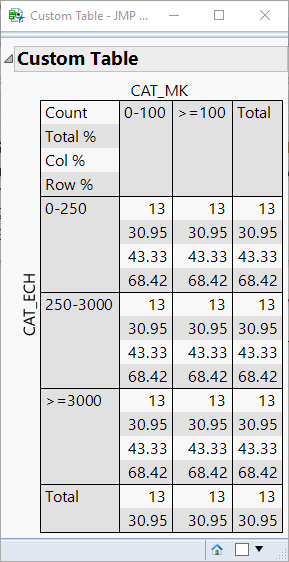
Here is what the resulting window will look like with this method:
- Mark as New
- Bookmark
- Subscribe
- Mute
- Subscribe to RSS Feed
- Get Direct Link
- Report Inappropriate Content
Re: Create a tab box with a cross tab box design
You can fairly easily recreate the Tabulate using a TableBox and ColSpan Boxes. See below for an example.
Names Default To Here( 1 );
New Window( "Col Span Box",
	Table Box(
		Number Col Box( "CAT_ECH", {1, 2, 3} ),
		Col Span Box(
			"CAT_MK",
			Col Span Box(
				"0-100",
				Col Span Box("COUT_TOT_ENVIRONNE",Number Col Box( "Mean", {1, 2, 3} )),
				Col Span Box("TEMPS",Number Col Box( "Mean", {1, 2, 3} )),
				Col Span Box("COUT_CONSOS",Number Col Box( "Mean", {1, 2, 3} ))
			),
			Col Span Box(
				">=100",
				Col Span Box("COUT_TOT_ENVIRONNE",Number Col Box( "Mean", {1, 2, 3} )),
				Col Span Box("TEMPS",Number Col Box( "Mean", {1, 2, 3} )),
				Col Span Box("COUT_CONSOS",Number Col Box( "Mean", {1, 2, 3} ))
			)
		)
	)
);
Here is what the Col Span Box method looks like:
Since the CrossTabBox DisplayBox is not scriptable using JSL, you would need to use a different method to recreate something like what is used in the Contingency platform.
You can do this using a concept I have been working on to use a LineupBox to create your own custom tables. This method uses a custom function for the creation of each cell to avoid a lot of code duplication. See my comments for details.
//helper function to create cells in the lineupBOx "table"
getCell = Function( {values, altShading, justify = "left"},
	{Default Local},

	// Create a lineup box to add each of the values to
	lb = Lineup Box( N Col( 1 ), SPacing( 0 ) ); // 1 column and no spacing

	// loop through and add each value
	For( i = 1, i <= N Items( values ), i++,

		// if justify is left, put the spacer box on the right, otherwise, put it on the left
		If( justify == "left",
			// borderBox to give values some spacing (and for shading)
			b = Border Box( Right( 5 ), Left( 5 ), top( 1 ), bottom( 1 ),
				H List Box(
					//Text box with current value
					Text Box( values[i] ),
					// Spacing to fill the cell shading all the way to the right (will grow horizontally, but not vertially)
					Spacer Box( <<Set Max Size( 99999, 0 ) )
				)
			)
		,
			b = Border Box( Right( 5 ), Left( 5 ), top( 1 ), bottom( 1 ),
				H List Box(
					// Spacing to right align the text. the spacer will grow horizontally, but not vertially)
					Spacer Box( <<Set Max Size( 99999, 0 ) ),

					//Text box with current value
					Text Box( values[i] )
				)
			)
		);

		// if altShading is turned on
		If( altShading == 1,

			// check if this is an even numbered row
			If( Mod( i, 2 ) == 0,
				//set the background color to a light-gray
				b << Background color( RGB Color( 225, 225, 225 ) )
			),

			//when altShading is off, we set the background color to a light-gray for all values
			b << Background color( RGB Color( 225, 225, 225 ) )
		);

		// Add the BorderBox to the LineupBox
		Insert Into( lb, b );
	);

	// Return the LineupBox with a Border with lines around it
	Return(
		Border Box( Right( 0 ), Left( 0 ), top( 0 ), bottom( 0 ), sides( 15 ),
			lb
		)
	);

);

New Window( "Custom Table",
	Outline Box( "Custom Table",
		Border Box( Right( 5 ), Left( 5 ), top( 5 ), bottom( 5 ),
			H List Box(
				V Center Box( Text Box( "CAT_ECH", <<Rotate Text( "left" ) ) ),
				V List Box(
					H Center Box( Text Box( "CAT_MK" ) ),
					Lineup Box( N Col( 4 ), spacing( 0 ),

						//Row 1
						getCell( {"Count", "Total %", "Col %", "Row %"}, 1 ),
						getCell( {"0-100", "", "", ""}, 0 ),
						getCell( {">=100", "", "", ""}, 0 ),
						getCell( {"Total", "", "", ""}, 0 ),

						//Row 2
						getCell( {"0-250", "", "", ""}, 0 ),
						getCell( {"13", "30.95", "43.33", "68.42"}, 1, "Right" ),
						getCell( {"13", "30.95", "43.33", "68.42"}, 1, "Right" ),
						getCell( {"13", "30.95", "43.33", "68.42"}, 1, "Right" ),

						//Row 3
						getCell( {"250-3000", "", "", ""}, 0 ),
						getCell( {"13", "30.95", "43.33", "68.42"}, 1, "Right" ),
						getCell( {"13", "30.95", "43.33", "68.42"}, 1, "Right" ),
						getCell( {"13", "30.95", "43.33", "68.42"}, 1, "Right" ),

						//Row 4
						getCell( {">=3000", "", "", ""}, 0 ),
						getCell( {"13", "30.95", "43.33", "68.42"}, 1, "Right" ),
						getCell( {"13", "30.95", "43.33", "68.42"}, 1, "Right" ),
						getCell( {"13", "30.95", "43.33", "68.42"}, 1, "Right" ),

						//Row 5
						getCell( {"Total", ""}, 0 ),
						getCell( {"13", "30.95"}, 1, "Right" ),
						getCell( {"13", "30.95"}, 1, "Right" ),
						getCell( {"13", "30.95"}, 1, "Right" )
					)
				)
			)
		)
	)
);
Here is what the resulting window will look like with this method:
- Mark as New
- Bookmark
- Subscribe
- Mute
- Subscribe to RSS Feed
- Get Direct Link
- Report Inappropriate Content
Re: Create a tab box with a cross tab box design
Very nice! Thank you! I surely will use this code template a lot!!
- Mark as New
- Bookmark
- Subscribe
- Mute
- Subscribe to RSS Feed
- Get Direct Link
- Report Inappropriate Content
Re: Create a tab box with a cross tab box design
Just one thing though, in your function I had to change the line:
// Add the BorderBox to the LineupBox
		Insert Into( lb, b );
into:
// Add the BorderBox to the LineupBox
		lb << Append( b );
to make it work, otherwise I got nothing displayed.
I definitely love your work!
- Mark as New
- Bookmark
- Subscribe
- Mute
- Subscribe to RSS Feed
- Get Direct Link
- Report Inappropriate Content
Re: Create a tab box with a cross tab box design
Ah, yes. The Insert Into functionality for DisplayBoxes was not added until JMP 13. Glad to hear this will work for you.
Recommended Articles
- © 2026 JMP Statistical Discovery LLC. All Rights Reserved.
- Terms of Use
- Privacy Statement
- Contact Us