cancel
Showing results for 
Show  only  | Search instead for 
Did you mean: 
  • Instantly extract effect sizes, F-ratios, and FDR-adjusted p-values from your models with the Calculate Effects Sizes extension, available now in the JMP Marketplace!
  • New to JMP? Join us Sept. 23-24 for the Early User Edition of Discovery Summit, tailor-made for new users. Register now for free!
  • Use World Cup data to build models, explore spatial relationships, and create informative visualizations in JMP. Register. July 17, 2 pm US Eastern Time.

Discussions

Solve problems, and share tips and tricks with other JMP users.
Choose Language Hide Translation Bar
29755
Level II

Count values

Hi all,


I have 2 columns, 1st column is for the parts name (sample: parts 1 and parts 2) then 2nd column is the judgement whether is good or no good.


Is is possible to count all the good parts and place the total good parts for parts 1 & 2 on the next column?

Thanks

1 REPLY 1
jthi
Super User

Re: Count values

In most of the cases with JMP you will end up with something like this with all rows getting the same value depending on grouping you use:
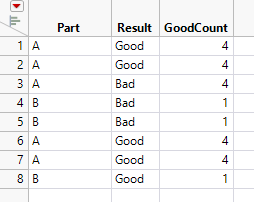
jthi_0-1627453815103.png

Col Sum(If(:Result == "Good", 1, 0), :Part)

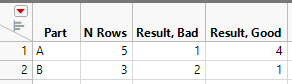
I would most likely suggest using Tabulate or Summary. Using the same table:

With tabulate you can get this:
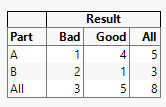
jthi_1-1627453883557.png

and with summary:

jthi_2-1627453982806.png


If these are not sufficient enough, could you provide example table (and use case if possible), so better answer can be given.

-Jarmo

Recommended Articles