Turn on suggestions
Auto-suggest helps you quickly narrow down your search results by suggesting possible matches as you type.
- Don’t miss your chance to experience Discovery Summit Europe at our best available rate! Early bird registration through 31 Oct.
- Image to Table JMP extension imports single or batch images as data tables. Useful to extract curves from pictures or convert image data to curve data to use in analyses like Functional Data Explorer. Download and install the extension.
Options
- Subscribe to RSS Feed
- Mark Topic as New
- Mark Topic as Read
- Float this Topic for Current User
- Bookmark
- Subscribe
- Mute
- Printer Friendly Page
Discussions
Solve problems, and share tips and tricks with other JMP users.- User Community
- :
- Discussions
- :
- Copy output from JMP 15.1 and pasting into Word 365

Level II
- Mark as New
- Bookmark
- Subscribe
- Mute
- Subscribe to RSS Feed
- Get Direct Link
- Report Inappropriate Content
Copy output from JMP 15.1 and pasting into Word 365
Mar 18, 2020 06:31 PM
(4725 views)
I used to be able to copy output for example tabulate results from JMP and easily paste in Word 16
I am now on Windows 10, JMP 15.1, office 365.
Results in JMP look like:
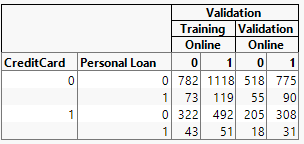
When pasted into Word I get 6 separate tables where each column becomes a separate table. I'm not pasting all of them in the example below. First 3 are:
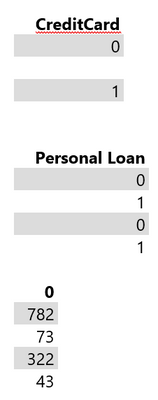
I have 4 options in Word.
1.Keep source formatting which I have shown.
2.Merge formatting, not shown but looks the same.
3.Picture which I don't want. I want to edit the values
4. Keep text only which again gives me 6 tables but, without any shading.
This used to work easily. Any suggestions? Not sure of what changed.
1 ACCEPTED SOLUTION
Accepted Solutions

Super User (Alumni)
Solution
- Mark as New
- Bookmark
- Subscribe
- Mute
- Subscribe to RSS Feed
- Get Direct Link
- Report Inappropriate Content
Re: Copy output from JMP 15.1 and pasting into Word 365
Hi, I just spent my day copying and pasting such tables...all it takes is precise mouse skills. Make sure when you select your table you select the outer part of the table...NOT just the inside portion. It only takes one click to get the entire tabulate table - if it takes more than one then you are getting "sub" parts of the table. Once you do that it will paste as you expect.
3 REPLIES 3
Super User (Alumni)
Solution
- Mark as New
- Bookmark
- Subscribe
- Mute
- Subscribe to RSS Feed
- Get Direct Link
- Report Inappropriate Content
Re: Copy output from JMP 15.1 and pasting into Word 365
Hi, I just spent my day copying and pasting such tables...all it takes is precise mouse skills. Make sure when you select your table you select the outer part of the table...NOT just the inside portion. It only takes one click to get the entire tabulate table - if it takes more than one then you are getting "sub" parts of the table. Once you do that it will paste as you expect.
Level II
- Mark as New
- Bookmark
- Subscribe
- Mute
- Subscribe to RSS Feed
- Get Direct Link
- Report Inappropriate Content
Re: Copy output from JMP 15.1 and pasting into Word 365
You are correct. I just wasn't be careful enough with the mouse.
Sorry.
Super User (Alumni)
- Mark as New
- Bookmark
- Subscribe
- Mute
- Subscribe to RSS Feed
- Get Direct Link
- Report Inappropriate Content
Re: Copy output from JMP 15.1 and pasting into Word 365
I had done the exact same thing, which is why I knew the answer. Happy to help!
Recommended Articles
- © 2026 JMP Statistical Discovery LLC. All Rights Reserved.
- Terms of Use
- Privacy Statement
- Contact Us