- Don’t miss your chance to experience Discovery Summit Europe at our best available rate! Early bird registration through 31 Oct.
- Graph Builder Toolbar streamlines interactive graphing. Creates shortcuts on Report and GraphBuilder Helpers toolbars. Download and install the extension.
- Subscribe to RSS Feed
- Mark Topic as New
- Mark Topic as Read
- Float this Topic for Current User
- Bookmark
- Subscribe
- Mute
- Printer Friendly Page
Discussions
Solve problems, and share tips and tricks with other JMP users.- User Community
- :
- Discussions
- :
- Re: Contour formula referencing block column

- Mark as New
- Bookmark
- Subscribe
- Mute
- Subscribe to RSS Feed
- Get Direct Link
- Report Inappropriate Content
Contour formula referencing block column
Hi,
I would like to get some help on troubleshooting the situation.
I ran a mixture design with 3 factors, followed by augmentation with a new separate block. I then fitted the data from the initial mixture design and augmentation.
Now, when I try to visualize contour on ternary plot by adding fitted formula to the 'Contour formula', I get the error message below.

This makes sense since the formula includes the 'Block' column. Is there any workaround for visualizing the contour on a ternary plot in this case?
Also moving forward, if I would like to run augmentation in separate block and still want to visualize contour with fitted function, what would be the ideal way?
Thank you!
Accepted Solutions


- Mark as New
- Bookmark
- Subscribe
- Mute
- Subscribe to RSS Feed
- Get Direct Link
- Report Inappropriate Content
Re: Contour formula referencing block column
Thanks for the clarification. I think the issue is that Block isn't a continuous variable, but the slider in the Ternary Plot expects a continuous variable. A potential workaround would be to modify the formula from the current Match () statement to something that is continuous, like the example below:
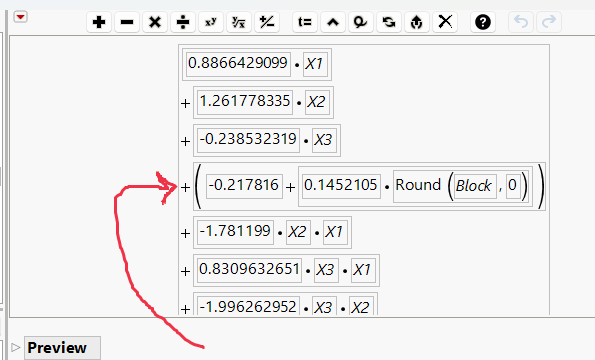
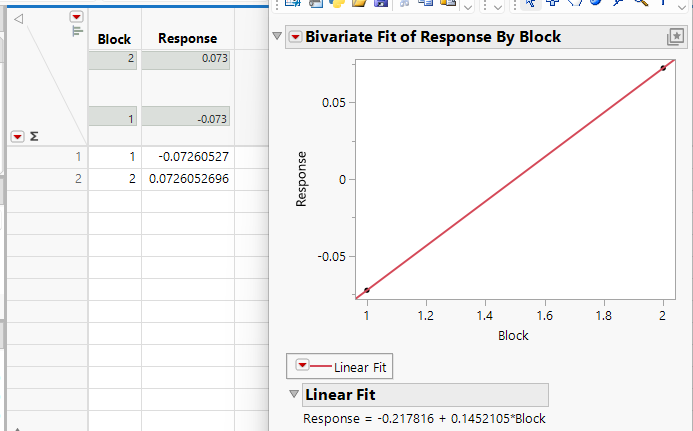
(To make this formula, I just used the Fit Y by X platform to get the equation, and forced Block to be rounded as an integer)
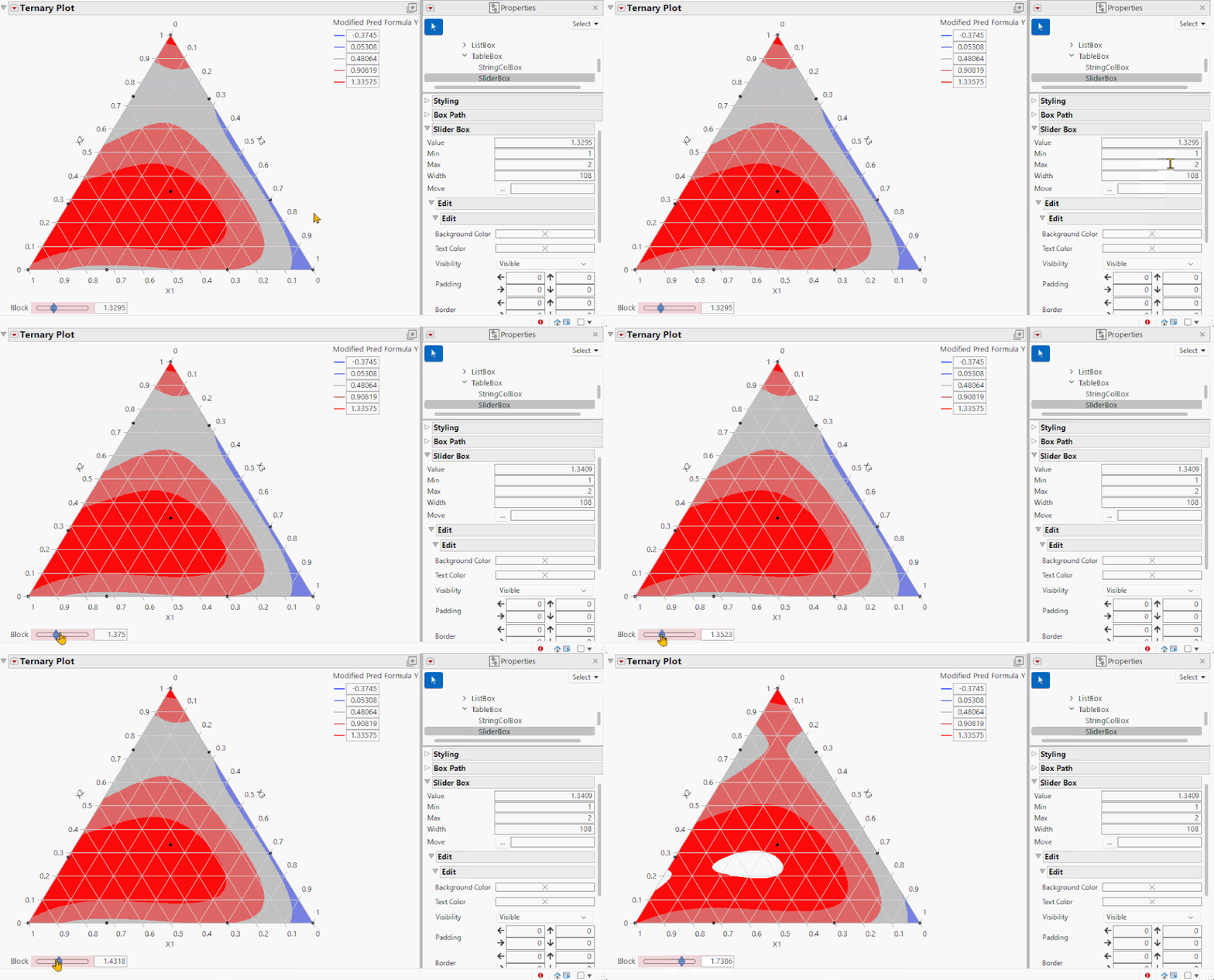
Below is the resulting Ternary diagram. I modified the slider min/max to mildly address the problem that any number can be used in the formula, but there are only 2 blocks in the design. You could likely get more fancy with some scripting.
Updated table attached.
Edit: Of course, this is assuming that the Block needs to be included as a factor in your formula. If you determine that Block is not significant, then you could just delete any references to Block in the column formula, and the Ternary Plot will work just fine.
- Mark as New
- Bookmark
- Subscribe
- Mute
- Subscribe to RSS Feed
- Get Direct Link
- Report Inappropriate Content
Re: Contour formula referencing block column
1. I don't think it matters which you choose, as the augmentation is focused on the factors themselves. JMP just wants to keep track of Factors and Responses during the process.
2. Yes, you just need to adjust the Mixture column property to reflect the entire design space (this was automatically changed to Block 2's design space during the augmentation). After doing the, the Ternary Plot will show your entire region.

- Mark as New
- Bookmark
- Subscribe
- Mute
- Subscribe to RSS Feed
- Get Direct Link
- Report Inappropriate Content
Re: Contour formula referencing block column
Could you provide more information about this? I created a 3 factor mixture design in the Custom Designer, then used DOE > Augment Design to increase it to a Scheffe Cubic model, and the Contour Profiler works without errors. I've attached the data table. Could you indicate if you've done something different or if I'm misunderstanding?

- Mark as New
- Bookmark
- Subscribe
- Mute
- Subscribe to RSS Feed
- Get Direct Link
- Report Inappropriate Content
Re: Contour formula referencing block column
Hi Jed,
Thank you for your response.
To add contour plot on ternary diagram, I needed a fitting formula from augmented data. The problem is not to be able to use that fitted formula for creating contour plot on ternary plot due to the inclusion of 'Block' as one of variables in the formula.
I used the jmp file attached on the post to repeat what I have done. I also added a screenshot below.


- Mark as New
- Bookmark
- Subscribe
- Mute
- Subscribe to RSS Feed
- Get Direct Link
- Report Inappropriate Content
Re: Contour formula referencing block column
Thanks for the clarification. I think the issue is that Block isn't a continuous variable, but the slider in the Ternary Plot expects a continuous variable. A potential workaround would be to modify the formula from the current Match () statement to something that is continuous, like the example below:
(To make this formula, I just used the Fit Y by X platform to get the equation, and forced Block to be rounded as an integer)
Below is the resulting Ternary diagram. I modified the slider min/max to mildly address the problem that any number can be used in the formula, but there are only 2 blocks in the design. You could likely get more fancy with some scripting.
Updated table attached.
Edit: Of course, this is assuming that the Block needs to be included as a factor in your formula. If you determine that Block is not significant, then you could just delete any references to Block in the column formula, and the Ternary Plot will work just fine.
- Mark as New
- Bookmark
- Subscribe
- Mute
- Subscribe to RSS Feed
- Get Direct Link
- Report Inappropriate Content
Re: Contour formula referencing block column
Thank you Jed for step-by-step explanation! Your suggestion works beautifully!
I have two more questions below. It would be great if you can help.
1. When augmenting design, I have option to choose either raw y value or predicted y value from formula. How does the choice of y value impact the augmented design?
2. I initially created mixture design in limited space. I, then, explored new design space during augmentation. Now I have two different fittings with two different design space (with overlap) between initial and augmented experiment.
Initial Design

Augmented Design

Is there anyway to merge those two fittings and visualize it in one graph?
I am attaching simulated JMP files.
Thank you!
- Mark as New
- Bookmark
- Subscribe
- Mute
- Subscribe to RSS Feed
- Get Direct Link
- Report Inappropriate Content
Re: Contour formula referencing block column
1. I don't think it matters which you choose, as the augmentation is focused on the factors themselves. JMP just wants to keep track of Factors and Responses during the process.
2. Yes, you just need to adjust the Mixture column property to reflect the entire design space (this was automatically changed to Block 2's design space during the augmentation). After doing the, the Ternary Plot will show your entire region.
Recommended Articles
- © 2026 JMP Statistical Discovery LLC. All Rights Reserved.
- Terms of Use
- Privacy Statement
- Contact Us