- Don’t miss your chance to experience Discovery Summit Europe at our best available rate! Early bird registration through 31 Oct.
- Graph Builder Toolbar streamlines interactive graphing. Creates shortcuts on Report and GraphBuilder Helpers toolbars. Download and install the extension.
- Subscribe to RSS Feed
- Mark Topic as New
- Mark Topic as Read
- Float this Topic for Current User
- Bookmark
- Subscribe
- Mute
- Printer Friendly Page
Discussions
Solve problems, and share tips and tricks with other JMP users.- User Community
- :
- Discussions
- :
- How can this JSL be used to create this graphic?

- Mark as New
- Bookmark
- Subscribe
- Mute
- Subscribe to RSS Feed
- Get Direct Link
- Report Inappropriate Content
How can this JSL be used to create this graphic?
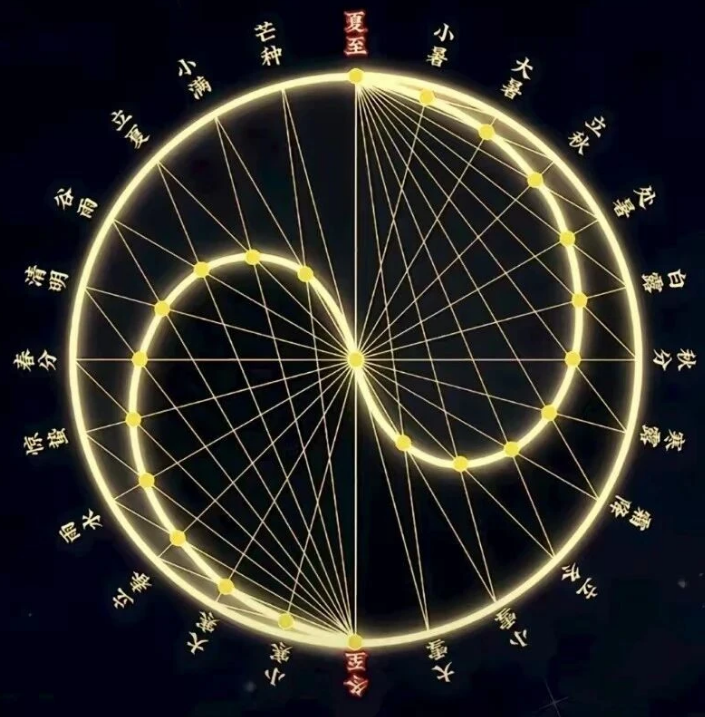
This is the code I wrote for the AI to view images, but I failed to add any text successfully.
Thanks Experts!
Names Default To Here( 1 );

// === 1. Data & Parameters ===
SolarTerms = {
    "夏至", "小暑", "大暑", "立秋", "处暑", "白露",
    "秋分", "寒露", "霜降", "立冬", "小雪", "大雪",
    "冬至", "小寒", "大寒", "立春", "雨水", "惊蛰",
    "春分", "清明", "谷雨", "立夏", "小满", "芒种"
};

OuterRadius = 10;
InnerRadius = OuterRadius / 2;
TermCount = N Items( SolarTerms );

SummerSolsticeX = 0; SummerSolsticeY = OuterRadius;
WinterSolsticeX = 0; WinterSolsticeY = -OuterRadius;

OuterX = J( TermCount, 1, . );
OuterY = J( TermCount, 1, . );
InnerX = J( TermCount, 1, . );
InnerY = J( TermCount, 1, . );
AngleList = J( TermCount, 1, . );

FontName = If( Host Is( "Mac" ), "Helvetica", "Arial" );

// === 2. Geometry ===
For( i = 1, i <= TermCount, i++,
    Angle = Pi() / 2 - (i - 1) * (2 * Pi() / 24);
    AngleList[i] = Angle;

    OuterX[i] = OuterRadius * Cos( Angle );
    OuterY[i] = OuterRadius * Sin( Angle );

    If( i <= 13,
        Progress = (i - 1) / 12;
        SmallAngle = Pi() / 2 - (Pi() * Progress);
        CX = 0; CY = InnerRadius;
    ,
        Progress = (i - 13) / 12;
        SmallAngle = Pi() / 2 + (Pi() * Progress);
        CX = 0; CY = -InnerRadius;
    );

    InnerX[i] = CX + InnerRadius * Cos( SmallAngle );
    InnerY[i] = CY + InnerRadius * Sin( SmallAngle );
);

// === 3. Window ===
nw = New Window( "Twenty-Four Solar Terms · Yin Yang Cycle",
    gb = Graph Box(
        Frame Size( 800, 800 ),
        X Scale( -16, 16 ),
        Y Scale( -16, 16 ),

        Fill Color( "Black" );
        Rect( -20, 20, 20, -20, 1 );

        Pen Color( {240, 230, 140} );
        Pen Size( 2 );
        Transparency( 0.9 );
        Circle( {0, 0}, OuterRadius );

        For( i = 1, i <= TermCount, i++,
            ix = InnerX[i]; iy = InnerY[i];
            ox = OuterX[i]; oy = OuterY[i];

            Pen Color( {240, 230, 140} );

            If( i > 1 & i < 13,
                Transparency( 0.4 ); Pen Size( 1 );
                Line( {SummerSolsticeX, SummerSolsticeY}, {ix, iy} );
                Transparency( 0.15 );
                Line( {ix, iy}, {ox, oy} );
            );

            If( i > 13,
                Transparency( 0.4 ); Pen Size( 1 );
                Line( {WinterSolsticeX, WinterSolsticeY}, {ix, iy} );
                Transparency( 0.15 );
                Line( {ix, iy}, {ox, oy} );
            );

            If( i == 1,
                Transparency( 0.6 ); Pen Size( 2 );
                Line( {0, 0}, {0, OuterRadius} );
            );

            If( i == 13,
                Transparency( 0.6 ); Pen Size( 2 );
                Line( {0, 0}, {0, -OuterRadius} );
            );
        );

        For( i = 1, i <= TermCount, i++,
            Pen Color( "Black" );
            Fill Color( {255, 215, 0} );
            Marker Size( 5 );
            Marker( 21, {OuterX[i], OuterY[i]} );
        );

        For( i = 1, i <= TermCount, i++,
            Pen Color( {218, 165, 32} );
            Fill Color( {255, 255, 224} );
            Marker Size( 6 );
            Marker( 21, {InnerX[i], InnerY[i]} );
        );

        Pen Color( "White" );
        Fill Color( {255, 250, 205} );
        Marker Size( 8 );
        Marker( 21, {0, 0} );

        LabelOffset = 1.8;
        For( i = 1, i <= TermCount, i++,
            Name = SolarTerms[i];
            A = AngleList[i];

            tx = (OuterRadius + LabelOffset) * Cos( A );
            ty = (OuterRadius + LabelOffset) * Sin( A );

            IsSolstice = ( Name == "夏至" | Name == "冬至" );
            TxtColor = If( IsSolstice, {255, 69, 0}, {224, 224, 224} );
            TxtSize = If( IsSolstice, 14, 11 );
            TxtWeight = If( IsSolstice, "bold", "plain" );

            Deg = A * 180 / Pi() - 90;

            Transparency( 1 );
            Fill Color( TxtColor );
            Text Font( FontName, TxtSize, TxtWeight );
            Text( Center Justified, {tx, ty}, Rotate( Deg ), Name );
        );

        Text Font( FontName, 20, "bold" );
        Fill Color( "White" );
        Text( Center Justified, {0, 14.5}, "Twenty-Four Solar Terms · Yin Yang Cycle" );
    )
);

gb << Show X Axis( 0 );
gb << Show Y Axis( 0 );
- Mark as New
- Bookmark
- Subscribe
- Mute
- Subscribe to RSS Feed
- Get Direct Link
- Report Inappropriate Content
回复: How can this JSL be used to create this graphic?

python



- Mark as New
- Bookmark
- Subscribe
- Mute
- Subscribe to RSS Feed
- Get Direct Link
- Report Inappropriate Content
Re: How can this JSL be used to create this graphic?
You have to set text color correctly (Text Color()) and you are using incorrect syntax for the angle of the text. Angle is determined with Text Font (check Scripting Index / JMP Help for the correct syntax and how to use it)

- Mark as New
- Bookmark
- Subscribe
- Mute
- Subscribe to RSS Feed
- Get Direct Link
- Report Inappropriate Content
Re: How can this JSL be used to create this graphic?
Thank jthi !
Could you help me keep making corrections?Thank you very much for your continued JSL reference.

- Mark as New
- Bookmark
- Subscribe
- Mute
- Subscribe to RSS Feed
- Get Direct Link
- Report Inappropriate Content
Re: How can this JSL be used to create this graphic?
I just want to achieve the effect of the original picture as much as possible.
Thanks Experts!


- Mark as New
- Bookmark
- Subscribe
- Mute
- Subscribe to RSS Feed
- Get Direct Link
- Report Inappropriate Content
Re: How can this JSL be used to create this graphic?
Check out the Scripting Index example for Text Font(). It does something similar that might be useful to your case.

- Mark as New
- Bookmark
- Subscribe
- Mute
- Subscribe to RSS Feed
- Get Direct Link
- Report Inappropriate Content
Re: How can this JSL be used to create this graphic?
I know this
I made this picture.
But this picture is different

- Mark as New
- Bookmark
- Subscribe
- Mute
- Subscribe to RSS Feed
- Get Direct Link
- Report Inappropriate Content
Re: How can this JSL be used to create this graphic?
The rotation of the characters still hasn't been resolved

- Mark as New
- Bookmark
- Subscribe
- Mute
- Subscribe to RSS Feed
- Get Direct Link
- Report Inappropriate Content
Re: How can this JSL be used to create this graphic?
Could just do this.
Deg = -(A * 180 / Pi() - 90);Recommended Articles
- © 2026 JMP Statistical Discovery LLC. All Rights Reserved.
- Terms of Use
- Privacy Statement
- Contact Us