- JMP will suspend normal business operations for our Winter Holiday beginning on Wednesday, Dec. 24, 2025, at 5:00 p.m. ET (2:00 p.m. ET for JMP Accounts Receivable).
Regular business hours will resume at 9:00 a.m. EST on Friday, Jan. 2, 2026. - We’re retiring the File Exchange at the end of this year. The JMP Marketplace is now your destination for add-ins and extensions.
- Subscribe to RSS Feed
- Mark Topic as New
- Mark Topic as Read
- Float this Topic for Current User
- Bookmark
- Subscribe
- Mute
- Printer Friendly Page
Discussions
Solve problems, and share tips and tricks with other JMP users.- JMP User Community
- :
- Discussions
- :
- Comment échantillonner une colonne ?

- Mark as New
- Bookmark
- Subscribe
- Mute
- Subscribe to RSS Feed
- Get Direct Link
- Report Inappropriate Content
Comment échantillonner une colonne ?
Dans une première colonne je simule une variable aléatoire pour créer une population (par exemple, 10000 lignes avec une loi normale).
Ensuite, j'aimerais, dans une autre colonne obtenir un échantillon aléatoire de taille n à fixer et extrait de la population créée dans la colonne précédente. Le top, serait d'obtenir plusieurs échantillons simultanément dans des colonnes juxtaposées.
Pour info, je découvre JMP que depuis quelques semaines (je travaille depuis des années avec Minitab), je n'ai pas trouvé la solution tout seul, si ce n'est un échantillonnage lors de la création d'un graphique.
Par avance, merci.
Accepted Solutions


- Mark as New
- Bookmark
- Subscribe
- Mute
- Subscribe to RSS Feed
- Get Direct Link
- Report Inappropriate Content
Re: Comment échantillonner une colonne ?
There are multiple ways to do this.
The simplest is to use the built in capability of the Subset platform
Tables=>Subset
Given a table with a column of data with 1000 rows
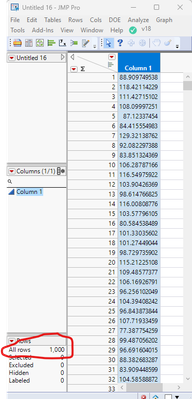
The Tables=>Subset allow you to create a random sample of either a given percentage or a given sample size

Which will give you a new table with 100 rows
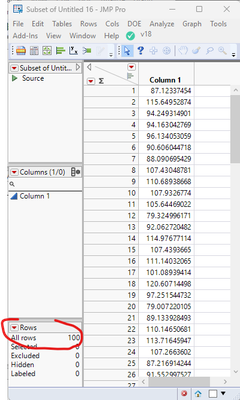
it is then a simple matter to join this table with the original table using
Tables=>Join
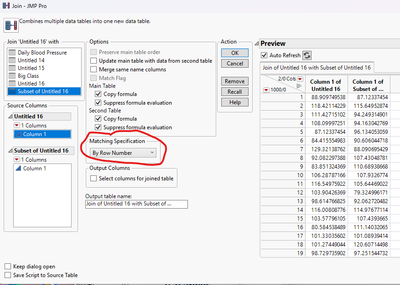
Which will give you what you asked for
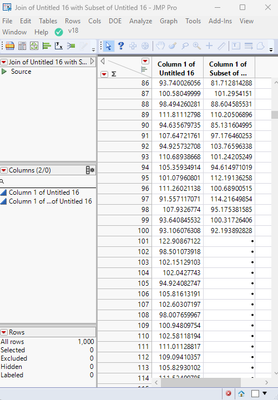
The main problem with this approach is that it is somewhat violating the assumptions of a JMP data table.
Another approach would be to use a column formula. The formula I came up with produces a random sample, but rather than placing the selected data into the first 100 rows, it places the values in the row the selected data comes from.
Here is the formula
As Constant(
	rowCount = N Rows( Current Data Table() );
	sampleMatrix = [];
	For( i = 1, i <= 100, i++,
		found = 0;
		While( found == 0,
			row = Random Integer( 1, rowCount );
			If( N Rows( Loc( sampleMatrix, row ) ) == 0,
				found = 1;
				sampleMatrix = sampleMatrix || Matrix( row );
			);
		);
	);
);
If( N Cols( Loc( sampleMatrix, Row() ) ) != 0,
	:Column 1,
	.
);
Which produces

Now if one moves the sample generation to JSL, it becomes a fairly easy task to create as many samples as needed
Names Default To Here( 1 );
dt = Current Data Table();
rowCount = N Rows( dt );

// Create 5 Random Samples of 100
For( k = 1, k <= 5, k++,
	dt << New Column( "Random" || Char( k ) );
	sampleMatrix = [];
	For( i = 1, i <= 100, i++,
		found = 0;
		While( found == 0,
			row = Random Integer( 1, rowCount );
			If( N Rows( Loc( sampleMatrix, row ) ) == 0,
				found = 1;
				sampleMatrix = sampleMatrix || Matrix( row );
			);
		);
	);

// Write the values to the new column
	For Each( {row}, sampleMatrix,
		Column( "Random" || Char( k ) )[row] = :Column 1[row]
	);
);
Which creates
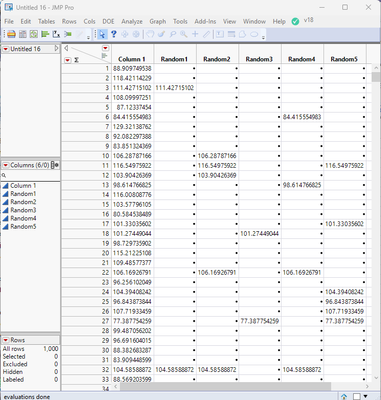
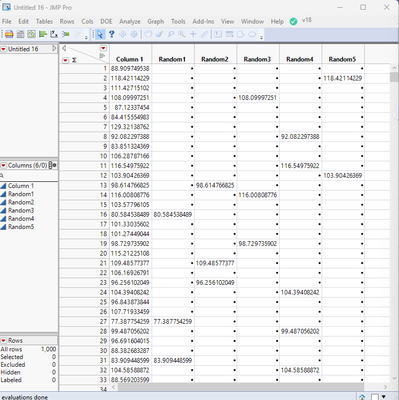
With a little modification, the random sample generation can be sampling without replacement
Names Default To Here( 1 );
dt = Current Data Table();
rowCount = N Rows( dt );
masterSampleMatrix = [];

// Create 5 Random Samples of 100
For( k = 1, k <= 5, k++,
	dt << New Column( "Random" || Char( k ) );
	sampleMatrix = [];
	For( i = 1, i <= 100, i++,
		found = 0;
		While( found == 0,
			row = Random Integer( 1, rowCount );
			If( N Rows( Loc( masterSampleMatrix, row ) ) == 0,
				found = 1;
				sampleMatrix = sampleMatrix || Matrix( row );
				masterSampleMatrix = masterSampleMatrix || Matrix( row );
			);
		);
	);

// Write the values to the new column
	For Each( {row}, sampleMatrix,
		Column( "Random" || Char( k ) )[row] = :Column 1[row]
	);
);
- Mark as New
- Bookmark
- Subscribe
- Mute
- Subscribe to RSS Feed
- Get Direct Link
- Report Inappropriate Content
Re: Comment échantillonner une colonne ?
There are multiple ways to do this.
The simplest is to use the built in capability of the Subset platform
Tables=>Subset
Given a table with a column of data with 1000 rows
The Tables=>Subset allow you to create a random sample of either a given percentage or a given sample size
Which will give you a new table with 100 rows
it is then a simple matter to join this table with the original table using
Tables=>Join
Which will give you what you asked for
The main problem with this approach is that it is somewhat violating the assumptions of a JMP data table.
Another approach would be to use a column formula. The formula I came up with produces a random sample, but rather than placing the selected data into the first 100 rows, it places the values in the row the selected data comes from.
Here is the formula
As Constant(
	rowCount = N Rows( Current Data Table() );
	sampleMatrix = [];
	For( i = 1, i <= 100, i++,
		found = 0;
		While( found == 0,
			row = Random Integer( 1, rowCount );
			If( N Rows( Loc( sampleMatrix, row ) ) == 0,
				found = 1;
				sampleMatrix = sampleMatrix || Matrix( row );
			);
		);
	);
);
If( N Cols( Loc( sampleMatrix, Row() ) ) != 0,
	:Column 1,
	.
);
Which produces
Now if one moves the sample generation to JSL, it becomes a fairly easy task to create as many samples as needed
Names Default To Here( 1 );
dt = Current Data Table();
rowCount = N Rows( dt );

// Create 5 Random Samples of 100
For( k = 1, k <= 5, k++,
	dt << New Column( "Random" || Char( k ) );
	sampleMatrix = [];
	For( i = 1, i <= 100, i++,
		found = 0;
		While( found == 0,
			row = Random Integer( 1, rowCount );
			If( N Rows( Loc( sampleMatrix, row ) ) == 0,
				found = 1;
				sampleMatrix = sampleMatrix || Matrix( row );
			);
		);
	);

// Write the values to the new column
	For Each( {row}, sampleMatrix,
		Column( "Random" || Char( k ) )[row] = :Column 1[row]
	);
);
Which creates
With a little modification, the random sample generation can be sampling without replacement
Names Default To Here( 1 );
dt = Current Data Table();
rowCount = N Rows( dt );
masterSampleMatrix = [];

// Create 5 Random Samples of 100
For( k = 1, k <= 5, k++,
	dt << New Column( "Random" || Char( k ) );
	sampleMatrix = [];
	For( i = 1, i <= 100, i++,
		found = 0;
		While( found == 0,
			row = Random Integer( 1, rowCount );
			If( N Rows( Loc( masterSampleMatrix, row ) ) == 0,
				found = 1;
				sampleMatrix = sampleMatrix || Matrix( row );
				masterSampleMatrix = masterSampleMatrix || Matrix( row );
			);
		);
	);

// Write the values to the new column
	For Each( {row}, sampleMatrix,
		Column( "Random" || Char( k ) )[row] = :Column 1[row]
	);
);
- Mark as New
- Bookmark
- Subscribe
- Mute
- Subscribe to RSS Feed
- Get Direct Link
- Report Inappropriate Content
Re: Comment échantillonner une colonne ?
Merci beaucoup.
JL
Recommended Articles
- © 2025 JMP Statistical Discovery LLC. All Rights Reserved.
- Terms of Use
- Privacy Statement
- Contact Us