cancel
Showing results for 
Show  only  | Search instead for 
Did you mean: 
  • JMP will suspend normal business operations for our Winter Holiday beginning on Wednesday, Dec. 24, 2025, at 5:00 p.m. ET (2:00 p.m. ET for JMP Accounts Receivable).
    Regular business hours will resume at 9:00 a.m. EST on Friday, Jan. 2, 2026.
  • We’re retiring the File Exchange at the end of this year. The JMP Marketplace is now your destination for add-ins and extensions.

Discussions

Solve problems, and share tips and tricks with other JMP users.
%3CLINGO-SUB%20id%3D%22lingo-sub-68082%22%20slang%3D%22en-US%22%20mode%3D%22NONE%22%3EKombinieren%20separater%20Datums-%20und%20Uhrzeitspalten%2C%20um%20das%20ISO%208601-Format%20zu%20erstellen%20(jjjj-mm-ttThh%3Amm)%3C%2FLINGO-SUB%3E%3CLINGO-BODY%20id%3D%22lingo-body-68082%22%20slang%3D%22en-US%22%20mode%3D%22NONE%22%3E%3CP%3EIch%20versuche%2C%20eine%20ISO%208601-formatierte%20Spalte%20zu%20generieren%2C%20die%20zwei%20separate%20Datums-%20und%20Uhrzeitspalten%20in%20einer%20gemeinsamen%20Datums-%2FUhrzeitform%20(jjjj-mm-ttThh%3Amm)%20kombiniert.%20Hier%20ist%20ein%20Beispiel%3A%3C%2FP%3E%3CP%3E%26nbsp%3B%3C%2FP%3E%3CTABLE%3E%3CTBODY%3E%3CTR%3E%3CTD%3EDATUM%20(JJJJ-MM-TT)%3C%2FTD%3E%3CTD%3EZEIT%20(%3ATag%3AStd.%3AM%3AS)%3C%2FTD%3E%3CTD%3E%3CP%3ETERMINZEIT%3CSPAN%3E%20(jjjj-mm-ttThh%3Amm)%3C%2FSPAN%3E%3C%2FP%3E%3C%2FTD%3E%3C%2FTR%3E%3CTR%3E%3CTD%3E20.07.2000%3C%2FTD%3E%3CTD%3E%3A0%3A09%3A30%3A00%3C%2FTD%3E%3CTD%3E%3CSPAN%3E2000-07-20T09%3A30%3C%2FSPAN%3E%3C%2FTD%3E%3C%2FTR%3E%3CTR%3E%3CTD%3E30.04.1993%3C%2FTD%3E%3CTD%3E%3A0%3A12%3A01%3A00%3C%2FTD%3E%3CTD%3E%3CSPAN%3E1993-04-30T12%3A01%3C%2FSPAN%3E%3C%2FTD%3E%3C%2FTR%3E%3CTR%3E%3CTD%3E05.05.2003%3C%2FTD%3E%3CTD%3E%3A0%3A16%3A28%3A00%3C%2FTD%3E%3CTD%3E%3CSPAN%3E2003-05-05T16%3A28%3C%2FSPAN%3E%3C%2FTD%3E%3C%2FTR%3E%3C%2FTBODY%3E%3C%2FTABLE%3E%3CP%3E%26nbsp%3B%3C%2FP%3E%3CP%3EIch%20habe%20versucht%2C%20einfach%20das%20Format%20f%C3%BCr%20die%20Spalte%20%E2%80%9ETIME%E2%80%9C%20in%20zu%20%C3%A4ndern%3CSPAN%3E%20jjjj-mm-ttThh%3Amm%2C%20aber%20das%20gab%20mir%20Daten%20im%20Jahr%201904.%3C%2FSPAN%3EIrgendwelche%20Gedanken%3F%3C%2FP%3E%3C%2FLINGO-BODY%3E%3CLINGO-SUB%20id%3D%22lingo-sub-68099%22%20slang%3D%22en-US%22%20mode%3D%22NONE%22%3EBetreff%3A%20Kombinieren%20separater%20Datums-%20und%20Uhrzeitspalten%2C%20um%20das%20ISO%208601-Format%20zu%20erstellen%20(jjjj-mm-ttThh%3Amm)%3C%2FLINGO-SUB%3E%3CLINGO-BODY%20id%3D%22lingo-body-68099%22%20slang%3D%22en-US%22%20mode%3D%22NONE%22%3E%3CP%3EHey%3CA%20href%3D%22https%3A%2F%2Fcommunity.jmp.com%2Ft5%2Fuser%2Fviewprofilepage%2Fuser-id%2F12389%22%20target%3D%22_blank%22%3E%20%40Valley_Gurl%3C%2FA%3E%20%2C%3C%2FP%3E%3CP%3E%26nbsp%3B%3C%2FP%3E%3CP%3EZum%20Gl%C3%BCck%20ist%20das%20einfacher%20als%20es%20aussieht.00%3A00%3A00%20Uhr%20Der%201.%20Januar%201904%20ist%20der%20Basiswert%20f%C3%BCr%20Datums-%2FUhrzeitwerte%20in%20JMP.Wenn%20Sie%20nur%20Datumswerte%20haben%20(erste%20Spalte)%2C%20liegt%20dem%20dargestellten%20formatierten%20Wert%20ein%20numerischer%20Wert%20zugrunde%2C%20der%20die%20Anzahl%20der%20Sekunden%20angibt%2C%20die%20von%20der%20Basiszeit%20im%20Jahr%201904%20bis%20Mitternacht%20des%20angegebenen%20Datumswerts%20verstrichen%20sind.Wenn%20Sie%20einen%20reinen%20Zeitwert%20haben%20(Ihre%20zweite%20Spalte)%2C%20ist%20dies%20die%20Anzahl%20der%20seit%20Mitternacht%20verstrichenen%20Sekunden%20(am%201.%20Januar%201904%2C%20wenn%20Sie%20ihn%20in%20Datum%2FUhrzeit%20umwandeln).Daher%20m%C3%BCssen%20Sie%20sie%20nur%20zusammenfassen%20und%20dann%20ein%20Format%20anwenden.%3C%2FP%3E%3CP%3E%26nbsp%3B%3C%2FP%3E%3CP%3EDie%20Spaltenformel%20f%C3%BCr%20Datum%2FZeit%3A%3C%2FP%3E%3CP%3E%26nbsp%3B%3CSPAN%20class%3D%22lia-inline-image-display-wrapper%20lia-image-align-inline%22%20image-alt%3D%22formula.PNG%22%20style%3D%22width%3A%20805px%3B%22%3E%3CSPAN%20class%3D%22lia-inline-image-display-wrapper%22%20image-alt%3D%22formula.PNG%22%20style%3D%22width%3A%20805px%3B%22%3E%3Cspan%20class%3D%22lia-inline-image-display-wrapper%22%20image-alt%3D%22formula.PNG%22%20style%3D%22width%3A%20805px%3B%22%3E%3Cimg%20src%3D%22https%3A%2F%2Fcommunity.jmp.com%2Ft5%2Fimage%2Fserverpage%2Fimage-id%2F12036iF0871EC10567CEA0%2Fimage-size%2Flarge%3Fv%3Dv2%26amp%3Bpx%3D999%22%20role%3D%22button%22%20title%3D%22formula.PNG%22%20alt%3D%22formula.PNG%22%20%2F%3E%3C%2Fspan%3E%3C%2FSPAN%3E%3C%2FSPAN%3E%3C%2FP%3E%3CP%3E%26nbsp%3B%3C%2FP%3E%3CP%3EAnwenden%20des%20Formats%3A%3CSPAN%20class%3D%22lia-inline-image-display-wrapper%20lia-image-align-center%22%20image-alt%3D%22columninfo.PNG%22%20style%3D%22width%3A%20540px%3B%22%3E%3CSPAN%20class%3D%22lia-inline-image-display-wrapper%22%20image-alt%3D%22columninfo.PNG%22%20style%3D%22width%3A%20540px%3B%22%3E%3Cspan%20class%3D%22lia-inline-image-display-wrapper%22%20image-alt%3D%22columninfo.PNG%22%20style%3D%22width%3A%20540px%3B%22%3E%3Cimg%20src%3D%22https%3A%2F%2Fcommunity.jmp.com%2Ft5%2Fimage%2Fserverpage%2Fimage-id%2F12037i5D07259AB622D02B%2Fimage-size%2Flarge%3Fv%3Dv2%26amp%3Bpx%3D999%22%20role%3D%22button%22%20title%3D%22columninfo.PNG%22%20alt%3D%22columninfo.PNG%22%20%2F%3E%3C%2Fspan%3E%3C%2FSPAN%3E%3C%2FSPAN%3E%3C%2FP%3E%3CP%3E%3CSTRONG%3E*Stellen%20Sie%20sicher%2C%20dass%20das%20Eingabeformat%20%E2%80%9ENumerisch%E2%80%9C%20ist%2C%20da%20das%20Ergebnis%20der%20Summe%20nur%20eine%20gro%C3%9Fe%20Ganzzahl%20ist%2C%20die%20die%20Anzahl%20der%20Sekunden%20von%20der%20Basislinie%20bis%20zum%20gew%C3%BCnschten%20Datums-%2FUhrzeitwert%20darstellt.%3C%2FSTRONG%3E%26nbsp%3B%26nbsp%3B%3C%2FP%3E%3CP%3EErgebnis%3A%3C%2FP%3E%3CP%3E%26nbsp%3B%3C%2FP%3E%3CP%3E%26nbsp%3B%3C%2FP%3E%3CP%3E%3CSPAN%20class%3D%22lia-inline-image-display-wrapper%20lia-image-align-center%22%20image-alt%3D%22Result.PNG%22%20style%3D%22width%3A%20736px%3B%22%3E%3CSPAN%20class%3D%22lia-inline-image-display-wrapper%22%20image-alt%3D%22Result.PNG%22%20style%3D%22width%3A%20736px%3B%22%3E%3Cspan%20class%3D%22lia-inline-image-display-wrapper%22%20image-alt%3D%22Result.PNG%22%20style%3D%22width%3A%20736px%3B%22%3E%3Cimg%20src%3D%22https%3A%2F%2Fcommunity.jmp.com%2Ft5%2Fimage%2Fserverpage%2Fimage-id%2F12038i54A0CB5995202F57%2Fimage-size%2Flarge%3Fv%3Dv2%26amp%3Bpx%3D999%22%20role%3D%22button%22%20title%3D%22Result.PNG%22%20alt%3D%22Result.PNG%22%20%2F%3E%3C%2Fspan%3E%3C%2FSPAN%3E%3C%2FSPAN%3E%3C%2FP%3E%3CP%3E%26nbsp%3B%3C%2FP%3E%3CP%3E%26nbsp%3B%3C%2FP%3E%3C%2FLINGO-BODY%3E
Choose Language Hide Translation Bar
Valley_Gurl
Level II

Combining separate date and time columns to make ISO 8601 format (yyyy-mm-ddThh:mm)

I am trying to generate a ISO 8601 formatted column, which combines two sepatate date and time columns into a joint date/time form (yyyy-mm-ddThh:mm). Here is an example:


DATE (yyyy-mm-dd)TIME (:day:hr:m:s)

DATE/TIME (yyyy-mm-ddThh:mm)

2000-07-20:0:09:30:002000-07-20T09:30
1993-04-30:0:12:01:001993-04-30T12:01
2003-05-05:0:16:28:002003-05-05T16:28


I have tried to simply change the format for the "TIME" column to yyyy-mm-ddThh:mm but that gave me dates in 1904. Any thoughts?

1 ACCEPTED SOLUTION

Accepted Solutions
cwillden
Super User (Alumni)

Re: Combining separate date and time columns to make ISO 8601 format (yyyy-mm-ddThh:mm)

Hey @Valley_Gurl,


Luckily, this is easier than it looks.  12:00:00 AM January 1, 1904 is the baseline value for date/time values in JMP.  If you have date only values (first column), underlying the presented formatted value is a numeric value that is the number of seconds elapsed the baseline time in 1904 to midnight of the given date value.  If you have a time only value (your second column), it is the number of elapsed seconds since midnight (on January 1, 1904 if you convert it to date/time).  Therefore, all you need to do is sum them together, and then apply a format.


The column formula for data/time:
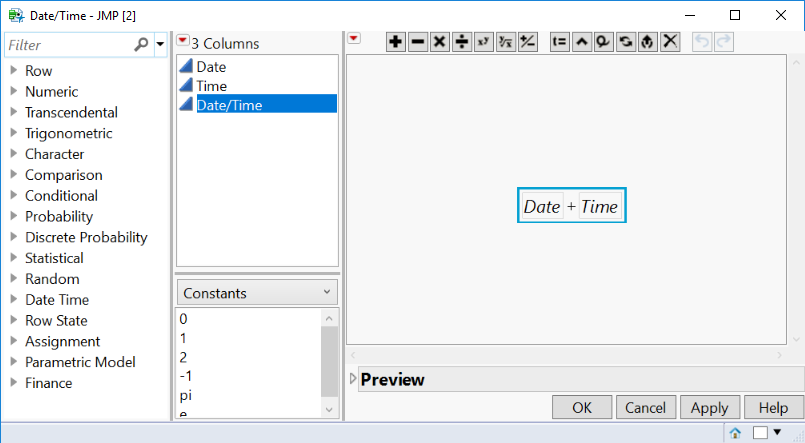
 formula.PNG


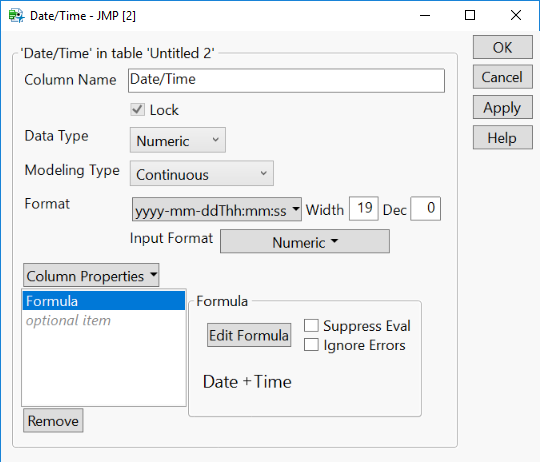
Applying the format:columninfo.PNG

*Make sure the input format is "Numeric" since the result of the sum will just be a large integer representing the number of seconds from baseline to the desired date/time value.  

Result:
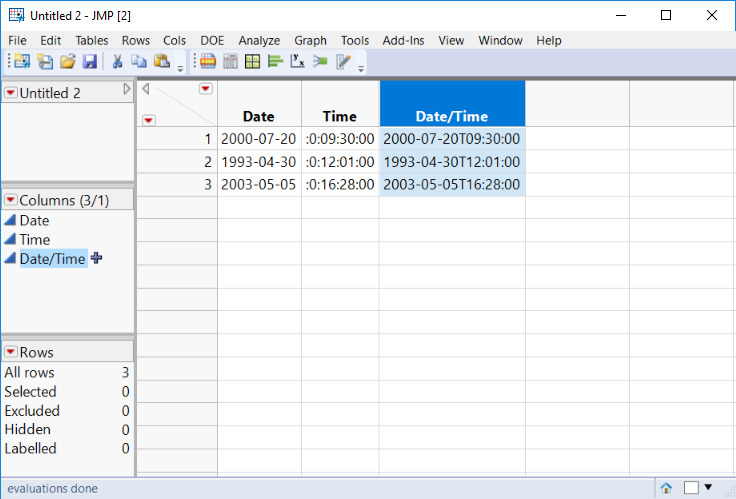


Result.PNG


-- Cameron Willden

View solution in original post

1 REPLY 1
cwillden
Super User (Alumni)

Re: Combining separate date and time columns to make ISO 8601 format (yyyy-mm-ddThh:mm)

Hey @Valley_Gurl,


Luckily, this is easier than it looks.  12:00:00 AM January 1, 1904 is the baseline value for date/time values in JMP.  If you have date only values (first column), underlying the presented formatted value is a numeric value that is the number of seconds elapsed the baseline time in 1904 to midnight of the given date value.  If you have a time only value (your second column), it is the number of elapsed seconds since midnight (on January 1, 1904 if you convert it to date/time).  Therefore, all you need to do is sum them together, and then apply a format.


The column formula for data/time:

 formula.PNG


Applying the format:columninfo.PNG

*Make sure the input format is "Numeric" since the result of the sum will just be a large integer representing the number of seconds from baseline to the desired date/time value.  

Result:


Result.PNG


-- Cameron Willden

Recommended Articles