Turn on suggestions
Auto-suggest helps you quickly narrow down your search results by suggesting possible matches as you type.
- Discovery Summit 2026: Early User Edition - September 23-24.Register. It's free.
- Graph Builder Toolbar streamlines interactive graphing. Creates shortcuts on Report and GraphBuilder Helpers toolbars. Download and install the extension.
Options
- Subscribe to RSS Feed
- Mark Topic as New
- Mark Topic as Read
- Float this Topic for Current User
- Bookmark
- Subscribe
- Mute
- Printer Friendly Page
Discussions
Solve problems, and share tips and tricks with other JMP users.- User Community
- :
- Discussions
- :
- Re: Columns locked

Level IV
- Mark as New
- Bookmark
- Subscribe
- Mute
- Subscribe to RSS Feed
- Get Direct Link
- Report Inappropriate Content
Columns locked
Created:
Feb 14, 2023 04:16 AM
| Last Modified: Jun 8, 2023 9:36 AM
(4311 views)
Hello
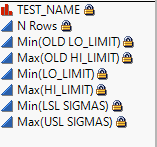
Some of the columns are locked,
If I have any option to convert the columns to open one without doing once again a summary and removing the "link to the original data table"?
3 REPLIES 3


Super User
- Mark as New
- Bookmark
- Subscribe
- Mute
- Subscribe to RSS Feed
- Get Direct Link
- Report Inappropriate Content
Re: Columns locked
Hello @Dennisbur,
@txnelson has provided a solution on this topic in this post : Solved: How do I unlock a column? - JMP User Community
I hope this will help you,
Victor GUILLER
"It is not unusual for a well-designed experiment to analyze itself" (Box, Hunter and Hunter)
"It is not unusual for a well-designed experiment to analyze itself" (Box, Hunter and Hunter)

Super User
- Mark as New
- Bookmark
- Subscribe
- Mute
- Subscribe to RSS Feed
- Get Direct Link
- Report Inappropriate Content
Re: Columns locked
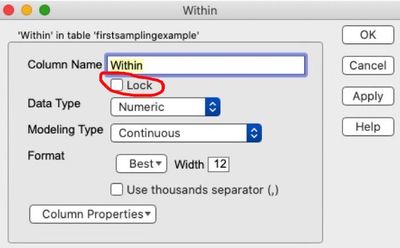
Quickly, right click on column you want to unlock, select Column Info>uncheck the Lock box.
"All models are wrong, some are useful" G.E.P. Box


Staff
- Mark as New
- Bookmark
- Subscribe
- Mute
- Subscribe to RSS Feed
- Get Direct Link
- Report Inappropriate Content
Re: Columns locked
If you are using JSL, you can use the code below to unlock a table and all columns in it:
			dt << Lock Data Table( 0 );

			For( j = 1, j <= N Col( dt ), j++,
				Try( Column( dt, j ) << lock( 0 ) )
			);
Cheers,
Brady
Recommended Articles
- © 2026 JMP Statistical Discovery LLC. All Rights Reserved.
- Terms of Use
- Privacy Statement
- Contact Us