- Don’t miss your chance to experience Discovery Summit Europe at our best available rate! Early bird registration through 31 Oct.
- Graph Builder Toolbar streamlines interactive graphing. Creates shortcuts on Report and GraphBuilder Helpers toolbars. Download and install the extension.
- Subscribe to RSS Feed
- Mark Topic as New
- Mark Topic as Read
- Float this Topic for Current User
- Bookmark
- Subscribe
- Mute
- Printer Friendly Page
Discussions
Solve problems, and share tips and tricks with other JMP users.- User Community
- :
- Discussions
- :
- Re: Column name from string

- Mark as New
- Bookmark
- Subscribe
- Mute
- Subscribe to RSS Feed
- Get Direct Link
- Report Inappropriate Content
Column name from string
Hi everyone,
I am working on a script that I would like to use a string as a column name, and use that column name in a formula, see below:
dt = Open( "$SAMPLE_DATA/Cities.jmp" );
//example column
dt << New Column("klaatu barada nikto", formula(3));
//suppose we don't know what exactly will be in 'a' as it is controlled by a for loop etc.
a = Concat Items( {"klaatu", "barada", "nikto"}, " " );

//can we get another column to take 'a' as an input?
dt << New Column("Gort", formula(column(a)*:Y));
When I use this however, it does not see "klaatu barada nikto" as a valid column, even though we created it before.
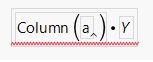
From other posts I have seen that the column() function can be used to assign a string to a column and I have used it in this way before, but in this instance it does not work. All we end up with is this:
Does anyone know a workaround for this? Thanks for any help in advance!
Accepted Solutions


- Mark as New
- Bookmark
- Subscribe
- Mute
- Subscribe to RSS Feed
- Get Direct Link
- Report Inappropriate Content
Re: Column name from string
Take a look at this Insert one expression into another using Eval Insert, Eval Expr, Parse, and Substitute
dt = Open( "$SAMPLE_DATA/Cities.jmp" );
//example column
dt << New Column("klaatu barada nikto", formula(3));
//suppose we don't know what exactly will be in 'a' as it is controlled by a for loop etc.
a = Concat Items( {"klaatu", "barada", "nikto"}, " " );

//can we get another column to take 'a' as an input?

Eval(EvalExpr(dt << New Column("Gort", numeric, formula(ascolumn(expr(a))*:Y))));- Mark as New
- Bookmark
- Subscribe
- Mute
- Subscribe to RSS Feed
- Get Direct Link
- Report Inappropriate Content
Re: Column name from string
Take a look at this Insert one expression into another using Eval Insert, Eval Expr, Parse, and Substitute
dt = Open( "$SAMPLE_DATA/Cities.jmp" );
//example column
dt << New Column("klaatu barada nikto", formula(3));
//suppose we don't know what exactly will be in 'a' as it is controlled by a for loop etc.
a = Concat Items( {"klaatu", "barada", "nikto"}, " " );

//can we get another column to take 'a' as an input?

Eval(EvalExpr(dt << New Column("Gort", numeric, formula(ascolumn(expr(a))*:Y))));- Mark as New
- Bookmark
- Subscribe
- Mute
- Subscribe to RSS Feed
- Get Direct Link
- Report Inappropriate Content
Re: Column name from string
Fantastic! Thank you so much for your help.

- Mark as New
- Bookmark
- Subscribe
- Mute
- Subscribe to RSS Feed
- Get Direct Link
- Report Inappropriate Content
Re: Column name from string
Jarmo,
I'm using the same approach in one of my scripts and bumped into a problem: the formula in the new column will have that "a" column as this:
Formula(As Column("klaatu barada nikto")*:Y)which means that if name of that column changes (and in my case it changes) this formula will become invalid. I need to somehow reference it not as As Column("name") but as :name - any way to do that?
- Mark as New
- Bookmark
- Subscribe
- Mute
- Subscribe to RSS Feed
- Get Direct Link
- Report Inappropriate Content
Re: Column name from string
If I understand correctly what you want, you could try adding Name Expr
Names Default To Here(1);

dt = Open( "$SAMPLE_DATA/Cities.jmp" );
//example column
dt << New Column("klaatu barada nikto", formula(3));
//suppose we don't know what exactly will be in 'a' as it is controlled by a for loop etc.
a = Concat Items( {"klaatu", "barada", "nikto"}, " " );

Eval(EvalExpr(dt << New Column("Gort", numeric, formula(Expr(Name Expr(As Column(a)))*:Y))));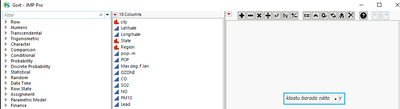
Recommended Articles
- © 2026 JMP Statistical Discovery LLC. All Rights Reserved.
- Terms of Use
- Privacy Statement
- Contact Us