Turn on suggestions
Auto-suggest helps you quickly narrow down your search results by suggesting possible matches as you type.
- JMP Statement Regarding Critical PHP Remote Code Execution Vulnerabilities (CVE-2026-109618, CVE-2026-109619)
- Don’t miss your chance to experience Discovery Summit Europe at our best available rate! Early bird registration through 31 Oct.
- Graph Builder Toolbar streamlines interactive graphing. Creates shortcuts on Report and GraphBuilder Helpers toolbars. Download and install the extension.
Options
- Subscribe to RSS Feed
- Mark Topic as New
- Mark Topic as Read
- Float this Topic for Current User
- Bookmark
- Subscribe
- Mute
- Printer Friendly Page
Discussions
Solve problems, and share tips and tricks with other JMP users.- User Community
- :
- Discussions
- :
- Re: Column Switcher: reduce width

Level XIII
- Mark as New
- Bookmark
- Subscribe
- Mute
- Subscribe to RSS Feed
- Get Direct Link
- Report Inappropriate Content
Column Switcher: reduce width
Created:
May 12, 2023 05:17 AM
| Last Modified: May 12, 2023 2:18 AM
(2721 views)
Column switchers are extremely useful.
But they occupy a lot of space in a Dashboard, especially if there is a long column name:
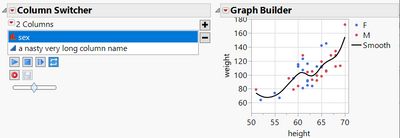
Fortunately, the user can adjust the width by resizing the list box:
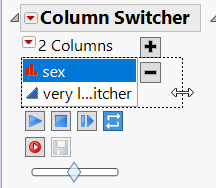
Unfortunately, this change is not saved when saving the script.
Adjusting the width via set width doesn't seem to work:
Current Report()["Column Switcher",ListBox(4)] << get width()    //works
Current Report()["Column Switcher",ListBox(4)] << set width(100) //doesn't have an effect
dt = Open( "$SAMPLE_DATA/Big Class.jmp" );
dt << New Column( "a nasty very long column name");
dt << Graph Builder(
	Variables( X( :height ), Y( :weight ), Color( :sex ) ),
	Elements( Points( X, Y, Legend( 11 ) ), Smoother( X, Y, Legend( 12 ) ) ),
	Column Switcher(:sex,
		{:sex,:a nasty very long column name}
	)
);
1 ACCEPTED SOLUTION
Accepted Solutions


Super User
Solution
- Mark as New
- Bookmark
- Subscribe
- Mute
- Subscribe to RSS Feed
- Get Direct Link
- Report Inappropriate Content
Re: Column Switcher: reduce width
Scripting index:
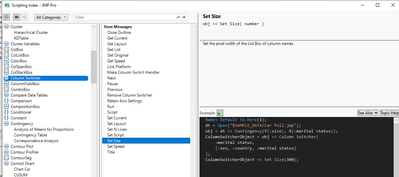
Names Default To Here(1);

dt = Open("$SAMPLE_DATA/Big Class.jmp");
dt << New Column("a nasty very long column name");
gb = dt << Graph Builder(
	Variables(X(:height), Y(:weight), Color(:sex)),
	Elements(Points(X, Y, Legend(11)), Smoother(X, Y, Legend(12)))
);

colswitcher = gb << Column Switcher(:sex, {:sex, :a nasty very long column name});
colswitcher << set size(100);
-Jarmo
3 REPLIES 3
Super User
Solution
- Mark as New
- Bookmark
- Subscribe
- Mute
- Subscribe to RSS Feed
- Get Direct Link
- Report Inappropriate Content
Re: Column Switcher: reduce width
Scripting index:
Names Default To Here(1);

dt = Open("$SAMPLE_DATA/Big Class.jmp");
dt << New Column("a nasty very long column name");
gb = dt << Graph Builder(
	Variables(X(:height), Y(:weight), Color(:sex)),
	Elements(Points(X, Y, Legend(11)), Smoother(X, Y, Legend(12)))
);

colswitcher = gb << Column Switcher(:sex, {:sex, :a nasty very long column name});
colswitcher << set size(100);
-Jarmo
Level XIII
- Mark as New
- Bookmark
- Subscribe
- Mute
- Subscribe to RSS Feed
- Get Direct Link
- Report Inappropriate Content
Re: Column Switcher: reduce width
Wonderful, thanks.
cs= Current Report()["Column Switcher"] << get scriptable object();
cs<< set size(100);
Level XIII
- Mark as New
- Bookmark
- Subscribe
- Mute
- Subscribe to RSS Feed
- Get Direct Link
- Report Inappropriate Content
Re: Column Switcher: reduce width
And for a Dashboard, is there a possibility to resize - and store the setting in the saved Dashboard?
- without changing the JSL code
Recommended Articles
- © 2026 JMP Statistical Discovery LLC. All Rights Reserved.
- Terms of Use
- Privacy Statement
- Contact Us