Turn on suggestions
Auto-suggest helps you quickly narrow down your search results by suggesting possible matches as you type.
- Don’t miss your chance to experience Discovery Summit Europe at our best available rate! Early bird registration through 31 Oct.
- Graph Builder Toolbar streamlines interactive graphing. Creates shortcuts on Report and GraphBuilder Helpers toolbars. Download and install the extension.
Options
- Subscribe to RSS Feed
- Mark Topic as New
- Mark Topic as Read
- Float this Topic for Current User
- Bookmark
- Subscribe
- Mute
- Printer Friendly Page
Discussions
Solve problems, and share tips and tricks with other JMP users.- User Community
- :
- Discussions
- :
- Re: Color by cell

Level III
- Mark as New
- Bookmark
- Subscribe
- Mute
- Subscribe to RSS Feed
- Get Direct Link
- Report Inappropriate Content
Color by cell
Created:
Oct 6, 2021 06:10 AM
| Last Modified: Jun 9, 2023 12:58 PM
(2937 views)
for each row(
Hi folks,
I want to colour my cells by value,
so if the row is <= 25 red, if > 25 and < 50 orange , if> 50 < 70 yellow.
and >75 green.
i am breaking it down to test first and when i run the first 2 arguments, the second condition changes all the rows to orange
For Each Row(
	If(
		:CDO 4 week Avg <= 25, dt:CDO 4 week Avg << color cells( "Red", Row() ),
		:CDO 4 week Avg > 25 <= 50,
			dt:CDO 4 week Avg << color cells( "orange", Row() )
	)
);
I cant understand why I am overwriting the condition and changing all cells colors to orange
- Tags:
- Mass Customization
1 ACCEPTED SOLUTION
Accepted Solutions


Super User
Solution
- Mark as New
- Bookmark
- Subscribe
- Mute
- Subscribe to RSS Feed
- Get Direct Link
- Report Inappropriate Content
Re: Color by cell
Second comparison seems wrong.
Try changing:
:CDO 4 week Avg > 25 <=50,to
25 < :CDO 4 week Avg <=50,
-Jarmo
3 REPLIES 3
Super User
Solution
- Mark as New
- Bookmark
- Subscribe
- Mute
- Subscribe to RSS Feed
- Get Direct Link
- Report Inappropriate Content
Re: Color by cell
Second comparison seems wrong.
Try changing:
:CDO 4 week Avg > 25 <=50,to
25 < :CDO 4 week Avg <=50,
-Jarmo
Level III
- Mark as New
- Bookmark
- Subscribe
- Mute
- Subscribe to RSS Feed
- Get Direct Link
- Report Inappropriate Content
Re: Color by cell
And is it possible to loop this for each column or do i have to make a for loop for each of the columns?

Super User
- Mark as New
- Bookmark
- Subscribe
- Mute
- Subscribe to RSS Feed
- Get Direct Link
- Report Inappropriate Content
Re: Color by cell
Here is a simple example of coloring cells across multiple columns, without having to process the cells row by row.
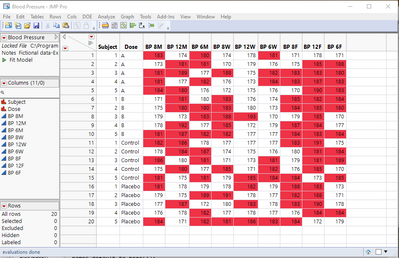
Names Default To Here( 1 );
// Open Data Table: Blood Pressure.jmp
// → Data Table( "Blood Pressure" )
dt = Open( "$SAMPLE_DATA/Blood Pressure.jmp" );

For( i = 3, i <= N Cols( dt ), i++,
	theRows = dt << get rows where( As Column( dt, i ) > 180 );
	Column( dt, i ) << color cells( "red", theRows );
);
Jim
Recommended Articles
- © 2026 JMP Statistical Discovery LLC. All Rights Reserved.
- Terms of Use
- Privacy Statement
- Contact Us