- JMP will suspend normal business operations for our Winter Holiday beginning on Wednesday, Dec. 24, 2025, at 5:00 p.m. ET (2:00 p.m. ET for JMP Accounts Receivable).
Regular business hours will resume at 9:00 a.m. EST on Friday, Jan. 2, 2026. - We’re retiring the File Exchange at the end of this year. The JMP Marketplace is now your destination for add-ins and extensions.
- Subscribe to RSS Feed
- Mark Topic as New
- Mark Topic as Read
- Float this Topic for Current User
- Bookmark
- Subscribe
- Mute
- Printer Friendly Page
Discussions
Solve problems, and share tips and tricks with other JMP users.- JMP User Community
- :
- Discussions
- :
- Col Functions and Row States


- Mark as New
- Bookmark
- Subscribe
- Mute
- Subscribe to RSS Feed
- Get Direct Link
- Report Inappropriate Content
Col Functions and Row States
According to the release notes for version 15 of JMP:
The Col functions honor excluded rows through the Excluded(Row State()) function.
Col Maximum( :height, :sex, Excluded( Row State() ) );
However, this syntax doesn't seem to work. Can anyone suggest the corect syntax?


- Mark as New
- Bookmark
- Subscribe
- Mute
- Subscribe to RSS Feed
- Get Direct Link
- Report Inappropriate Content
Re: Col Functions and Row States
I quickly tested and seemed that using only Excluded() seemed to work (I'm using 15.2.1).
- Mark as New
- Bookmark
- Subscribe
- Mute
- Subscribe to RSS Feed
- Get Direct Link
- Report Inappropriate Content
Re: Col Functions and Row States
Thanks for letting me know. That doesn't work with 15.1 - I'll try and do a comparison with 15.2.
- Mark as New
- Bookmark
- Subscribe
- Mute
- Subscribe to RSS Feed
- Get Direct Link
- Report Inappropriate Content
Re: Col Functions and Row States
I'll add this very simple example here if anyone else comes around:
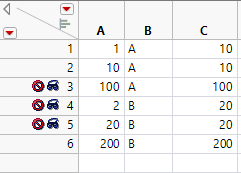
Names Default To Here(1);
New Table("ExcludeColMax",
	Add Rows(6),
	Compress File When Saved(1),
	New Column("A",
		Numeric,
		"Continuous",
		Format("Best", 12),
		Set Values([1, 10, 100, 2, 20, 200]),
		Set Display Width(46)
	),
	New Column("B",
		Character,
		"Nominal",
		Set Values({"A", "A", "A", "B", "B", "B"})
	),
	New Column("C",
		Numeric,
		"Continuous",
		Format("Best", 12),
		Formula(Col Maximum(:A, :B, Excluded())),
		Set Display Width(65)
	),
	Set Row States([0, 0, 6, 6, 6, 0])
);- Mark as New
- Bookmark
- Subscribe
- Mute
- Subscribe to RSS Feed
- Get Direct Link
- Report Inappropriate Content
Re: Col Functions and Row States
I've tested with v15.2 and the issue is the same. Note the use case is using the function within a script, not within a column formula (not sure why I would want a column statistic in a row).
- Mark as New
- Bookmark
- Subscribe
- Mute
- Subscribe to RSS Feed
- Get Direct Link
- Report Inappropriate Content
Re: Col Functions and Row States
Maybe honoring means in this case that the excluded is just additional byVar in column statistics formulas?
If you want maximum value of column without excluded values, could you use Summarize instead of Col Maximum? It seems to ignore excluded rows.
Names Default To Here(1);
dt =New Table("ExcludeColMax",
	Add Rows(6),
	Compress File When Saved(1),
	New Column("A",
		Numeric,
		"Continuous",
		Format("Best", 12),
		Set Values([1, 10, 100, 2, 20, 200]),
		Set Display Width(46)
	),
	New Column("B",
		Character,
		"Nominal",
		Set Values({"A", "A", "A", "B", "B", "B"})
	),
	New Column("C",
		Numeric,
		"Continuous",
		Format("Best", 12),
		Formula(Col Maximum(:A, :B, Excluded())),
		Set Display Width(65)
	),
	Set Row States([0, 0, 6, 6, 0, 6])
);

Write("Looping col max:");
For Each Row(
	Show(Col Maximum(:A, :B, Excluded()))
);

Write("\!N\!NOnly col max:");
Show(Col Maximum(:A, :B, Excluded()));

Write("\!N\!NSummarize:");
Summarize(dt, exg = By(:B), exm = Max(:A));
Show(Eval List({exg, exm}));
Show(Max(exm));- Mark as New
- Bookmark
- Subscribe
- Mute
- Subscribe to RSS Feed
- Get Direct Link
- Report Inappropriate Content
Re: Col Functions and Row States
I can code a solution - my question was specifically about whether version 15 allowed it to be done solely using the column functions - that was the impression I got from the release notes.

- Mark as New
- Bookmark
- Subscribe
- Mute
- Subscribe to RSS Feed
- Get Direct Link
- Report Inappropriate Content
Re: Col Functions and Row States
Very confusing. I think this is a question for our friend Wendy.

- Mark as New
- Bookmark
- Subscribe
- Mute
- Subscribe to RSS Feed
- Get Direct Link
- Report Inappropriate Content
Re: Col Functions and Row States
Interesting. A pre-release build of JMP 16 seems to get it right for r=1 and r=2, but not thereafter:
NamesDefaultToHere(1);

dt = Open("$SAMPLE_DATA/Big Class.jmp");

mw = J(NRow(dt), 2, .);
for(r=1, r<=NRow(dt), r++,
	Row() = r;
	RowState(Row()) = ExcludedState(1);
	mw[r,1] = ColMean(:weight, Excluded(RowState(Row())));
	mw[r,2] = ColMean(:weight, Excluded());
	RowState(Row()) = ExcludedState(0);
	);
AsTable(mw);

dt << Distribution(
			Continuous Distribution(
				Column( :weight ),
				Quantiles( 0 ),
				Histogram( 0 ),
				Outlier Box Plot( 0 )
			),
			Local Data Filter(
				Add Filter(
					columns( Transform Column( "Row", Nominal, Formula( Row() ) ) ),
					Where( Transform Column( "Row", Nominal, Formula( Row() ) ) == 1 ),
					Display(
						Transform Column( "Row", Nominal, Formula( Row() ) ),
						N Items( 15 ),
						Find( Set Text( "" ) )
					)
				)
			)
);- Mark as New
- Bookmark
- Subscribe
- Mute
- Subscribe to RSS Feed
- Get Direct Link
- Report Inappropriate Content
Re: Col Functions and Row States
Working with Big Class (of course):
colmaximum(:height,excluded(rowstate()))This is working. But on one computer but not another. Both running 15.1.0.
Now I am totally confused!
Screenshots on next post ...
Recommended Articles
- © 2025 JMP Statistical Discovery LLC. All Rights Reserved.
- Terms of Use
- Privacy Statement
- Contact Us