- Don’t miss your chance to experience Discovery Summit Europe at our best available rate! Early bird registration through 31 Oct.
- Graph Builder Toolbar streamlines interactive graphing. Creates shortcuts on Report and GraphBuilder Helpers toolbars. Download and install the extension.
- Subscribe to RSS Feed
- Mark Topic as New
- Mark Topic as Read
- Float this Topic for Current User
- Bookmark
- Subscribe
- Mute
- Printer Friendly Page
Discussions
Solve problems, and share tips and tricks with other JMP users.- User Community
- :
- Discussions
- :
- Changing the font size of point labels in a Contour Plot

- Mark as New
- Bookmark
- Subscribe
- Mute
- Subscribe to RSS Feed
- Get Direct Link
- Report Inappropriate Content
Changing the font size of point labels in a Contour Plot
Hi,
In a Contour Plot (or for that matter any chart in which points are automatically labelled with the contents of one or more specified rows and/or columns in the data set from which it is generated) is there any way to change the font size of the labels?
I know I could increase them manually with a Control-Shift-Plus key combination, but doing that increases the font size in every open window, whereas I want the change limited to just the window containing the chart in question. The same objection precludes my simply modifying the default font size in the Preferences.
Alternatively, I could simply turn them off and replace them with a set of annotations of my own in a larger font size, but if I do that I lose the ability to drag them about the chart manually afterwards - and I'd like to retain that functionality if possible.
Is there any other way to do it?
Many thanks
Accepted Solutions


- Mark as New
- Bookmark
- Subscribe
- Mute
- Subscribe to RSS Feed
- Get Direct Link
- Report Inappropriate Content
Re: Changing the font size of point labels in a Contour Plot
You are correct in your assumption. The only work around that I can think of, is to turn off the labeling and to write a script that places the labels on the chart. This can be done with a "Make Row State Handler" and "Add Graphics" messages to the chart. Using this method, you can make the font any size you want.
- Mark as New
- Bookmark
- Subscribe
- Mute
- Subscribe to RSS Feed
- Get Direct Link
- Report Inappropriate Content
Re: Changing the font size of point labels in a Contour Plot
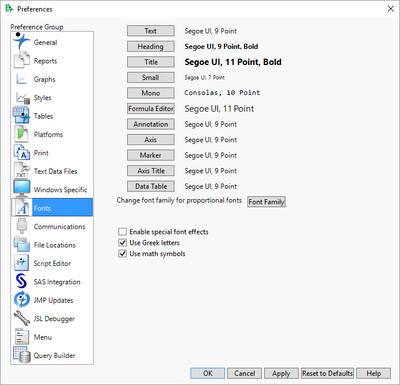
You can change the defaults in the Preferences
File==>Preferences==>Fonts
- Mark as New
- Bookmark
- Subscribe
- Mute
- Subscribe to RSS Feed
- Get Direct Link
- Report Inappropriate Content
Re: Changing the font size of point labels in a Contour Plot
Hi Jim, doing that will affect every chart in my output; unfortunately I need to restrict the change to just the one chart I'm working on. Am I right in thinking this isn't possible?
Kind regards,
David
- Mark as New
- Bookmark
- Subscribe
- Mute
- Subscribe to RSS Feed
- Get Direct Link
- Report Inappropriate Content
Re: Changing the font size of point labels in a Contour Plot
You are correct in your assumption. The only work around that I can think of, is to turn off the labeling and to write a script that places the labels on the chart. This can be done with a "Make Row State Handler" and "Add Graphics" messages to the chart. Using this method, you can make the font any size you want.
- Mark as New
- Bookmark
- Subscribe
- Mute
- Subscribe to RSS Feed
- Get Direct Link
- Report Inappropriate Content
Re: Changing the font size of point labels in a Contour Plot
Hi Jim - I suspected as much, but it's always good to know I'm not missing a trick. Many thanks.
Recommended Articles
- © 2026 JMP Statistical Discovery LLC. All Rights Reserved.
- Terms of Use
- Privacy Statement
- Contact Us