- Discovery Summit 2026: Early User Edition - September 23-24.Register. It's free.
- Graph Builder Toolbar streamlines interactive graphing. Creates shortcuts on Report and GraphBuilder Helpers toolbars. Download and install the extension.
- Subscribe to RSS Feed
- Mark Topic as New
- Mark Topic as Read
- Float this Topic for Current User
- Bookmark
- Subscribe
- Mute
- Printer Friendly Page
Discussions
Solve problems, and share tips and tricks with other JMP users.- User Community
- :
- Discussions
- :
- Re: Changing char date column to numeric date

- Mark as New
- Bookmark
- Subscribe
- Mute
- Subscribe to RSS Feed
- Get Direct Link
- Report Inappropriate Content
Changing char date column to numeric date
Hello,
Attached is a table with a column called StartDate. It is in char format and have excessive '0's at the end of each date. I wish to write a script to change the StartDate column to this format like : 04/12/2024 4:10:09 PM. Any help is appreciated.
Thanks!
Accepted Solutions


- Mark as New
- Bookmark
- Subscribe
- Mute
- Subscribe to RSS Feed
- Get Direct Link
- Report Inappropriate Content
Re: Changing char date column to numeric date
Here is a little script that will create a new numeric date/time column converting your StartTime column values.
Names Default To Here( 1 );
dt = Current Data Table();
dt << New Column( "StartTime2",
	set each value(
		Informat( Word( 1, :StartTime, "+" ), "yyy/mm/ddThh:mm:ss" )
	),
	Format( "m/d/y h:m:s" )
);
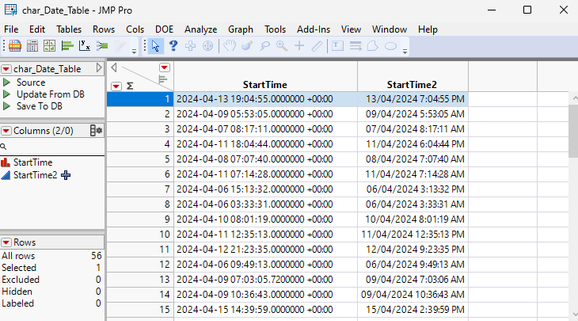
- Mark as New
- Bookmark
- Subscribe
- Mute
- Subscribe to RSS Feed
- Get Direct Link
- Report Inappropriate Content
Re: Changing char date column to numeric date
Here is a little script that will create a new numeric date/time column converting your StartTime column values.
Names Default To Here( 1 );
dt = Current Data Table();
dt << New Column( "StartTime2",
	set each value(
		Informat( Word( 1, :StartTime, "+" ), "yyy/mm/ddThh:mm:ss" )
	),
	Format( "m/d/y h:m:s" )
);
- Mark as New
- Bookmark
- Subscribe
- Mute
- Subscribe to RSS Feed
- Get Direct Link
- Report Inappropriate Content
Re: Changing char date column to numeric date
Thank you, this works!

- Mark as New
- Bookmark
- Subscribe
- Mute
- Subscribe to RSS Feed
- Get Direct Link
- Report Inappropriate Content
Re: Changing char date column to numeric date
I wondered about the "T" ...
Actually,
dt = Current Data Table();
dt << New Column( "StartTime2",
	set each value(
		Informat( Word( 1, :StartTime, "+" ), "hello" )
	),
	Format( "m/d/y h:m:s" )
);
does the job as well :)
It's the power of Informat: For most cases there is no need to specify the pattern, Informat will detect it on it's own.
https://community.jmp.com/t5/Discussions/Informat-ParseDate-function-with-time/m-p/736131/highlight/...
Just for some rare cases (like DD.MM.YYYY ) you have to invest some additional effort.
Either specify the pattern via "Format Pattern", your pattern ,
or via Date Format Writer from the Data Table Tools Add-in :
https://community.jmp.com/t5/JMP-On-Air/The-Doctor-Cures-Your-Date-and-Time-Import-Problems/tac-p/73...
:)
- Mark as New
- Bookmark
- Subscribe
- Mute
- Subscribe to RSS Feed
- Get Direct Link
- Report Inappropriate Content
Re: Changing char date column to numeric date
maybe the easiest way:
open the column properties, and change the data type to numeric, then specify the pattern.
a) row 13 shows:
with the pattern <ss> Jmp automatically reads the seconds including the digits after the point.
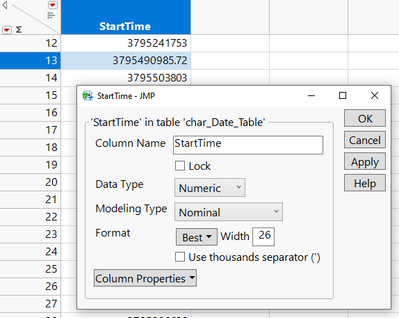
b) The only thing that is not automatically detected is the timezone offset *)
→ if all values are the same, you can just add " +00:00" - to get it "ignored".
*) Date Format Pattern - additional functionality
Recommended Articles
- © 2026 JMP Statistical Discovery LLC. All Rights Reserved.
- Terms of Use
- Privacy Statement
- Contact Us