- Don’t miss your chance to experience Discovery Summit Europe at our best available rate! Early bird registration through 31 Oct.
- Graph Builder Toolbar streamlines interactive graphing. Creates shortcuts on Report and GraphBuilder Helpers toolbars. Download and install the extension.
- Subscribe to RSS Feed
- Mark Topic as New
- Mark Topic as Read
- Float this Topic for Current User
- Bookmark
- Subscribe
- Mute
- Printer Friendly Page
Discussions
Solve problems, and share tips and tricks with other JMP users.- User Community
- :
- Discussions
- :
- Re: Change order of categorical columns in graph

- Mark as New
- Bookmark
- Subscribe
- Mute
- Subscribe to RSS Feed
- Get Direct Link
- Report Inappropriate Content
Change order of categorical columns in graph
Hi
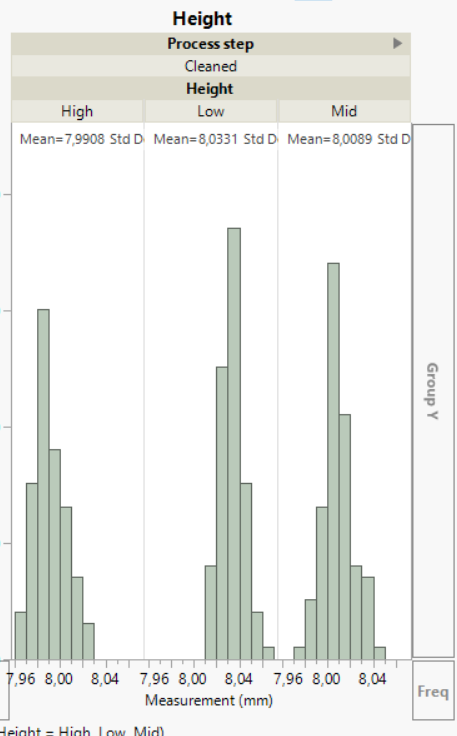
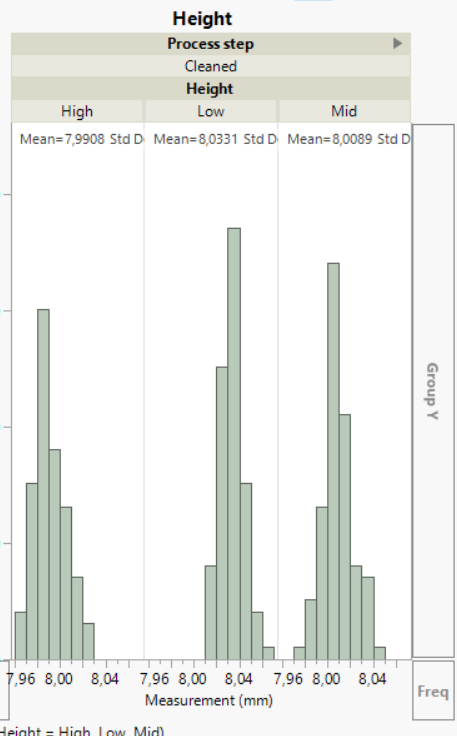
I'm new to the forum. I'm making a graph which has many rows containing a column of real numbers "measurement (mm)" and one of categrorical labels "Height". I want to have the graph divided into groups of each height. But the order of the height is not desireable. See picture. Is there a way to change the order of the grouping with nominal data labels?
Accepted Solutions


- Mark as New
- Bookmark
- Subscribe
- Mute
- Subscribe to RSS Feed
- Get Direct Link
- Report Inappropriate Content
Re: Change order of categorical columns in graph
Add the column property Value Order and arrange the Height levels the way that you want. Right-click the Height column header and select Column Properties. Then select Value Order.
This way is a global change so that you do not have to re-order the levels every where that they might appear (local change).
- Mark as New
- Bookmark
- Subscribe
- Mute
- Subscribe to RSS Feed
- Get Direct Link
- Report Inappropriate Content
Re: Change order of categorical columns in graph
Add the column property Value Order and arrange the Height levels the way that you want. Right-click the Height column header and select Column Properties. Then select Value Order.
This way is a global change so that you do not have to re-order the levels every where that they might appear (local change).
Recommended Articles
- © 2026 JMP Statistical Discovery LLC. All Rights Reserved.
- Terms of Use
- Privacy Statement
- Contact Us