- JMP will suspend normal business operations for our Winter Holiday beginning on Wednesday, Dec. 24, 2025, at 5:00 p.m. ET (2:00 p.m. ET for JMP Accounts Receivable).
Regular business hours will resume at 9:00 a.m. EST on Friday, Jan. 2, 2026. - We’re retiring the File Exchange at the end of this year. The JMP Marketplace is now your destination for add-ins and extensions.
- Subscribe to RSS Feed
- Mark Topic as New
- Mark Topic as Read
- Float this Topic for Current User
- Bookmark
- Subscribe
- Mute
- Printer Friendly Page
Discussions
Solve problems, and share tips and tricks with other JMP users.- JMP User Community
- :
- Discussions
- :
- Change contingency table formatting

- Mark as New
- Bookmark
- Subscribe
- Mute
- Subscribe to RSS Feed
- Get Direct Link
- Report Inappropriate Content
Change contingency table formatting
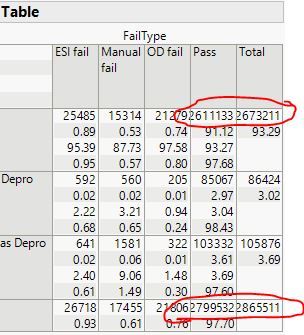
When I do a contingency analysis, the numbers in the table are too big for the column and they end up overlapping. I can't figure out how to adjust the size of the columns or the text formatting so that this doesn't happen.


- Mark as New
- Bookmark
- Subscribe
- Mute
- Subscribe to RSS Feed
- Get Direct Link
- Report Inappropriate Content
Re: Change contingency table formatting
I tried various actions, like Control-click, but there is either no menu or the menu does not provide a command to change the format or size of the cells. I looked at the protocol for the CrossTabBox object. The only messages that might help are << Set Height and << Set Width, but these messages had no effect.
Maybe someone else knows of a solution. If there isn't one, then I suggest that you enter a request in the JMP Wish List. (Be sure to search first because someone else might have already entered such a request and then you can vote for it.)
Recommended Articles
- © 2025 JMP Statistical Discovery LLC. All Rights Reserved.
- Terms of Use
- Privacy Statement
- Contact Us