cancel
Showing results for 
Show  only  | Search instead for 
Did you mean: 
  • New to JMP? Join us Sept. 23-24 for the Early User Edition of Discovery Summit, tailor-made for new users. Register now for free!

Discussions

Solve problems, and share tips and tricks with other JMP users.
Choose Language Hide Translation Bar
aallman
Level III

Change contingency table formatting

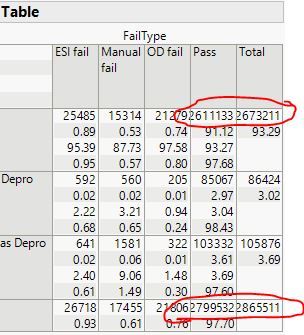
When I do a contingency analysis, the numbers in the table are too big for the column and they end up overlapping. I can't figure out how to adjust the size of the columns or the text formatting so that this doesn't happen.

 Contingency.JPG

1 REPLY 1

Re: Change contingency table formatting

I tried various actions, like Control-click, but there is either no menu or the menu does not provide a command to change the format or size of the cells. I looked at the protocol for the CrossTabBox object. The only messages that might help are << Set Height and << Set Width, but these messages had no effect.


Maybe someone else knows of a solution. If there isn't one, then I suggest that you enter a request in the JMP Wish List. (Be sure to search first because someone else might have already entered such a request and then you can vote for it.)

Recommended Articles
