- Don’t miss your chance to experience Discovery Summit Europe at our best available rate! Early bird registration through 31 Oct.
- Graph Builder Toolbar streamlines interactive graphing. Creates shortcuts on Report and GraphBuilder Helpers toolbars. Download and install the extension.
- Subscribe to RSS Feed
- Mark Topic as New
- Mark Topic as Read
- Float this Topic for Current User
- Bookmark
- Subscribe
- Mute
- Printer Friendly Page
Discussions
Solve problems, and share tips and tricks with other JMP users.- User Community
- :
- Discussions
- :
- Change MySQL ODBC Driver version

- Mark as New
- Bookmark
- Subscribe
- Mute
- Subscribe to RSS Feed
- Get Direct Link
- Report Inappropriate Content
Change MySQL ODBC Driver version
I am trying to connect JMP to a MySQL database but JMP give me only the latest version of drivers even if on my machine I have the old version that is the only one compatible with the database.
I have installed the correct drivers and as you can see on the attached picture on the Admin tools I have the the 5.1 version that is compatible and I can connect the database to the system.
However when I use JMP I have only the 8.0 that is not compatible with the database.
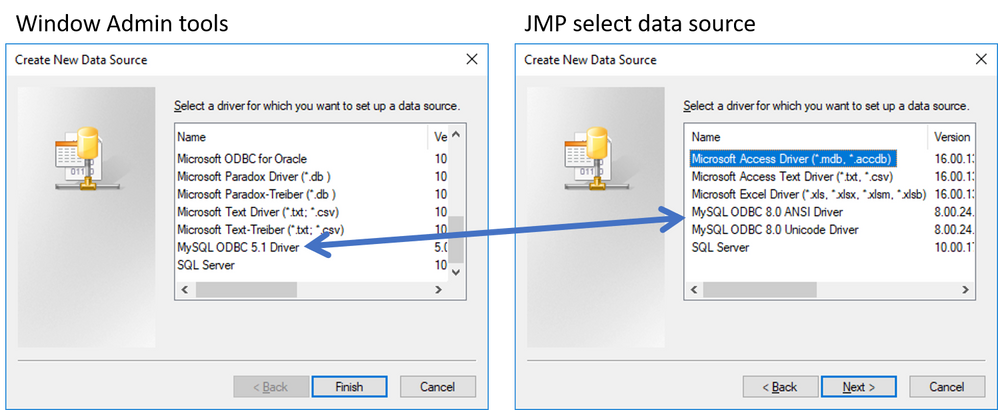
Any idea how I can use a different drive version within JMP?
Accepted Solutions


- Mark as New
- Bookmark
- Subscribe
- Mute
- Subscribe to RSS Feed
- Get Direct Link
- Report Inappropriate Content
Re: Change MySQL ODBC Driver version
I think if you have 64bit JMP it will only look for drivers you can find from 64-bit ODBC Data Source Administrator. I'm not sure if there are any ways to look for 32bit drivers with 64bit JMP.
I think JMP support maybe be able to help you out with this one. You can contact them by sending email to: [email protected]
- Mark as New
- Bookmark
- Subscribe
- Mute
- Subscribe to RSS Feed
- Get Direct Link
- Report Inappropriate Content
Re: Change MySQL ODBC Driver version
Could you be comparing 32bit and 64bit drivers by accident?
- Mark as New
- Bookmark
- Subscribe
- Mute
- Subscribe to RSS Feed
- Get Direct Link
- Report Inappropriate Content
Re: Change MySQL ODBC Driver version
On the admin tool I am on the 32 panel and I have installed only the 32 version of mysql drivers
- Mark as New
- Bookmark
- Subscribe
- Mute
- Subscribe to RSS Feed
- Get Direct Link
- Report Inappropriate Content
Re: Change MySQL ODBC Driver version
I think if you have 64bit JMP it will only look for drivers you can find from 64-bit ODBC Data Source Administrator. I'm not sure if there are any ways to look for 32bit drivers with 64bit JMP.
I think JMP support maybe be able to help you out with this one. You can contact them by sending email to: [email protected]


 Community Manager
- Mark as New
- Bookmark
- Subscribe
- Mute
- Subscribe to RSS Feed
- Get Direct Link
- Report Inappropriate Content
Re: Change MySQL ODBC Driver version
- Mark as New
- Bookmark
- Subscribe
- Mute
- Subscribe to RSS Feed
- Get Direct Link
- Report Inappropriate Content
Re: Change MySQL ODBC Driver version
Thanks, I installed the 64bit version of the same drivers and now I can find the driver on the JMP panel too.
Recommended Articles
- © 2026 JMP Statistical Discovery LLC. All Rights Reserved.
- Terms of Use
- Privacy Statement
- Contact Us