- JMP Statement Regarding Critical PHP Remote Code Execution Vulnerabilities (CVE-2026-109618, CVE-2026-109619)
- Don’t miss your chance to experience Discovery Summit Europe at our best available rate! Early bird registration through 31 Oct.
- Graph Builder Toolbar streamlines interactive graphing. Creates shortcuts on Report and GraphBuilder Helpers toolbars. Download and install the extension.
- Subscribe to RSS Feed
- Mark Topic as New
- Mark Topic as Read
- Float this Topic for Current User
- Bookmark
- Subscribe
- Mute
- Printer Friendly Page
Discussions
Solve problems, and share tips and tricks with other JMP users.- User Community
- :
- Discussions
- :
- Can Web reports be grouped ?

- Mark as New
- Bookmark
- Subscribe
- Mute
- Subscribe to RSS Feed
- Get Direct Link
- Report Inappropriate Content
Can Web reports be grouped ?
Hi,
I have many Web reports and I would like to create for them level structure, which will group them similarly as here JMP HTML5 Examples
Every help highly appreciated!
Thanks,
Li


- Mark as New
- Bookmark
- Subscribe
- Mute
- Subscribe to RSS Feed
- Get Direct Link
- Report Inappropriate Content
Re: Can Web reports be grouped ?
Hello @Li78,
JMP does not provide that functionality, but the JMP Live team is looking into enhancing the organization of published reports.
If you would like to see this capability in JMP, please enter a suggestion on the JMP Wish List.
If you are familiar with web page development and would like to build a page something like the JMP HTML5 Examples page, you could copy a web report's index file (index.html) to a folder above several web report folders and edit it with a standard text editor to replace the images and hyperlinks to refer to the index files in each sub folder.
Here's an example with two web reports in folders wr1 and wr2:
<!DOCTYPE html>
<html>
<head>
<link rel="stylesheet" href="wr1/_css/jmp-reports.css">
<title id="j-webreport-index-title">Two Web Reports</title>
</head>
<body>
<div id="content" class="group">
<div class="section_header">
<div class="title_header">
<h1><a href="" target="_top"><img src="wr1/_logo/logo1.png" alt="logo"></a> Two Web Reports</h1>
</div>
<h2 id="j-webreport-index-description"></h2>
</div>
<div class="section">
<div id="report-rack" >
<ul>
<div class="item j-webreport-item" id="item-0">
<li>
<a class="j-item-url" href="wr1/index.html" target="_top">
<span id="rack-0"><img class="j-item-thumbnail" src="wr1/_images/Big_Class_-_Bivariate_of_weight_by_height_4_thumb1.png" alt=""></span>
<p class="timestamp">03/03/2022 1:40 PM</p>
<h3 class="j-item-title">Web Report 1</h3>
<p class="j-item-description"></p>
</a>
</li>
</div>
<div class="item j-webreport-item" id="item-1">
<li>
<a class="j-item-url" href="wr2/index.html" target="_top">
<span id="rack-1"><img class="j-item-thumbnail" src="wr2/_images/Big_Class_-_Graph_Builder_thumb1.png" alt=""></span>
<p class="timestamp">03/03/2022 1:40 PM</p>
<h3 class="j-item-title">Web Report 1</h3>
<p class="j-item-description"></p>
</a>
</li>
</div>
</ul>
</div>
</div>
</div>
</body>
</html>
Notice how the css style file from the first folder is used: wr1/_css/jmp-reports.css. Also, thumbnail images representing each group are picked from the wr1/_html and wr2/_html subfolders.
The top level page will look like this:
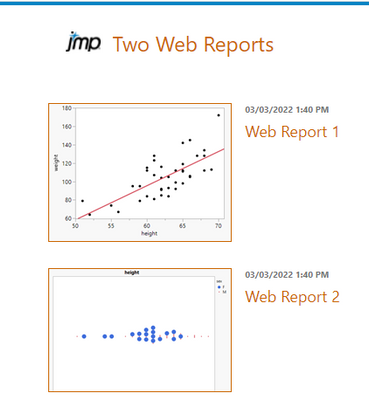
I hope this helps.
~John

- Mark as New
- Bookmark
- Subscribe
- Mute
- Subscribe to RSS Feed
- Get Direct Link
- Report Inappropriate Content
Re: Can Web reports be grouped ?
Hi @Li78,
Have you tried File -> Publish -> Publish to File... from JMP's main menu bar? That option gives you the ability to create an index page with images and text that links to the reports you would like to group together:
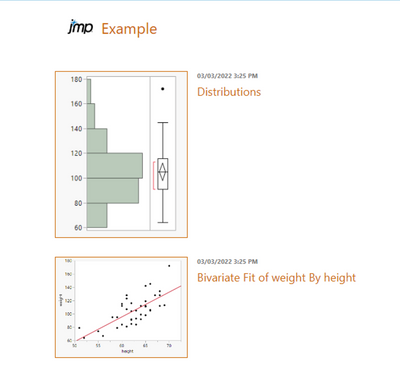
Best,
Bryan
Recommended Articles
- © 2026 JMP Statistical Discovery LLC. All Rights Reserved.
- Terms of Use
- Privacy Statement
- Contact Us