- JMP Statement Regarding Critical PHP Remote Code Execution Vulnerabilities (CVE-2026-109618, CVE-2026-109619)
- Don’t miss your chance to experience Discovery Summit Europe at our best available rate! Early bird registration through 31 Oct.
- Graph Builder Toolbar streamlines interactive graphing. Creates shortcuts on Report and GraphBuilder Helpers toolbars. Download and install the extension.
- Subscribe to RSS Feed
- Mark Topic as New
- Mark Topic as Read
- Float this Topic for Current User
- Bookmark
- Subscribe
- Mute
- Printer Friendly Page
Discussions
Solve problems, and share tips and tricks with other JMP users.- User Community
- :
- Discussions
- :
- Can I use JSL to modify and update platform presets?

- Mark as New
- Bookmark
- Subscribe
- Mute
- Subscribe to RSS Feed
- Get Direct Link
- Report Inappropriate Content
Can I use JSL to modify and update platform presets?
I am trying to create presets for best graphing practices, including having specific axis increments, adding horizonal reference lines, and sorting bar charts in descending order. When I attempt to create a preset and save it using Graph Builder, these aspects do not save to my preset. Is there a way that I can update the JSL script and directly code these aspects in?


- Mark as New
- Bookmark
- Subscribe
- Mute
- Subscribe to RSS Feed
- Get Direct Link
- Report Inappropriate Content
Re: Can I use JSL to modify and update platform presets?
You can find the presets from PlatformPresets.jmppresets file. This makes it easier to see what the presets are trying to do. For windows I think they are found from C:\Users\<username>\AppData\Roaming\JMP\JMP\. You can also access the JSL this way: select the Platform Presets button, and press Shift and select Customize Menu. More info possibly from different pages of Using JMP > Platform Presets .
I haven't tried modifying presents and usually just rely on scripts which I then run as add-ins/toolbar/shortcuts/JSL files.


 Community Manager
- Mark as New
- Bookmark
- Subscribe
- Mute
- Subscribe to RSS Feed
- Get Direct Link
- Report Inappropriate Content
Re: Can I use JSL to modify and update platform presets?
Hi @avalaughlin25,
As Jarmo pointed out, you can edit the platform presets file directly from its location on disk. Alternatively, you can make edits to your saved platform preset definitions by holding down the shift key before clicking on the preset icon > Customize Menu..., which will reveal the preset code section in the menu editor for you to make changes. Ordinarily that's not something we suggest, but in some cases it's useful which is why we have that method available.
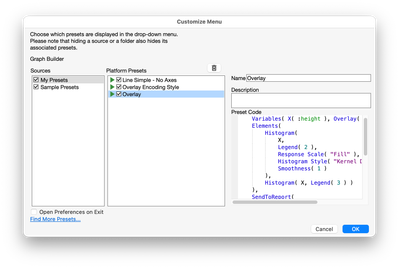
However, I'm sorry to say that the customizations you wish to make are intentionally scrubbed during the application of a platform preset. Most axis settings, including reference lines, are usually context specific, and so in our research developing platform presets, it was determined that in most cases it would be problematic for us to retain them.
That said, we're considered some configurability about the scope of what a preset it able to set in a platform. If this functionality is something that would be helpful to you, adding it to our JMP Wish List can get it on our radar for future development!
Recommended Articles
- © 2026 JMP Statistical Discovery LLC. All Rights Reserved.
- Terms of Use
- Privacy Statement
- Contact Us