- JMP will suspend normal business operations for our Winter Holiday beginning on Wednesday, Dec. 24, 2025, at 5:00 p.m. ET (2:00 p.m. ET for JMP Accounts Receivable).
Regular business hours will resume at 9:00 a.m. EST on Friday, Jan. 2, 2026. - We’re retiring the File Exchange at the end of this year. The JMP Marketplace is now your destination for add-ins and extensions.
- Subscribe to RSS Feed
- Mark Topic as New
- Mark Topic as Read
- Float this Topic for Current User
- Bookmark
- Subscribe
- Mute
- Printer Friendly Page
Discussions
Solve problems, and share tips and tricks with other JMP users.- JMP User Community
- :
- Discussions
- :
- CIs other then 95% for Parameter Estimates

- Mark as New
- Bookmark
- Subscribe
- Mute
- Subscribe to RSS Feed
- Get Direct Link
- Report Inappropriate Content
CIs other then 95% for Parameter Estimates
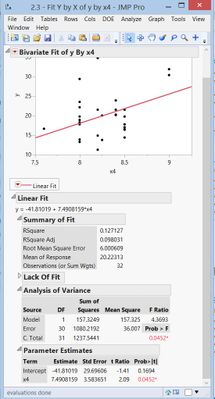
I am currently working with a linear fit via the "Fit Y by X" option in JMP. In regards to the Parameter Estimates table, there is an option when right clicking on the table under "columns" to add columns for the upper and lower 95% confidence intervals for the Intercept and x4, but what if I want to know confidence intervals other then 95%? Is there a way to get JMP to display other values? (i.e. 90% or 99%)?
Accepted Solutions


 Community Manager
- Mark as New
- Bookmark
- Subscribe
- Mute
- Subscribe to RSS Feed
- Get Direct Link
- Report Inappropriate Content
Re: CIs other then 95% for Parameter Estimates
Hi Arcadinal,
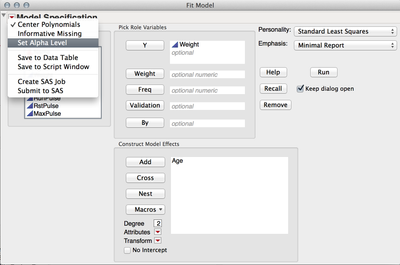
In Fit Y by X the confidence level for the parameter estimate confidence intervals is not selectable. However, you can perform the identical analysis with the more flexible Fit Model and in that platform you can set the confidence level for the confidence intervals. To set the alpha level, first launch Fit Model (Analyze > Fit Model) and specify your Y and X variables. Before clicking Run, click the Red Triangle in the model launch and select Set Alpha Level. To get 99% intervals, enter .01, for 90% intervals enter .10.
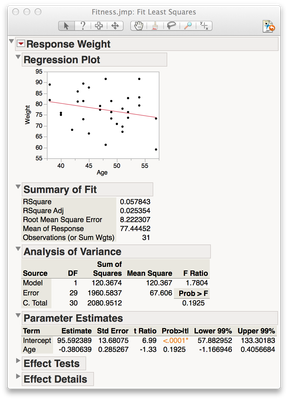
Next, reveal the confidence intervals in the same way you did before (right clicking the Parameter Estimates > Columns). You will find confidence intervals corresponding to the alpha level you specified.
I hope this helps!
Julian
Community Manager
- Mark as New
- Bookmark
- Subscribe
- Mute
- Subscribe to RSS Feed
- Get Direct Link
- Report Inappropriate Content
Re: CIs other then 95% for Parameter Estimates
Hi Arcadinal,
In Fit Y by X the confidence level for the parameter estimate confidence intervals is not selectable. However, you can perform the identical analysis with the more flexible Fit Model and in that platform you can set the confidence level for the confidence intervals. To set the alpha level, first launch Fit Model (Analyze > Fit Model) and specify your Y and X variables. Before clicking Run, click the Red Triangle in the model launch and select Set Alpha Level. To get 99% intervals, enter .01, for 90% intervals enter .10.
Next, reveal the confidence intervals in the same way you did before (right clicking the Parameter Estimates > Columns). You will find confidence intervals corresponding to the alpha level you specified.
I hope this helps!
Julian
- Mark as New
- Bookmark
- Subscribe
- Mute
- Subscribe to RSS Feed
- Get Direct Link
- Report Inappropriate Content
Re: CIs other then 95% for Parameter Estimates
That does it, thank you!
Community Manager
- Mark as New
- Bookmark
- Subscribe
- Mute
- Subscribe to RSS Feed
- Get Direct Link
- Report Inappropriate Content
Re: CIs other then 95% for Parameter Estimates
You're welcome! I'm glad that answered your question.
Julian
Recommended Articles
- © 2025 JMP Statistical Discovery LLC. All Rights Reserved.
- Terms of Use
- Privacy Statement
- Contact Us