- Discovery Summit 2026: Early User Edition - September 23-24.Register. It's free.
- Graph Builder Toolbar streamlines interactive graphing. Creates shortcuts on Report and GraphBuilder Helpers toolbars. Download and install the extension.
- Subscribe to RSS Feed
- Mark Topic as New
- Mark Topic as Read
- Float this Topic for Current User
- Bookmark
- Subscribe
- Mute
- Printer Friendly Page
Discussions
Solve problems, and share tips and tricks with other JMP users.- User Community
- :
- Discussions
- :
- Re: Box-plot with points aligned in box plus violin plot

- Mark as New
- Bookmark
- Subscribe
- Mute
- Subscribe to RSS Feed
- Get Direct Link
- Report Inappropriate Content
Box-plot with points aligned in box plus violin plot
Good afternoon all,
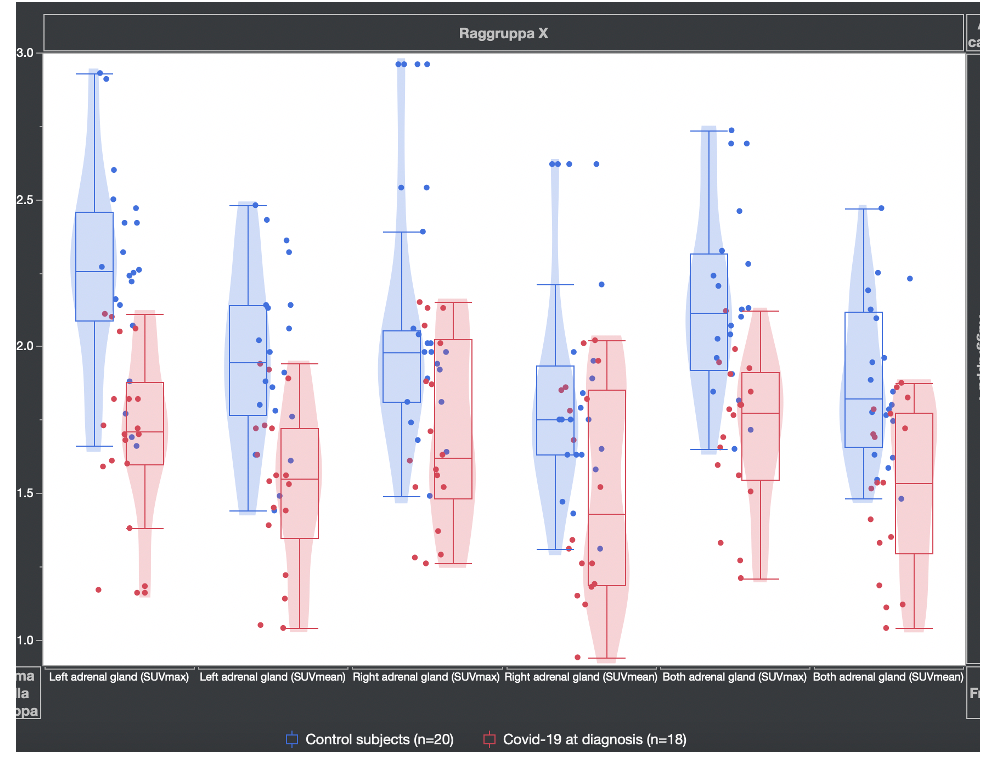
I wanted to create a graph in which the points fell exactly within each box-plot and the related violin plot.
Using the graph builder, I realized that the points don't line up inside the box.
Anyone have any idea how to fix this?
I attach photos.
- Tags:
- Mass Customization
- Mark as New
- Bookmark
- Subscribe
- Mute
- Subscribe to RSS Feed
- Get Direct Link
- Report Inappropriate Content
Re: Box-plot with points aligned in box plus violin plot
THANK YOU VERY MUCH,
very useful and decisive advice.
Best wishes
Giuseppe
P.S. 18F-FDG with 18 as exponent among the unicode I can't find the solution. Do you know how to do it?


- Mark as New
- Bookmark
- Subscribe
- Mute
- Subscribe to RSS Feed
- Get Direct Link
- Report Inappropriate Content
Re: Box-plot with points aligned in box plus violin plot
I found the codes on Wikipedia
print("18F-FDG\!U00B9\!U2078");"18F-FDG¹⁸"
- Mark as New
- Bookmark
- Subscribe
- Mute
- Subscribe to RSS Feed
- Get Direct Link
- Report Inappropriate Content
Re: Box-plot with points aligned in box plus violin plot
THANK YOU VERY VERY VERY MUCH
Giuseppe

- Mark as New
- Bookmark
- Subscribe
- Mute
- Subscribe to RSS Feed
- Get Direct Link
- Report Inappropriate Content
Re: Box-plot with points aligned in box plus violin plot
If you are using Windows you can also find these from Character Map:
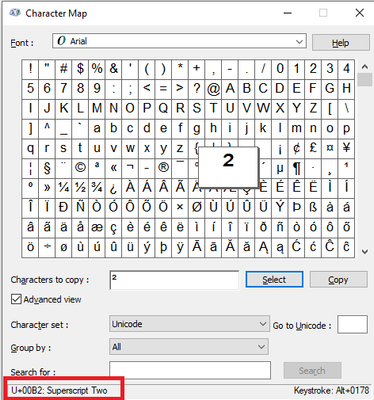
There is also an option to create addin / custom function to do this. This wouldn't be perfect, but it could be helpful? Here is quick example of possible function (I would make it more robust if I were to create one):
Names Default To Here(1);

replace_str = Function({str}, {Default Local},
	aa_unicode = Associative Array();
	aa_unicode["\sigma"] = "\!U03C3";
	aa_unicode["\mu"] = "\!U03BC";
	aa_unicode["\subscript1"] = "\!U2081";
	aa_unicode["\subscript2"] = "\!U00B2";
	aa_unicode["\subscript3"] = "\!U00B3";
	aa_unicode["\subscript4"] = "\!U2074";
	return(Substitute(str, aa_unicode << get keys, aa_unicode << get values));
);

dt = New Table("Untitled 3",
	Add Rows(0),
	New Column("kg/m\subscript2"),
	New Column("\sigma*\mu"),
	New Column("\subscript1\subscript3")
);

wait(2);

For Each({col_name}, dt << Get Column Names(String),
	Column(dt, col_name) << Set Name(replace_str(col_name));
);
- « Previous
-
- 1
- 2
- Next »
Recommended Articles
- © 2026 JMP Statistical Discovery LLC. All Rights Reserved.
- Terms of Use
- Privacy Statement
- Contact Us