- Don’t miss your chance to experience Discovery Summit Europe at our best available rate! Early bird registration through 31 Oct.
- Graph Builder Toolbar streamlines interactive graphing. Creates shortcuts on Report and GraphBuilder Helpers toolbars. Download and install the extension.
- Subscribe to RSS Feed
- Mark Topic as New
- Mark Topic as Read
- Float this Topic for Current User
- Bookmark
- Subscribe
- Mute
- Printer Friendly Page
Discussions
Solve problems, and share tips and tricks with other JMP users.- User Community
- :
- Discussions
- :
- Re: Bivariate Fit - how to delete fitting lines and results

- Mark as New
- Bookmark
- Subscribe
- Mute
- Subscribe to RSS Feed
- Get Direct Link
- Report Inappropriate Content
Bivariate Fit - how to delete fitting lines and results
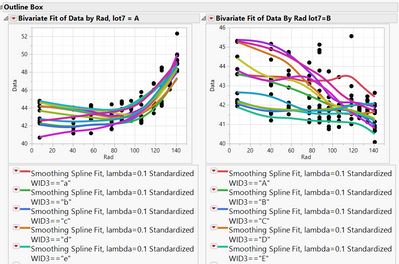
I would like to my plots simple after fitting each values. I have searched some solutions, but it is not working to my case.
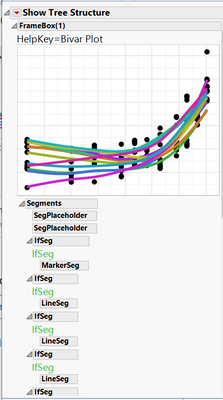
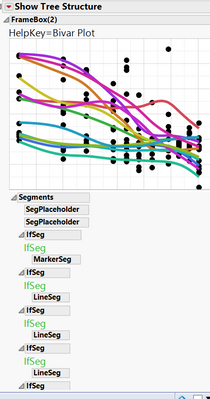
I want to delete the box containing all of the "Fit Each Value" line items. It looks that it can be done with report(biv)[PictureBox(2)]<<delete;. But unfortunately, "Fit each value" is not "PictureBox". Instead, it looks "Segments" from display trees. How could I address this issue so that make plot looks better?


- Mark as New
- Bookmark
- Subscribe
- Mute
- Subscribe to RSS Feed
- Get Direct Link
- Report Inappropriate Content
Re: Bivariate Fit - how to delete fitting lines and results
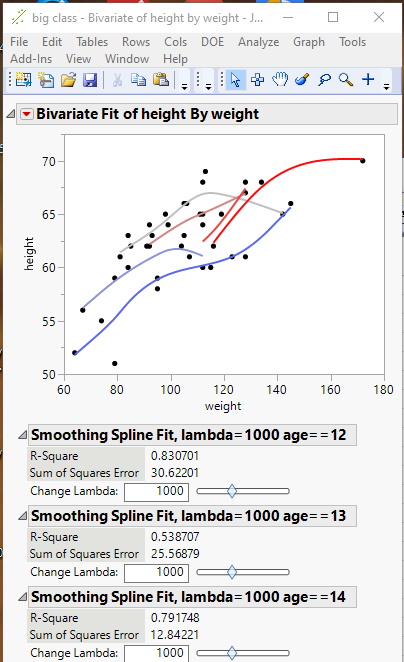
The Fit displays are all located within a Border Box(). If the Border Box() is deleted, the displayed Fits will be deleted..
Report( biv )[Border Box( 2 )] << delete;Or, you could just "hide" the display by changing it's Visibility
Report( biv )[Border Box( 2 )] << visibility("collapse");Here is a complete example
Names Default To Here( 1 );
dt = Open( "$SAMPLE_DATA/big class.jmp" );
biv = Bivariate(
	Y( :height ),
	X( :weight ),
	Fit Where( :age == 12, Fit Spline( 1000, {Line Color( {92, 106, 234} )} ) ),
	Fit Where( :age == 13, Fit Spline( 1000, {Line Color( {142, 149, 213} )} ) ),
	Fit Where( :age == 14, Fit Spline( 1000, {Line Color( {192, 192, 192} )} ) ),
	Fit Where( :age == 15, Fit Spline( 1000, {Line Color( {212, 132, 132} )} ) ),
	Fit Where( :age == 16, Fit Spline( 1000, {Line Color( {232, 71, 71} )} ) ),
	Fit Where( :age == 17, Fit Spline( 1000, {Line Color( {252, 11, 11} )} ) )
);
Report( biv )[Border Box( 2 )] << delete;
// or
// Report( biv )[Border Box( 2 )] << visibility("collapse");- Mark as New
- Bookmark
- Subscribe
- Mute
- Subscribe to RSS Feed
- Get Direct Link
- Report Inappropriate Content
Re: Bivariate Fit - how to delete fitting lines and results
Jim,
I have tested but nothing changed. I have included my script. Could you please take a look and give advice?
Thansk,
Jun Sung
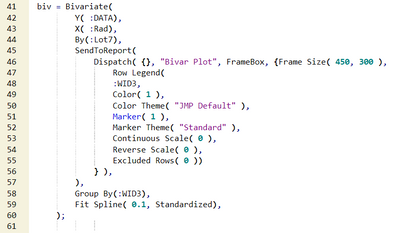
--- coding format broken when I paste it so that reading is not strightforward. please check screen capture in above.
biv = Bivariate(
	Y( :DATA ),
	X( :Rad ),
	By( :Lot7 ),
	SendToReport(
		Dispatch(
			{},
			"Bivar Plot",
			FrameBox,
			{Frame Size( 450, 300 ), Row Legend(
				:WID3,
				Color( 1 ),
				Color Theme( "JMP Default" ),
				Marker( 1 ),
				Marker Theme( "Standard" ),
				Continuous Scale( 0 ),
				Reverse Scale( 0 ),
				Excluded Rows( 0 )
			)}
		),

	),
	Group By( :WID3 ),
	Fit Spline( 0.1, Standardized )
);- Mark as New
- Bookmark
- Subscribe
- Mute
- Subscribe to RSS Feed
- Get Direct Link
- Report Inappropriate Content
Re: Bivariate Fit - how to delete fitting lines and results
You left off the statement that does the deletion of the fit displays
Report( biv )[Border Box( 2 )] << delete;

- Mark as New
- Bookmark
- Subscribe
- Mute
- Subscribe to RSS Feed
- Get Direct Link
- Report Inappropriate Content
Re: Bivariate Fit - how to delete fitting lines and results
You have a By() column in your analysis which means that your variable biv is not a bivariate platform object but a list of two or more bivariate objects. You will need to loop through them to make the changes to all the sub-reports.
Try this:
xp = (biv << xpath( "//PictureBox" ));
For( i = N Items( xp ), i > 0, i--,
	xp[i][2] << visibility( "collapse" )
);
- Mark as New
- Bookmark
- Subscribe
- Mute
- Subscribe to RSS Feed
- Get Direct Link
- Report Inappropriate Content
Re: Bivariate Fit - how to delete fitting lines and results
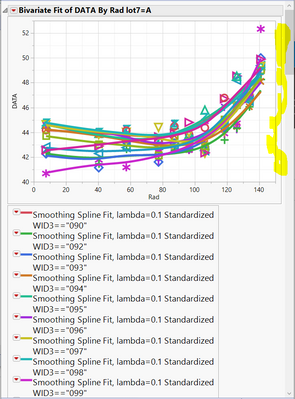
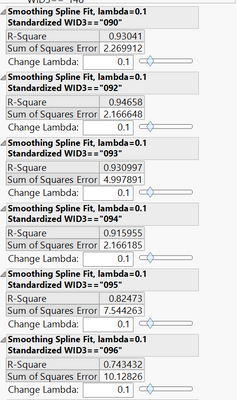
There is some deletion with looping. But, it actually deletes legend. How could I edit script to delete fitting lines?
Thanks,
Jun Sung
Before looping script:
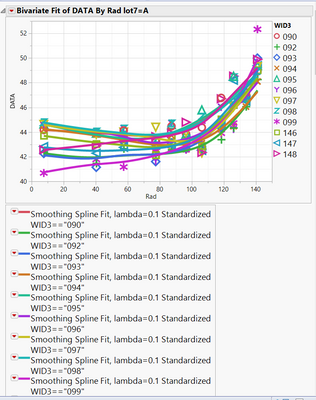
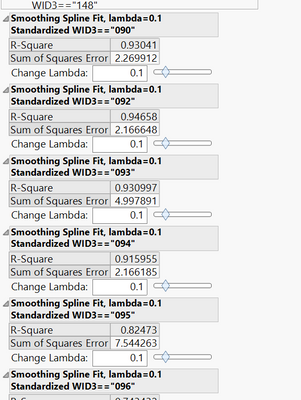
With looping script:
- Mark as New
- Bookmark
- Subscribe
- Mute
- Subscribe to RSS Feed
- Get Direct Link
- Report Inappropriate Content
Re: Bivariate Fit - how to delete fitting lines and results
If you have a row legend, the fitted-lines box would be the third PictureBox of each bivariate sub-report.
This should work:
xp = (biv << xpath( "//PictureBox" ));
For( i = N Items( xp ), i > 0, i--,
	xp[i][3] << visibility( "collapse" )
);- Mark as New
- Bookmark
- Subscribe
- Mute
- Subscribe to RSS Feed
- Get Direct Link
- Report Inappropriate Content
Re: Bivariate Fit - how to delete fitting lines and results
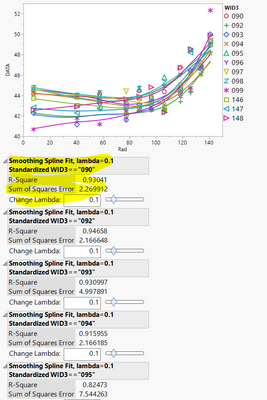
Wow. It is great~~~ Could I ask one more question?
Fitting lines are deleted. But, I would like to delete fitting curve results. I have tried [4], but it is not working. Could you please give great advice?
Thanks,
Jun Sung
Recommended Articles
- © 2026 JMP Statistical Discovery LLC. All Rights Reserved.
- Terms of Use
- Privacy Statement
- Contact Us