Turn on suggestions
Auto-suggest helps you quickly narrow down your search results by suggesting possible matches as you type.
- JMP Statement Regarding Critical PHP Remote Code Execution Vulnerabilities (CVE-2026-109618, CVE-2026-109619)
- Don’t miss your chance to experience Discovery Summit Europe at our best available rate! Early bird registration through 31 Oct.
- Graph Builder Toolbar streamlines interactive graphing. Creates shortcuts on Report and GraphBuilder Helpers toolbars. Download and install the extension.
Options
- Subscribe to RSS Feed
- Mark Topic as New
- Mark Topic as Read
- Float this Topic for Current User
- Bookmark
- Subscribe
- Mute
- Printer Friendly Page
Discussions
Solve problems, and share tips and tricks with other JMP users.- User Community
- :
- Discussions
- :
- Re: Bar chart Label size/position

Level IV
- Mark as New
- Bookmark
- Subscribe
- Mute
- Subscribe to RSS Feed
- Get Direct Link
- Report Inappropriate Content
Bar chart Label size/position
Created:
Sep 28, 2022 04:20 PM
| Last Modified: Jun 11, 2023 4:28 AM
(2855 views)
Hi,
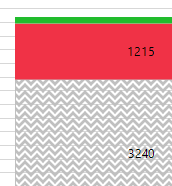
how can I adjust the size and/or position of the label e.g. "label by value" in a stacked bar chart? In terms of the screenshot below the label of the green area is missing. I think because of the height but how can I still show it?
Thanks
2 REPLIES 2


Staff
- Mark as New
- Bookmark
- Subscribe
- Mute
- Subscribe to RSS Feed
- Get Direct Link
- Report Inappropriate Content
Re: Bar chart Label size/position
I can't find a way to do this. I think that there must be a rule that if the label is bigger than the bar, it will not be displayed. It would obviously get very messy if you had multiple such bars within the same stack.
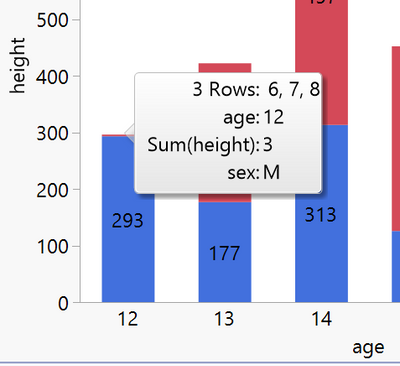
I can only suggest using a different visual (side by side bar) or providing a tabulation alongside the stacked bar plot for people to refer to for the figures. You should know that you can also hover on the chart to get the values.
Level IV
- Mark as New
- Bookmark
- Subscribe
- Mute
- Subscribe to RSS Feed
- Get Direct Link
- Report Inappropriate Content
Re: Bar chart Label size/position
Thanks for the helpful explanation and hints.
Recommended Articles
- © 2026 JMP Statistical Discovery LLC. All Rights Reserved.
- Terms of Use
- Privacy Statement
- Contact Us