- Don’t miss your chance to experience Discovery Summit Europe at our best available rate! Early bird registration through 31 Oct.
- Graph Builder Toolbar streamlines interactive graphing. Creates shortcuts on Report and GraphBuilder Helpers toolbars. Download and install the extension.
- Subscribe to RSS Feed
- Mark Topic as New
- Mark Topic as Read
- Float this Topic for Current User
- Bookmark
- Subscribe
- Mute
- Printer Friendly Page
Discussions
Solve problems, and share tips and tricks with other JMP users.- User Community
- :
- Discussions
- :
- Axis Label: Newline?

- Mark as New
- Bookmark
- Subscribe
- Mute
- Subscribe to RSS Feed
- Get Direct Link
- Report Inappropriate Content
Axis Label: Newline?
After learning the trick of adding a newline to an entry in a table ....
https://community.jmp.com/t5/Discussions/Enter-quot-NewLine-quot/m-p/620984/highlight/true#M82015
this week I'm wondering: what is the official way to add a newline to an axis label?
What doesn't work:
click on the label to edit it, and press Enter, Shift + Enter, Alt + Enter, Ctrl + Enter, Shift + Ctrl + Enter
These variants just close the edit mode:
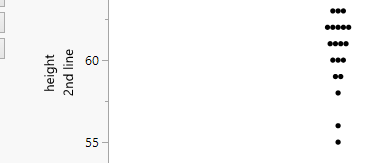
Also: pasting a newline (the trick for entries in a table) doesn't work
Accepted Solutions
- Mark as New
- Bookmark
- Subscribe
- Mute
- Subscribe to RSS Feed
- Get Direct Link
- Report Inappropriate Content
Re: Axis Label: Newline?
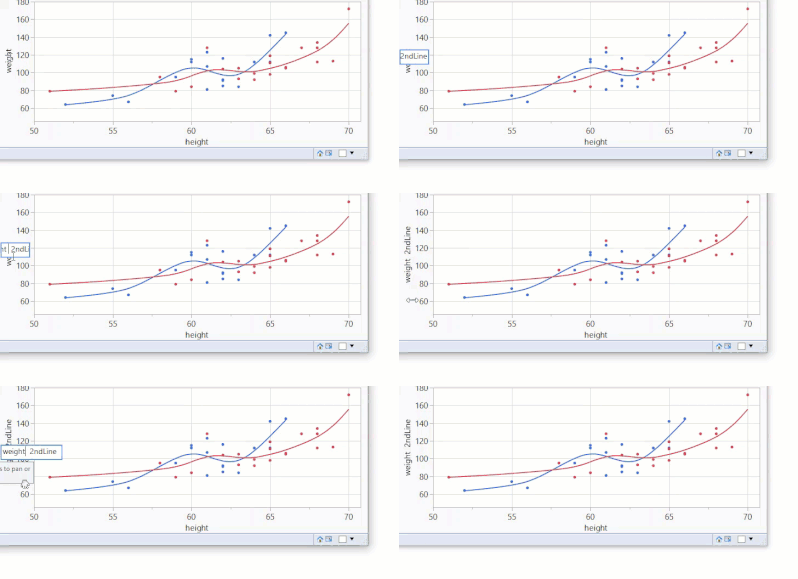
A workaround which I used up to now:
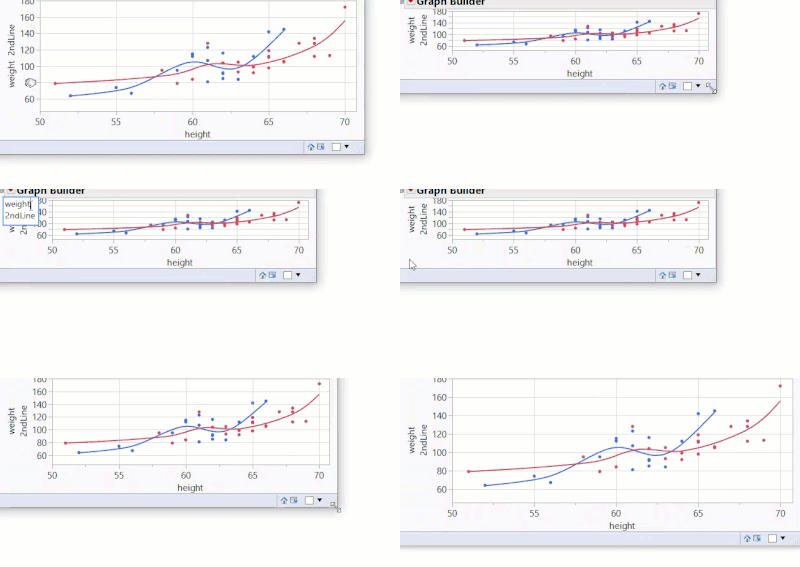
First reduce the graph size, then
click on the label to edit it, press Enter *), press delete
*)This time it doesn't closes the edit mode - but adds a newline.
Actually: it "adds" 2 Newlines - therefore one has to press delete to delete one of the two Newlines.
In the video it looks like going forth and back:
The "2ndLine" gets shifted out of the edit box & comes back.
To finish,
- click somewhere with the mouse to exit edit mode (... as pressing Enter would add another newline :)
- adjust the size of the graph and enjoy the magically added Newline.


- Mark as New
- Bookmark
- Subscribe
- Mute
- Subscribe to RSS Feed
- Get Direct Link
- Report Inappropriate Content
Re: Axis Label: Newline?
- Mark as New
- Bookmark
- Subscribe
- Mute
- Subscribe to RSS Feed
- Get Direct Link
- Report Inappropriate Content
Re: Axis Label: Newline?
A workaround which I used up to now:
First reduce the graph size, then
click on the label to edit it, press Enter *), press delete
*)This time it doesn't closes the edit mode - but adds a newline.
Actually: it "adds" 2 Newlines - therefore one has to press delete to delete one of the two Newlines.
In the video it looks like going forth and back:
The "2ndLine" gets shifted out of the edit box & comes back.
To finish,
- click somewhere with the mouse to exit edit mode (... as pressing Enter would add another newline :)
- adjust the size of the graph and enjoy the magically added Newline.
- Mark as New
- Bookmark
- Subscribe
- Mute
- Subscribe to RSS Feed
- Get Direct Link
- Report Inappropriate Content
Re: Axis Label: Newline?
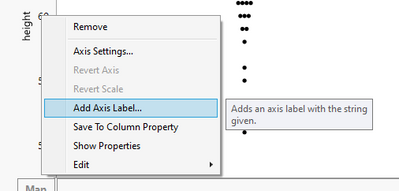
Using Add Axis label is one option
Recommended Articles
- © 2026 JMP Statistical Discovery LLC. All Rights Reserved.
- Terms of Use
- Privacy Statement
- Contact Us