- Image to Table JMP extension imports single or batch images as data tables. Useful to extract curves from pictures or convert image data to curve data to use in analyses like Functional Data Explorer. Download and install the extension.
- Subscribe to RSS Feed
- Mark Topic as New
- Mark Topic as Read
- Float this Topic for Current User
- Bookmark
- Subscribe
- Mute
- Printer Friendly Page
Discussions
Solve problems, and share tips and tricks with other JMP users.- User Community
- :
- Discussions
- :
- Axis Label: Newline?

- Mark as New
- Bookmark
- Subscribe
- Mute
- Subscribe to RSS Feed
- Get Direct Link
- Report Inappropriate Content
Axis Label: Newline?
After learning the trick of adding a newline to an entry in a table ....
https://community.jmp.com/t5/Discussions/Enter-quot-NewLine-quot/m-p/620984/highlight/true#M82015
this week I'm wondering: what is the official way to add a newline to an axis label?
What doesn't work:
click on the label to edit it, and press Enter, Shift + Enter, Alt + Enter, Ctrl + Enter, Shift + Ctrl + Enter
These variants just close the edit mode:
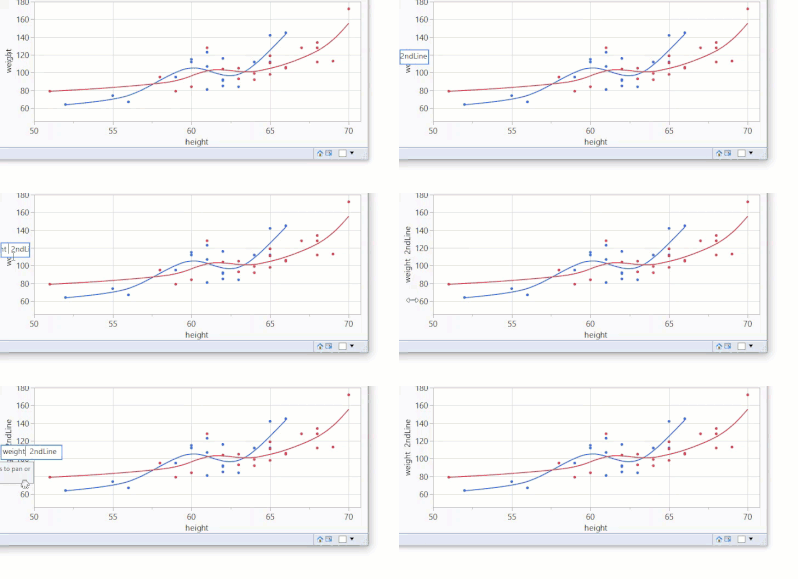
Also: pasting a newline (the trick for entries in a table) doesn't work
Accepted Solutions
- Mark as New
- Bookmark
- Subscribe
- Mute
- Subscribe to RSS Feed
- Get Direct Link
- Report Inappropriate Content
Re: Axis Label: Newline?
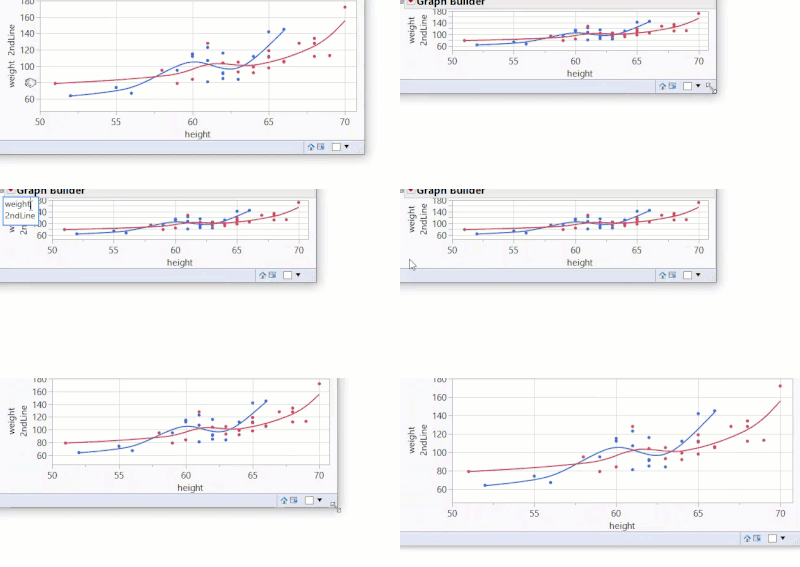
A workaround which I used up to now:
First reduce the graph size, then
click on the label to edit it, press Enter *), press delete
*)This time it doesn't closes the edit mode - but adds a newline.
Actually: it "adds" 2 Newlines - therefore one has to press delete to delete one of the two Newlines.
In the video it looks like going forth and back:
The "2ndLine" gets shifted out of the edit box & comes back.
To finish,
- click somewhere with the mouse to exit edit mode (... as pressing Enter would add another newline :)
- adjust the size of the graph and enjoy the magically added Newline.


- Mark as New
- Bookmark
- Subscribe
- Mute
- Subscribe to RSS Feed
- Get Direct Link
- Report Inappropriate Content
Re: Axis Label: Newline?
- Mark as New
- Bookmark
- Subscribe
- Mute
- Subscribe to RSS Feed
- Get Direct Link
- Report Inappropriate Content
Re: Axis Label: Newline?
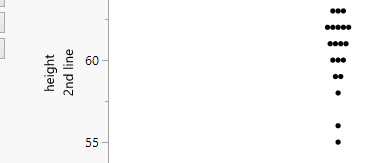
A workaround which I used up to now:
First reduce the graph size, then
click on the label to edit it, press Enter *), press delete
*)This time it doesn't closes the edit mode - but adds a newline.
Actually: it "adds" 2 Newlines - therefore one has to press delete to delete one of the two Newlines.
In the video it looks like going forth and back:
The "2ndLine" gets shifted out of the edit box & comes back.
To finish,
- click somewhere with the mouse to exit edit mode (... as pressing Enter would add another newline :)
- adjust the size of the graph and enjoy the magically added Newline.
- Mark as New
- Bookmark
- Subscribe
- Mute
- Subscribe to RSS Feed
- Get Direct Link
- Report Inappropriate Content
Re: Axis Label: Newline?
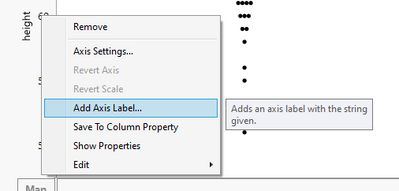
Using Add Axis label is one option
Recommended Articles
- © 2026 JMP Statistical Discovery LLC. All Rights Reserved.
- Terms of Use
- Privacy Statement
- Contact Us