- Due to the recently reported Microsoft outage, users may be temporarily unable to access My JMP or experience a delay receiving their verification codes. If you have previously installed JMP on your computer, this outage should not impact your ability to access the software. My JMP services will be restored as soon as Microsoft resolves this issue.
- Image to Table JMP extension imports single or batch images as data tables. Useful to extract curves from pictures or convert image data to curve data to use in analyses like Functional Data Explorer. Download and install the extension.
- Subscribe to RSS Feed
- Mark Topic as New
- Mark Topic as Read
- Float this Topic for Current User
- Bookmark
- Subscribe
- Mute
- Printer Friendly Page
Discussions
Solve problems, and share tips and tricks with other JMP users.- User Community
- :
- Discussions
- :
- Automatically generating reports in Degradation Data Analysis platform?

- Mark as New
- Bookmark
- Subscribe
- Mute
- Subscribe to RSS Feed
- Get Direct Link
- Report Inappropriate Content
Automatically generating reports in Degradation Data Analysis platform?
Hi,
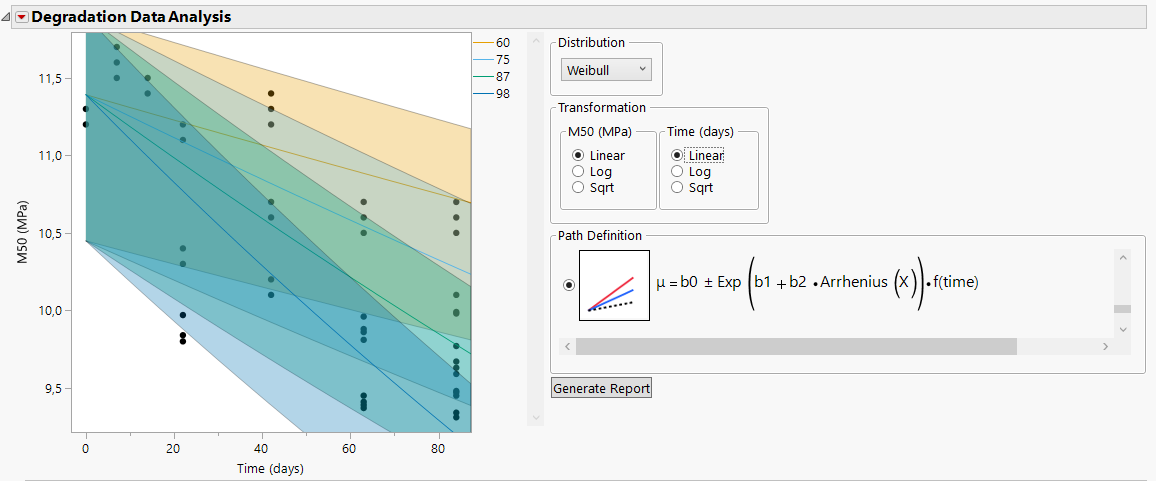
When analyzing degradation data using the Degradation Data Analysis platform, I want to screen various models in order to select the best one based on AICc. To do this I am manually applying the different distributions and transformations for a given path definition, and generating reports for each combination by clicking the "Generate Report" button. Is there a way to have JMP automatically generate reports for all the combinations and add them to the Model List? A bonus would be to have JMP perform this while also excluding transformations that are deemed inappropiate or generates missing values (i.e. applying log-tranformation to the time factor when it contains zero).
JMP version 17.2
Thanks in advance.
/JF


- Mark as New
- Bookmark
- Subscribe
- Mute
- Subscribe to RSS Feed
- Get Direct Link
- Report Inappropriate Content
Re: Automatically generating reports in Degradation Data Analysis platform?
You might have to do this by scripting. Below is one option (not very robust script, but can give some ideas about what can be done)
Names Default To Here(1);
dt = Open("$SAMPLE_DATA/Reliability/Adhesive Bond.jmp");
obj = dt << Destructive Degradation(
	Y(:Strength),
	Time(:Weeks),
	X(:Degrees),
	Censor(:Censor),
	Censor Code("Right"),
	Control("Log10", "Sqrt", "Normal", "Individual Path with Intercept")
);

rep = Report(obj);

cb = (rep << XPath("//PanelBox[text() = 'Distribution']/ComboBox"))[1];
rb_transformations = (rep << XPath("//PanelBox[text() = 'Transformation']//RadioBox"));

cb_options = cb << get items;
rb_tr = rb_transformations << get items;
btn = (rep << XPath("//ButtonBox[text() = 'Generate Report']"))[1];
tb1 = rep[TextBox(3)];
tb2 = rep[TextBox(4)];

For Each({option, idx}, cb_options,
	cb << Set(idx);
	For Each({op1, idx1}, rb_tr[1],
		rb_transformations[1] << Set(idx1);
		For Each({op2, idx2}, rb_tr[2],
			rb_transformations[2] << Set(idx2);
			visibilities = {tb1, tb2} << get visibility;
			visibs = Loc(visibilities, "Visible");
			If(N Items(visibs) == 0,
				btn << Click(1);
			,
				skipped_txt = Eval insert("\[Skipped combination ^option^+^op1^+^op2^ due to ^Concat Items(({tb1, tb2} << get text)[Matrix(visibs)], ", ")^]\");
				Write("\!N", skipped_txt);
			);
			wait(0);
		);
	);
);

Write();Recommended Articles
- © 2026 JMP Statistical Discovery LLC. All Rights Reserved.
- Terms of Use
- Privacy Statement
- Contact Us