- JMP Statement Regarding Critical PHP Remote Code Execution Vulnerabilities (CVE-2026-109618, CVE-2026-109619)
- Don’t miss your chance to experience Discovery Summit Europe at our best available rate! Early bird registration through 31 Oct.
- Graph Builder Toolbar streamlines interactive graphing. Creates shortcuts on Report and GraphBuilder Helpers toolbars. Download and install the extension.
- Subscribe to RSS Feed
- Mark Topic as New
- Mark Topic as Read
- Float this Topic for Current User
- Bookmark
- Subscribe
- Mute
- Printer Friendly Page
Discussions
Solve problems, and share tips and tricks with other JMP users.- User Community
- :
- Discussions
- :
- Re: Add-in doesn't work after installation

- Mark as New
- Bookmark
- Subscribe
- Mute
- Subscribe to RSS Feed
- Get Direct Link
- Report Inappropriate Content
Add-in doesn't work after installation
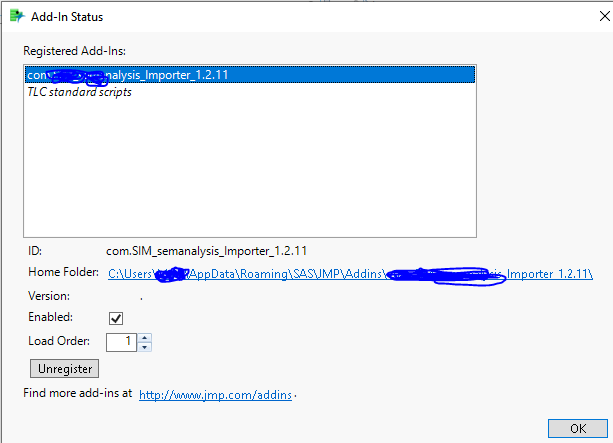
I can install the add-ins to my JMP 16 and JMP 17, it is also 'enabled'. However, when I click it, nothing happens (there supposed to be a pop-up window). Please help. Thank you!


- Mark as New
- Bookmark
- Subscribe
- Mute
- Subscribe to RSS Feed
- Get Direct Link
- Report Inappropriate Content
Re: Add-in doesn't work after installation
Check the log window for messages.
Check with the person that wrote the add-in.
Click the Home Folder link to examine the add-in's JSL.
- Mark as New
- Bookmark
- Subscribe
- Mute
- Subscribe to RSS Feed
- Get Direct Link
- Report Inappropriate Content
Re: Add-in doesn't work after installation
And, "when I click it" ...you are most likely running it from the add-ins menu. Not clicking anything in the View->add-ins window.
- Mark as New
- Bookmark
- Subscribe
- Mute
- Subscribe to RSS Feed
- Get Direct Link
- Report Inappropriate Content
Re: Add-in doesn't work after installation
Hi Craige,
thank you for reply. This is an add-in many of my collogues are using. They are using the same JMP version as mine (JMP 16 or 17). Normally when they install the add-in, there will be an option added to the 'file' drop down menu. However such option wasn't added to mine. I can only see it is added to 'Add-ins' but when I click that, there is no response.
- Mark as New
- Bookmark
- Subscribe
- Mute
- Subscribe to RSS Feed
- Get Direct Link
- Report Inappropriate Content
Re: Add-in doesn't work after installation
I probably can't help as much as tech support or the person that wrote the add-in. My only suggestion is to disable, remove, then check the log when reinstalling it.
- Mark as New
- Bookmark
- Subscribe
- Mute
- Subscribe to RSS Feed
- Get Direct Link
- Report Inappropriate Content
Re: Add-in doesn't work after installation
thank you, I'll try
Recommended Articles
- © 2026 JMP Statistical Discovery LLC. All Rights Reserved.
- Terms of Use
- Privacy Statement
- Contact Us