Turn on suggestions
Auto-suggest helps you quickly narrow down your search results by suggesting possible matches as you type.
- JMP Statement Regarding Critical PHP Remote Code Execution Vulnerabilities (CVE-2026-109618, CVE-2026-109619)
- Don’t miss your chance to experience Discovery Summit Europe at our best available rate! Early bird registration through 31 Oct.
- Graph Builder Toolbar streamlines interactive graphing. Creates shortcuts on Report and GraphBuilder Helpers toolbars. Download and install the extension.
Options
- Subscribe to RSS Feed
- Mark Topic as New
- Mark Topic as Read
- Float this Topic for Current User
- Bookmark
- Subscribe
- Mute
- Printer Friendly Page
Discussions
Solve problems, and share tips and tricks with other JMP users.- User Community
- :
- Discussions
- :
- 怎样用脚本将文件中的脚本全部删除?

Level IX
- Mark as New
- Bookmark
- Subscribe
- Mute
- Subscribe to RSS Feed
- Get Direct Link
- Report Inappropriate Content
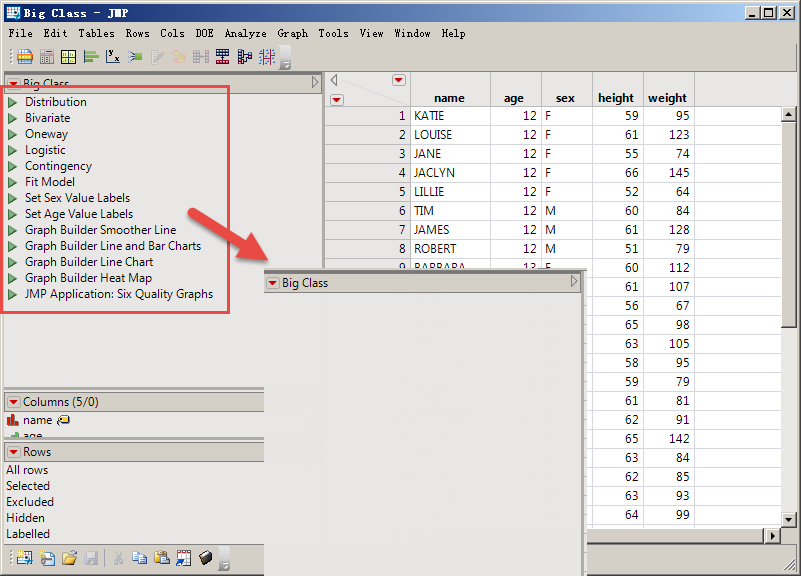
怎样用脚本将文件中的脚本全部删除?
Created:
Mar 7, 2022 02:19 AM
| Last Modified: Jun 9, 2023 11:12 AM
(3889 views)
2 ACCEPTED SOLUTIONS
Accepted Solutions


Super User
Solution
- Mark as New
- Bookmark
- Subscribe
- Mute
- Subscribe to RSS Feed
- Get Direct Link
- Report Inappropriate Content
回复: 怎样用脚本将文件中的脚本全部删除?
Here is an example of one way to delete the scripts
names default to here(1);
// Open Data Table: big class.jmp
// → Data Table( "big class" )
dt = Open( "$SAMPLE_DATA/big class.jmp" );

dt << delete scripts(dt << Get Table Script Names);
Jim
Level VIII
Solution
- Mark as New
- Bookmark
- Subscribe
- Mute
- Subscribe to RSS Feed
- Get Direct Link
- Report Inappropriate Content
回复: 怎样用脚本将文件中的脚本全部删除?
Try( dt << Delete Table Property( "Source" ) );
3 REPLIES 3
Level IX
- Mark as New
- Bookmark
- Subscribe
- Mute
- Subscribe to RSS Feed
- Get Direct Link
- Report Inappropriate Content
回复: 怎样用脚本将文件中的脚本全部删除?
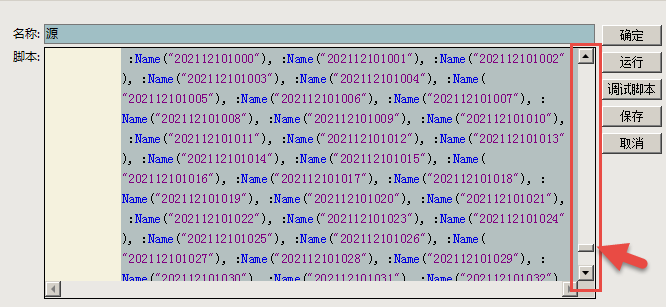
这样的记录很浪费空间、如何设置能使进行各种操作后、保存文件时没有这样的"源"记录?
Super User
Solution
- Mark as New
- Bookmark
- Subscribe
- Mute
- Subscribe to RSS Feed
- Get Direct Link
- Report Inappropriate Content
回复: 怎样用脚本将文件中的脚本全部删除?
Here is an example of one way to delete the scripts
names default to here(1);
// Open Data Table: big class.jmp
// → Data Table( "big class" )
dt = Open( "$SAMPLE_DATA/big class.jmp" );

dt << delete scripts(dt << Get Table Script Names);
Jim
Level VIII
Solution
- Mark as New
- Bookmark
- Subscribe
- Mute
- Subscribe to RSS Feed
- Get Direct Link
- Report Inappropriate Content
回复: 怎样用脚本将文件中的脚本全部删除?
Try( dt << Delete Table Property( "Source" ) );
Recommended Articles
- © 2026 JMP Statistical Discovery LLC. All Rights Reserved.
- Terms of Use
- Privacy Statement
- Contact Us