Turn on suggestions
Auto-suggest helps you quickly narrow down your search results by suggesting possible matches as you type.
- New to JMP? Let the Data Analysis Director guide you through selecting an analysis task, an analysis goal, and a data type. Available now in the JMP Marketplace!
- See how to install JMP Marketplace extensions to customize and enhance JMP.
Options
- Subscribe to RSS Feed
- Mark Topic as New
- Mark Topic as Read
- Float this Topic for Current User
- Bookmark
- Subscribe
- Mute
- Printer Friendly Page
Discussions
Solve problems, and share tips and tricks with other JMP users.- JMP User Community
- :
- Discussions
- :
- 如何编JSL语句让分布分析自动把变化

Level V
- Mark as New
- Bookmark
- Subscribe
- Mute
- Subscribe to RSS Feed
- Get Direct Link
- Report Inappropriate Content
如何编JSL语句让分布分析自动把变化
Created:
Jan 25, 2023 10:00 PM
| Last Modified: Jun 8, 2023 9:41 AM
(3006 views)
我写了一个程序,但并没有随着我选择单选框的价值,自动改变。
Names Default To Here( 1 );

dt = Open( "$SAMPLE_DATA/Big Class.jmp" );

cc={"身高", "体重"};

New Window( "Example",
aa=1;

rb = Radio Box( {"身高", "体重"},

     aa= rb<<get();

     bb<<inval;
     bb<<update window

),


bb=Distribution(

Stack( 1 ),

Continuous Distribution(

Column( cc[aa] ),

Horizontal Layout( 1 ),

Vertical( 0 )

),
Histograms Only,

))
  ;
- Tags:
- windows
1 ACCEPTED SOLUTION
Accepted Solutions


Super User
Solution
- Mark as New
- Bookmark
- Subscribe
- Mute
- Subscribe to RSS Feed
- Get Direct Link
- Report Inappropriate Content
Re: 如何编JSL语句让分布分析自动把变化
Created:
Jan 26, 2023 02:03 AM
| Last Modified: Jan 25, 2023 11:15 PM
(2979 views)
| Posted in reply to message from lehaofeng 01-25-2023
See if this is what you want
Names Default To Here( 1 );

dt = Open( "$SAMPLE_DATA/Big Class.jmp" );

cc = {"height", "weight"};

nw = New Window( "Chooser",
	rb = Radio Box(
		cc,
		theColumn = rb << get;
		Try( dis << delete );
		vlb << append( dis = Distribution( Continuous Distribution( Column( cc[theColumn] ) ) ) );
	),
	vlb = V List Box(
		dis = Distribution( Continuous Distribution( Column( cc[1] ) ) )

	)
);
But what I really think you should use, is the builtin Column Switcher
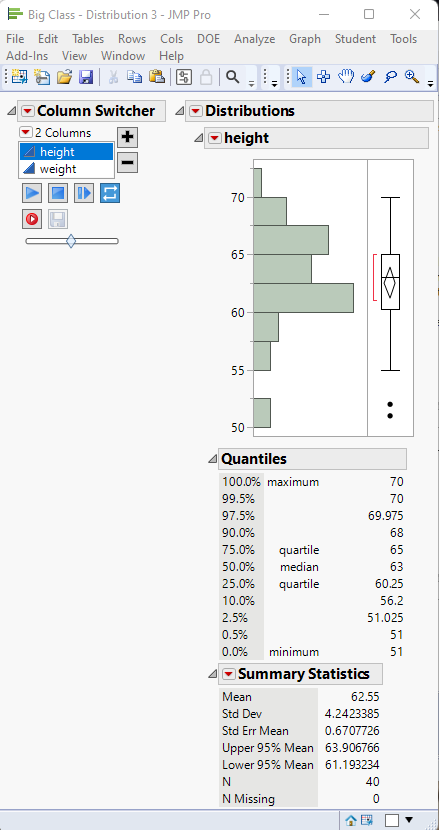
Names Default To Here( 1 );
dt = Open( "$SAMPLE_DATA/Big Class.jmp" );
Distribution(
Continuous Distribution( Column( :height ), Always use column properties( 1 ) ),
Column Switcher( :height, {:height, :weight} )
);
Jim
4 REPLIES 4
Super User
- Mark as New
- Bookmark
- Subscribe
- Mute
- Subscribe to RSS Feed
- Get Direct Link
- Report Inappropriate Content
Re: 如何编JSL语句让分布分析自动把变化
This may be what you are looking for
Names Default To Here( 1 );

dt = Open( "$SAMPLE_DATA/Big Class.jmp" );

cc = {"height","weight"};

nw = new window("Chooser",
	rb= radio box(cc,
		theColumn = rb << get;
		Distribution( Continuous Distribution( Column( cc[theColumn] ) ) )
	)
);
Jim
Level V
- Mark as New
- Bookmark
- Subscribe
- Mute
- Subscribe to RSS Feed
- Get Direct Link
- Report Inappropriate Content
Re: 如何编JSL语句让分布分析自动把变化
我是想让窗口内容随着radio box的选择,自动更新。之前的窗口关闭,更新为新的。
Super User
Solution
- Mark as New
- Bookmark
- Subscribe
- Mute
- Subscribe to RSS Feed
- Get Direct Link
- Report Inappropriate Content
Re: 如何编JSL语句让分布分析自动把变化
Created:
Jan 26, 2023 02:03 AM
| Last Modified: Jan 25, 2023 11:15 PM
(2980 views)
| Posted in reply to message from lehaofeng 01-25-2023
See if this is what you want
Names Default To Here( 1 );

dt = Open( "$SAMPLE_DATA/Big Class.jmp" );

cc = {"height", "weight"};

nw = New Window( "Chooser",
	rb = Radio Box(
		cc,
		theColumn = rb << get;
		Try( dis << delete );
		vlb << append( dis = Distribution( Continuous Distribution( Column( cc[theColumn] ) ) ) );
	),
	vlb = V List Box(
		dis = Distribution( Continuous Distribution( Column( cc[1] ) ) )

	)
);
But what I really think you should use, is the builtin Column Switcher
Names Default To Here( 1 );
dt = Open( "$SAMPLE_DATA/Big Class.jmp" );
Distribution(
Continuous Distribution( Column( :height ), Always use column properties( 1 ) ),
Column Switcher( :height, {:height, :weight} )
);
Jim
Level V
- Mark as New
- Bookmark
- Subscribe
- Mute
- Subscribe to RSS Feed
- Get Direct Link
- Report Inappropriate Content
Re: 如何编JSL语句让分布分析自动把变化
非常感谢,太棒了!
Recommended Articles
- © 2026 JMP Statistical Discovery LLC. All Rights Reserved.
- Terms of Use
- Privacy Statement
- Contact Us