- JMP Statement Regarding Critical PHP Remote Code Execution Vulnerabilities (CVE-2026-109618, CVE-2026-109619)
- Don’t miss your chance to experience Discovery Summit Europe at our best available rate! Early bird registration through 31 Oct.
- Graph Builder Toolbar streamlines interactive graphing. Creates shortcuts on Report and GraphBuilder Helpers toolbars. Download and install the extension.
- Subscribe to RSS Feed
- Mark Topic as New
- Mark Topic as Read
- Float this Topic for Current User
- Bookmark
- Subscribe
- Mute
- Printer Friendly Page
Benelux JMP Users Group Discussions
- User Community
- :
- Benelux JMP Users Group
- :
- Discussions
- :
- Re: Workflow Builder or the "baby steps" into Scripting


- Mark as New
- Bookmark
- Subscribe
- Mute
- Subscribe to RSS Feed
- Get Direct Link
- Report Inappropriate Content
Workflow Builder or the "baby steps" into Scripting
Workflow Builder is a new utility to record your JMP data preparation and analysis workflows. It is a way to capture, build, manage, and share your data steps and work without resorting to scripting. Learn how to easily reproduce and recycle an analysis that will save you and your organization precious time.
- Tags:
- jmp

- Mark as New
- Bookmark
- Subscribe
- Mute
- Subscribe to RSS Feed
- Get Direct Link
- Report Inappropriate Content
Re: Workflow Builder or the "baby steps" into Scripting
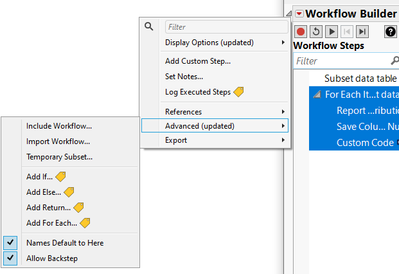
Jmp 18: more options to structure a Workflow:
- Mark as New
- Bookmark
- Subscribe
- Mute
- Subscribe to RSS Feed
- Get Direct Link
- Report Inappropriate Content
Re: Workflow Builder or the "baby steps" into Scripting
Concerning the issue with the Table References, which was discussed in the Q&A
... there seems to be a workaround with Jmp18:
example-of-a-workflow-with-a-for-each-loop.shtml
1) use a workflow step #1 to open/create new tables:
Subset by, open(), Multi File Import ...
2) Select step #1 as Source - Workflow Step in the FOR EACH settings
3) and add as many workflow steps as you want to the For Each branch:
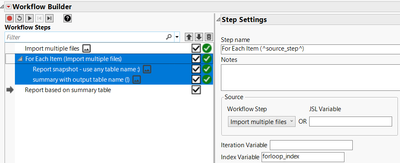
-> for all steps in the For Each loop, Jmp will use the the tables which were opened in step #1.
[independent of the table name which was used when recording the steps!]
- Mark as New
- Bookmark
- Subscribe
- Mute
- Subscribe to RSS Feed
- Get Direct Link
- Report Inappropriate Content
Re: Workflow Builder or the "baby steps" into Scripting
-
- © 2026 JMP Statistical Discovery LLC. All Rights Reserved.
- Terms of Use
- Privacy Statement
- Contact Us