How many of us find ourselves having multiple data tables, JSL scripts, JMP journals, etc open and have difficulty locating the right file to continue our work? There is an add-in that helps us navigate through them. Window manager was one of the Top 10 Most Downloaded add-ins of 2015. To test how useful this script is, I opened all the JMP files I used in the last week, which came upto 50+ data tables, 4 journals and 8 JSL scripts totaling about 1.5 MB in size.
Cool Features:
1) Current Data Table drop down menu. A simple drop down menu to see all open data tables. Clicking on the icon to the right of the data table will show only that data table.
2) Filter by file type. The filter icon helps to view only certain types of files that are open. As you can see below, I filtered to show only journals.
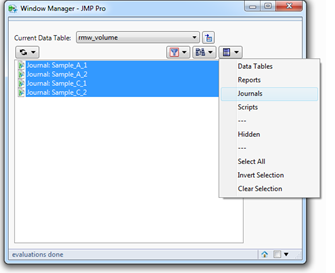
3) Selection Tool. The menu selected in the above picture can help select multiple file types at the same time. Once selected, options such as View, Hide, Minimize and Close are available.
For me personally, I will use 1) and 2) extensively as it helps me narrow down the file I want to see pretty quickly. Try it out!
