안녕하세요.
JMP Graph Builder에서 사용할 수 있는 서울시 자치구 기반 Custom Map Shape 파일을 공유드립니다.
서울시 25개 자치구 기준으로 제작되었으며, JMP의 Custom Map 기능에서 바로 사용할 수 있도록 구성하였습니다.
구성 파일
- KR-Seoul-Name.jmp
- KR-Seoul-XY.jmp
특징
- 서울시 25개 자치구 지원
- JMP Graph Builder Custom Map Shape 사용 가능
- Shape ID : 3001 ~ 3025
- Polygon 단순화 및 좌표 정규화 적용
- JMP 환경에서 사용 가능하도록 최적화
사용 방법
- 첨부된 두 개의 .jmp 파일을 다운로드합니다.(KR-Seoul-Name, KR-Seoul-XY)
- 아래 경로에 파일을 복사합니다.
C:\Program Files\JMP\JMPPRO\19\Maps
(JMP 버전에 따라 JMPPRO\18, JMP\19 등 경로가 다를 수 있습니다.)
- JMP 재실행
- Graph Builder 실행 후,
분석 데이터의 지역 변수(District 등)를 Shape 역할에 넣으면
KR-Seoul Map Shape를 사용할 수 있습니다.
예시:
District Population
Gangnam-gu 548321
Mapo-gu 365882
참고사항
- 일부 자치구는 Multi-part polygon 구조를 포함합니다.
- Polygon은 JMP 동작 안정성을 고려하여 단순화(simplify) 처리되었습니다.
- 좌표는 normalized local coordinate(0~100) 기반입니다.
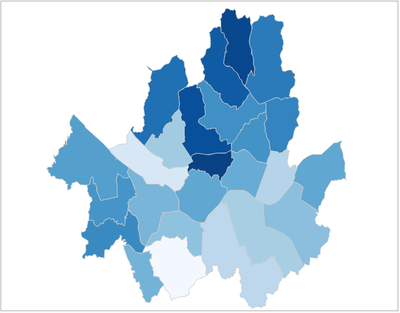
첨부드린 seoul-exampl.jmp를 jmp로 열어서, Graph Builder를 실행한 다음, 지명을 Map에 Drag해서 그래프를 작성하시면, 아래 예시와 같이 지도가 그려져야 합니다.

example을 이용하여 작성한 그림의 예시
혹시 사용 중 개선사항이나 오류가 있다면 댓글로 남겨주시면 감사하겠습니다.
잘 활용되길 바랍니다 :)

