JMP Live helps teams transform interesting analytics into decisions that stick. In this release, we focused on accelerating triage, tightening governance, and making it easier to communicate insights to stakeholders. The result: faster cycles from detection to correction, cleaner environments at scale, and clearer storytelling when it matters most.
What’s new and why it matters
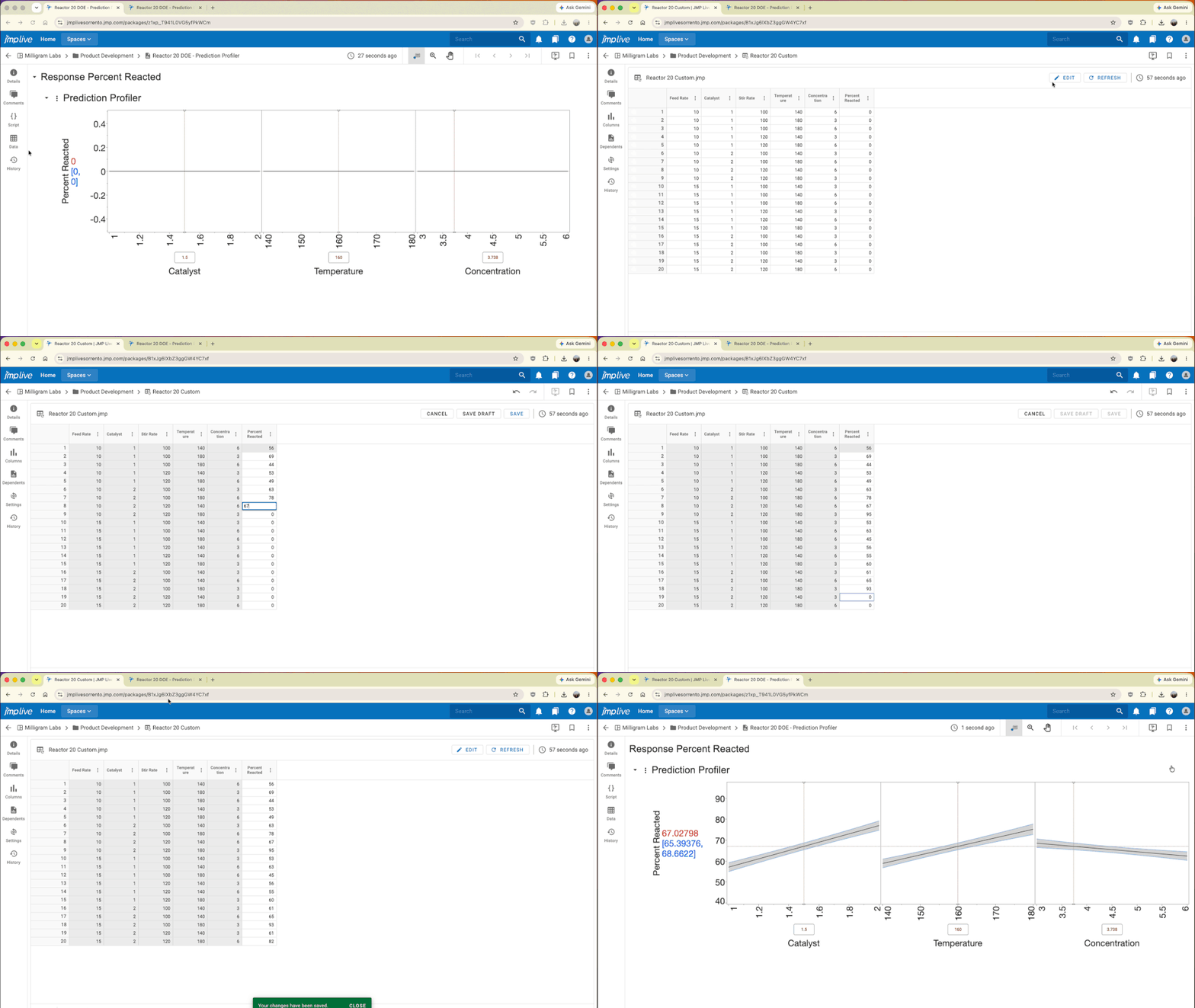
Direct data editing
Data agility from signal to fix. Analysts can jump straight to the underlying data table and make governed edits in place. By doing so, they can shorten investigation loops and help their teams confirm and document corrective actions.
- Reduce the time to determine the root cause by navigating directly to affected records from the chart.
- Speed up corrections while maintaining traceability through a team’s data policies.
- Improve audit readiness by documenting corrective actions in the same system where issues are detected.
Governance reminder: Establish clear policies for assigning edit permission, what qualifies for in-place correction, and how changes are reviewed to preserve audit trails.
A faster path from experimental design to results. Design your experiment in JMP, publish the table to JMP Live, and hand it off to operators – no clipboards, spreadsheets, or file transfers needed. Results flow back into your analysis as they're entered.
- Scientists and engineers design and publish experiment tables in JMP; operators log into JMP Live to enter run results directly in the browser.
- Factor columns stay locked, so the experimental design stays intact while results come in.
- Analysis updates automatically as data arrives with no waiting for files to be sent back.
Presenter Mode for insightful, slide-free storytelling
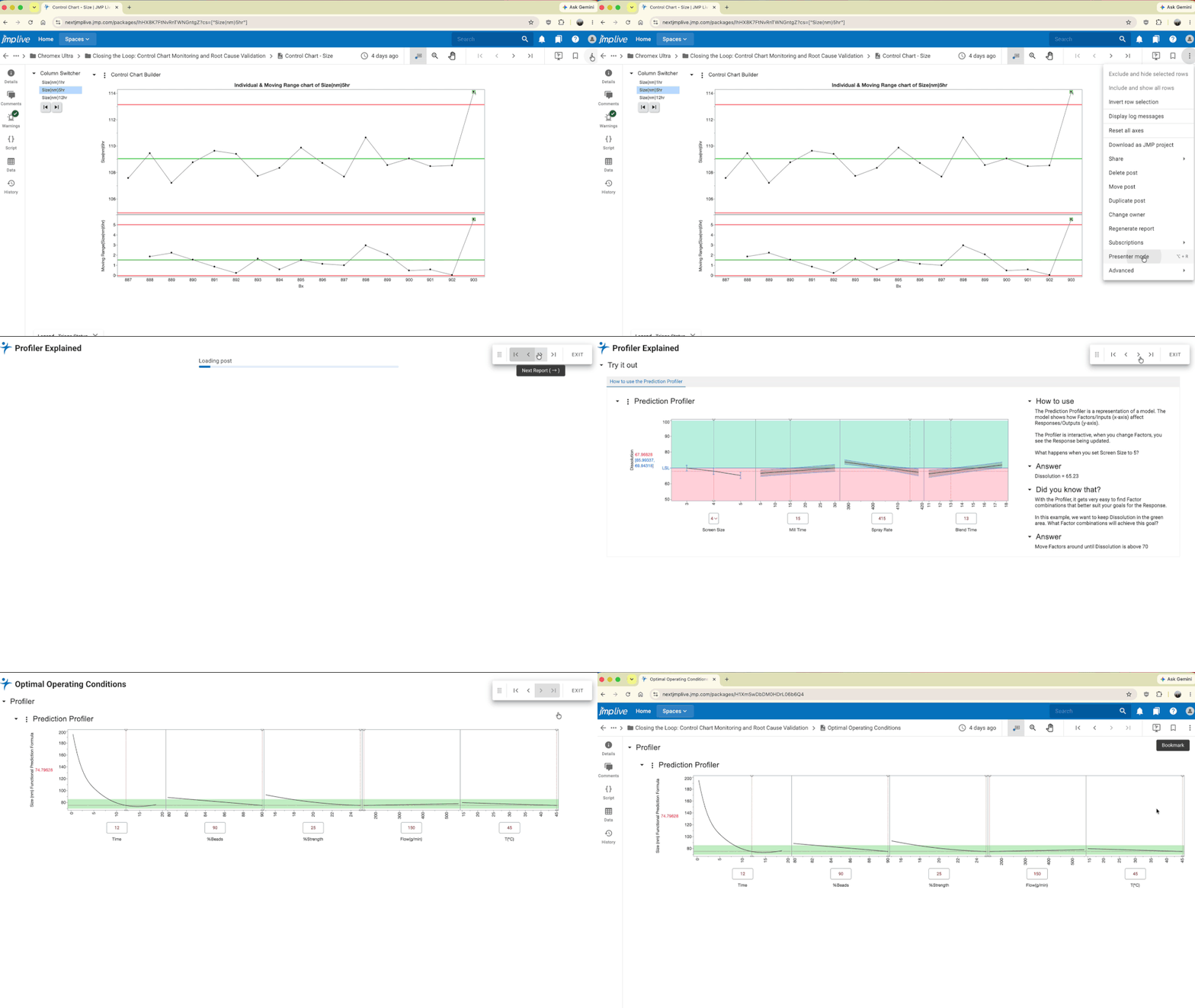
Elevate how you present with JMP Live reports. Presenter Mode lets you step through a curated sequence of reports using on-screen controls or keyboard shortcuts. It’s ideal for executive reviews, plant meetings, and customer-facing walkthroughs where clarity and pace matter.
- Keep context as you progress through overview, exception, root cause, and action.
- Reduce prep time – no more capturing screenshots or rebuilding slide decks.
- Use folder order to create a narrative flow your audience can follow.
Power user hint: Organize reports into a presentation folder. Launch Presenter Mode with a shortcut, use arrow keys to advance, and keep floating controls out of the way for clean recordings.
Content ownership reassignment
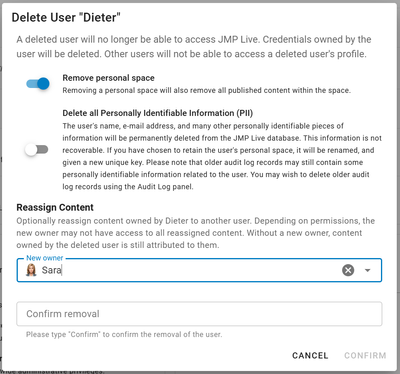
Operate at scale with confidence. People change roles, but accountability shouldn’t slip. Reassign posts individually, or in bulk, including content from departed users, to prevent orphaned assets and ensure projects keep moving.
- Maintain clear ownership through staff changes.
- Avoid stalled work and reduce administrator effort.
- Support audits with transparent responsibility handoffs.
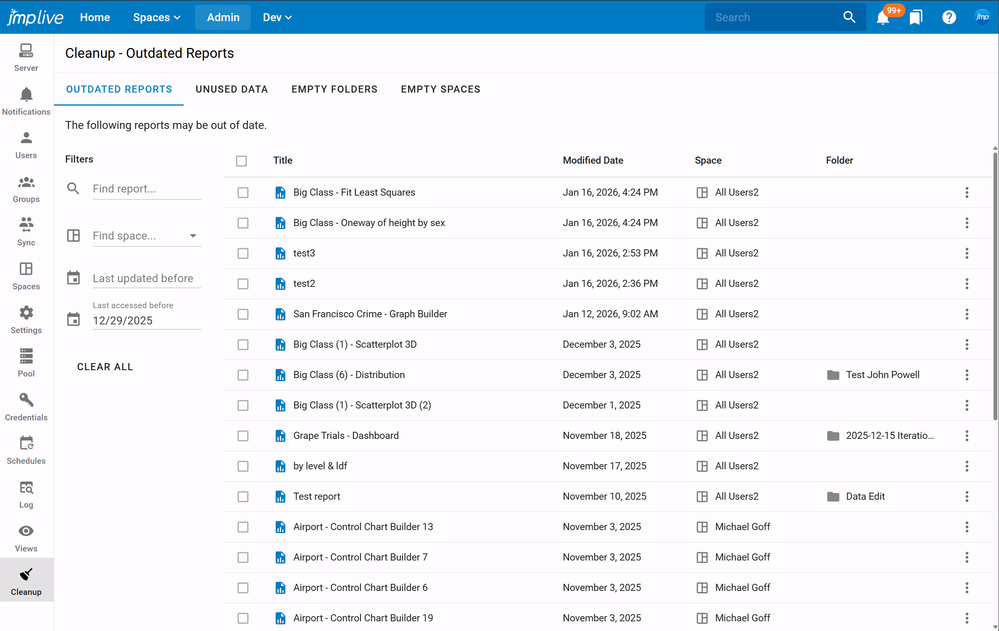
New dashboards help administrators clean up content
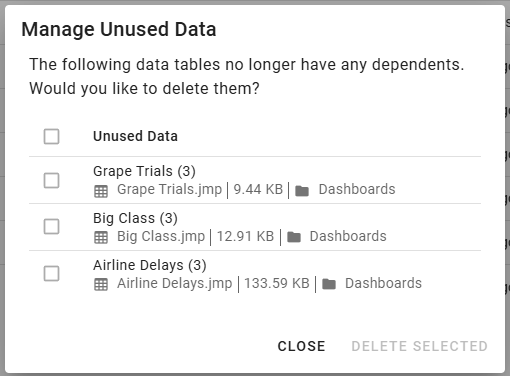
Governance, clarity, and trust. New dashboards highlight outdated reports, unused data, and empty folders or spaces, making it simple to keep environments lean and discoverable.
- Delete unused data to control storage and reduce clutter.
- Identify and address stale content to improve findability and trust.
- Streamline navigation by removing empty spaces and folders.
Best practice: Schedule a 15-minute monthly hygiene review – start with unused data for biggest savings, check empty spaces next, and then tune outdated reports to your team’s cadence.
Control chart triage enhancements
Monitor what matters and resolve warnings faster. Quality and manufacturing teams can analyze and act with more confidence.
- Download warning history in bulk to analyze trends and demonstrate compliance.
- Set automatic renotifications on status regressions so nothing slips through the cracks.
Trend insight: Export warning history monthly and overlay in JMP to spot systemic patterns – seasonality, recurring shifts, or site-specific signatures – that single incidents can hide.
Frictionless publishing and reuse
Publish more, manage less. It’s easier than ever to start, duplicate, and manage content in JMP Live.
- Duplicate posts within or across spaces to accelerate reuse while preserving data connections.
- Create blank reports or data tables directly in JMP Live to paste scripts and get moving fast.
- Keep environments tidy using smarter data handling and orphaned data prompts.
How organizations use these capabilities
- Executive operations reviews: Use Presenter Mode to walk leaders through KPIs, drill into exceptions, and end with clear action owners – no slides required.
- Quality event response: Download warning history in bulk to understand context, assign follow-ups across teams, and jump directly to affected rows to validate fixes.
- Team turnover resilience: Reassign all content from a departing analyst to the new owner in minutes, preserving continuity and accountability.
- Space hygiene: Monthly cleanup uncovers stale reports and unused data so new users can find and trust what they need.
Business impact
- Lower time-to-value: Presenter Mode and post duplication reduce prep work and speed deployment of stakeholder-ready views.
- Enterprise-grade governance: Ownership controls and admin dashboards align with audit and compliance expectations.
- Operational efficiency: Control chart triage and direct data editing shorten detection-to-correction cycles.
- Scalable collaboration: Direct creation and smarter data handling support more contributors – without chaos.
FAQ
- Does Presenter Mode change the underlying analysis?
No. Presenter Mode provides a guided, meeting-friendly way to step through existing content without altering the reports themselves.
- Can I reuse reports as templates in other spaces?
Yes. Use Duplicate to copy posts within or across spaces.
- How do cleanup dashboards interact with permissions?
Dashboards respect existing admin permissions. You only see and act on content you’re authorized to manage.
- What happens when I reassign content from a deleted user?
Bulk reassignment preserves continuity and accountability, even when a user account has been removed.
Next steps for JMP Live users
- Pilot the workflows: Start with a control chart scenario, enable direct data edits for designated roles, and measure time from warning to verified fix.
- Strengthen governance: Define edit policies and set a recurring admin hygiene cadence using the new dashboards.
Ready to explore JMP Live?


You must be a registered user to add a comment. If you've already registered, sign in. Otherwise, register and sign in.